Search
-
Polycount - Filter out non-attached images and those that have attachments?
 Hey to all, I was wondering if there is an easier way to navigate the WAYWO threads on PC? Basically, I would like to make it so that I only see posts that have their own attachments/links/images in them and not replies. Kinda like a 'gallery' mode if you will? I tried changing around the display mode, but it's not what…
 -
Re: artifacts appearing on overlapping parts during baking
 Hi! What does the mesh shading of the lowpoly look like? Is it the same on all parts using the same texture? Are the stacked shells oriented in the same direction? I would expect the final shading (normal map applied) to look off for each part that's reusing texture but that has mesh shading that's different than the part…
 -
Issue with loading a HDR image to zbrush
 Hello everyone,I was trying to loading a HDR image to zbrush to make a lightcap,but every time when I imported the image, it showed like this: I don't know why.Could anybody help me with it?:)
 -
Materialize: image to material tool

 I've been working on and off for a while now on a program for converting images to materials. Recently I figured out some convenience issues and now seems like a good time to promoting it a bit. You can download a 30 day free trial at http://www.boundingboxsoftware.com/materialize/ Here are some materials I made with…
 -
Maya 2016 Mental Ray: I can't see my background image through the window
 Hi there! i've a problem with my background image i can't see it through the glass. I put the image in the physical sun and sky as a background image and all i see is the horizon generated by the physical sun and sky. Thank you in advance!!
 -
Maya hardware 2.0 render has different colors than the saved image.
I've tried all manner of color management configurations and formats but i cannot get maya to show me exactly what the image will look like when its saved. its infuriating. Here is a screen shot of the render window and the resulting .PNG (happens in jpg, maya iff, tiff formats also) file opened. Swapping around what is… -
I would like some tips on how to recreate a Miku concert model
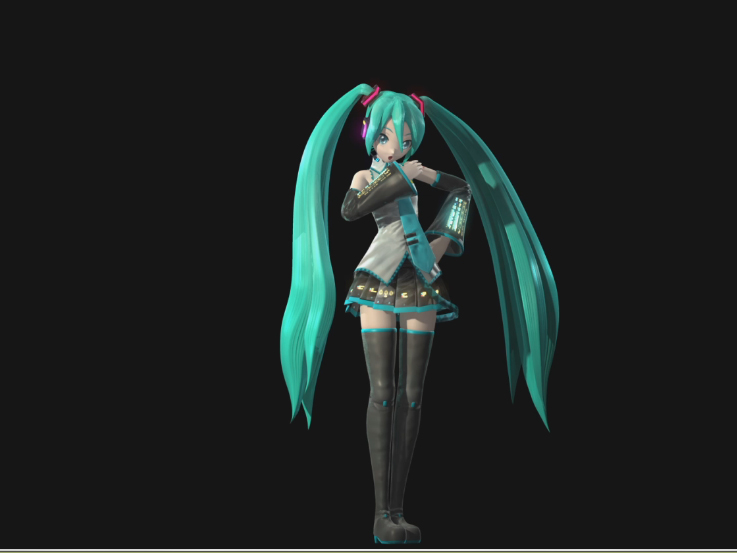 I want to recreate the amazing look of the MikuPa concert model, and I want to my model look more accurate Reference images (Photos by MARZA ANIMATION PLANET, rendered from Autodesk Maya) What I currently have in Blender:
 -
Zbrush 4R8 Image Projection Problem
 Hello I am kinda new to all the function of Zbrush. Why am I getting this red material on my mesh when I try to image project in spot light. In MRGB I get a red ring and in RGB I get the image covered in red.
 -
Re: **Image Based Lighting in Maya**
 If you have your MR set up to use image-based lighting: Render Options (Mental Ray)> Indirect Lighting **Environment**>And click on the image-based Lighting and select your image. Then go to Color>Batch Bake (Mental Ray) **OPTIONS**> Bake to VERTICIES> Then set the color mode to Light and Color. There are tons of options…
 -
Image Plane Plugin Not Working - Zbrush
 I have recently upgraded to 4R3 and i've installed the 4R3 version of Image Plane plugin, located in C/program files/Pixologic/zbrush/zstartup/zplugs. The same location as all my other functional plugins. Nothing is showing up in the texture tab for Image Plane at all :/
>44200 results