Best Of
Re: AI Art, Good or Bad? A (hopefully) nuanced take on the subject.
that seems like a lot of word play to me.
i think you just want to use the stuff and not think about it, which is fine. But i believe there is zero chance you will convince any artist that AI art isn't ripping them off.
 Alex_J
4 ·
Re: AI Art, Good or Bad? A (hopefully) nuanced take on the subject.
Meanwhile, on the Artstation store :

These are obviously AI-generated renders, probably prompted as "digital sculpt, realistic, trending on Artstation, in the style of xxxx". And since the AI model is using copyrighted images, this is basically infringing on thousands ...
[edit] For the morbidly curious, here is some more :

 pior
pior
3 ·
Re: [UE5] Stylized watermill

Hi everyone!
Decided to wrap up the projects, and move on another. Thank you so much to everyone for the precious feedbacks, learned a lot on it really!
If you wanna see more in depth details, I just posted everything on artstation as well:
https://www.artstation.com/artwork/d0z9qJ
Thanks!
 Olingova
6 ·
Sketchfab Spotlight | January 2023

A collection of the latest and greatest pieces from Sketchfab users
 Sean VanGorder
3 ·
Brutal Knights - Game Project/Learning Experience
Recent Update:

Original plan from 2018:
So an old co-worker and myself decided to collaborate on a game project idea. It's mostly an opportunity to learn some new areas of game development at the same time as make something that is fun and looks cool.
He'll be streaming some of his programming on twitch: HERE
I figured I would make a thread on polycount to document what I learn during the process.
Anyways, here's a crazy proportioned knight that we're going to use as a starting point.
Figure it might be worth mentioning that all of these models have been made with Zmodeler. Something else I'm trying to get better at using. I think if it had a simple "cut polygon" tool like Max or Maya it would be even more powerful. You can get similar functionality using the zsphere method but it's so cumbersome to get the mesh into there in order to modify it.

A few different weapons


Original plan from 2018:
So an old co-worker and myself decided to collaborate on a game project idea. It's mostly an opportunity to learn some new areas of game development at the same time as make something that is fun and looks cool.
He'll be streaming some of his programming on twitch: HERE
I figured I would make a thread on polycount to document what I learn during the process.
Anyways, here's a crazy proportioned knight that we're going to use as a starting point.
Figure it might be worth mentioning that all of these models have been made with Zmodeler. Something else I'm trying to get better at using. I think if it had a simple "cut polygon" tool like Max or Maya it would be even more powerful. You can get similar functionality using the zsphere method but it's so cumbersome to get the mesh into there in order to modify it.
A few different weapons
 Bolovorix
3 ·
Re: Sketchbook: Frank Polygon
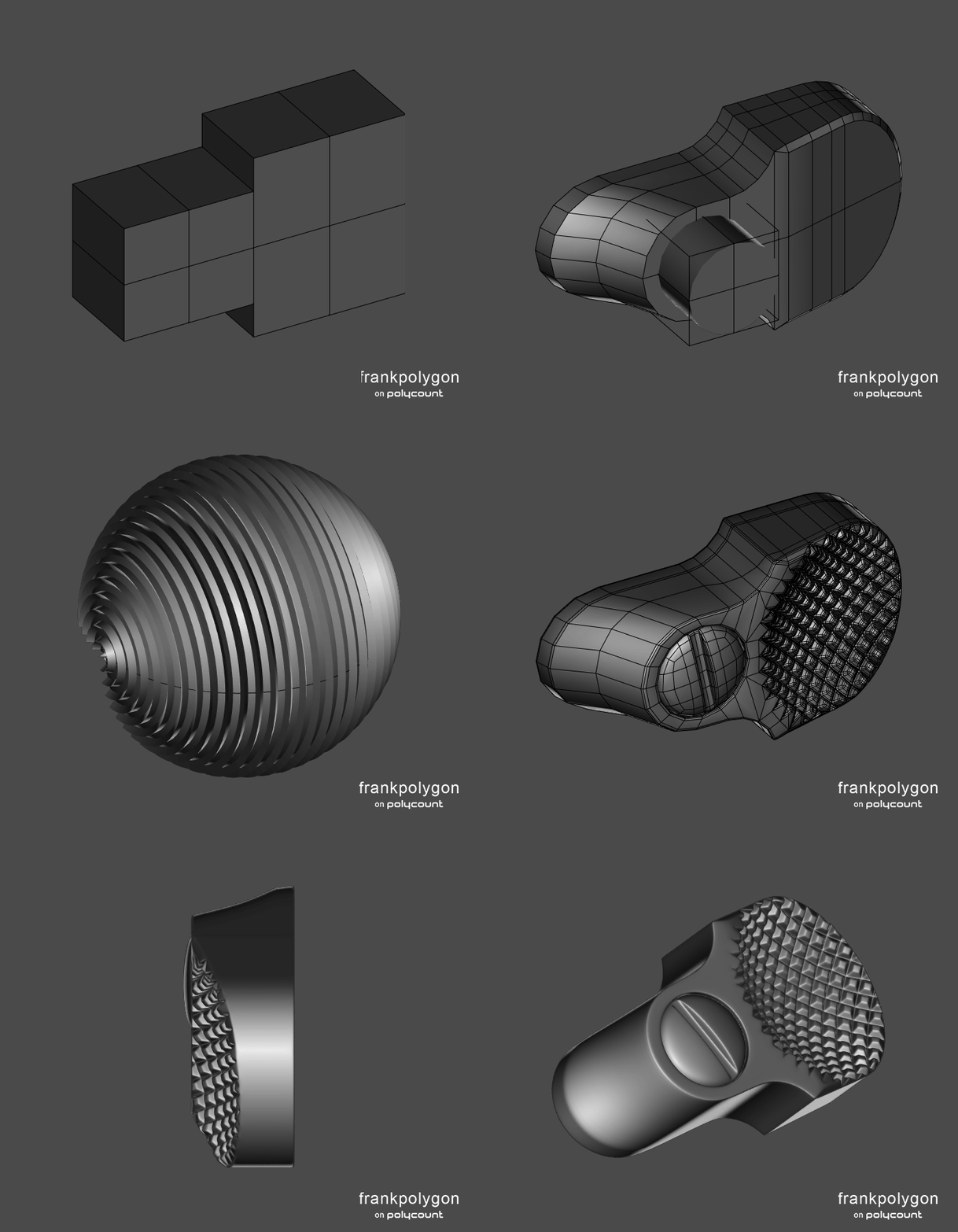
Subdivision sketch: cylinder release.
This is a quick overview of an iterative block out process, combined with a boolean and modifier based subdivision workflow.
A significant part of hard surface modeling is figuring out the shapes in the references then generating an accurate block out. Booleans and modifiers help streamline a lot of basic modeling tasks. They also make it easier to adjust individual surface features, without having to remodel large sections of the mesh. Which reduces the amount of work required to make significant revisions to the basic shapes. There's also the added benefit of using the final block out as a base mesh for generating both the high poly and low poly models. Something that's still relevant to contemporary poly re-meshing workflows.
In the example above: The curved surfaces are generated by bevel / chamfer modifiers and surface features, like the spherical knurling pattern, are cut in with booleans. Everything in the block out remains editable through the modifier stack. First pass cleanup of the base mesh is handled by modifiers that dissolve extraneous edges by angle and weld any stray vertices by distance. Support loops for the high poly are automatically generated by a simple angle based bevel / chamfer modifier and the width parameter can be adjusted to make the edge highlights sharper or softer.
Recap: Using an iterative block out process makes it easier to focus on resolving issues with the individual shapes of an object and is a workflow element that's relevant to almost all hard surface modeling workflows. There's also a significant amount of overlap in the poly modeling skills used to develop the block out, base mesh, high poly and low poly models. Which are still relevant to both boolean re-meshing and subdivision workflows. It's these overlapping skills that are worth developing and the associated workflow processes that are worth streamlining.
 FrankPolygon
7 ·
Re: Asuka - Handpainted Evangelion Fanart - Blender/BPainter.
@AdamSimons Thanks, painted highlights are super fun!
I got some feedback recently that I think really helped push this model further.
My buddy Denny Zunon suggested some proportional tweaks including squaring off the hips:

And another good friend Kevin Manning gave me a great paintover to get a bit more of a classic anime feel in there seen on the left:

Still working on refinement but here's an update after all the great feedback.
 Bolovorix
3 ·


3d model search engine
I have been working on a 3d model search engine for sometime.
It is indexing 3d models from several websites. I will be adding more websites very soon.
3d models can be filtered by price and formats. There is also a separate subcategory for printable 3d models.
Any suggestions for improvements are welcome.
meshplorer
3 ·