Best Of
Re: Sketchbook: Frank Polygon
@chien Thanks for the question. There are a few links to some write-ups about common baking artifacts in this post and some examples of how triangulation affects normal bakes in this discussion. Additional content about these topics is planned but, since most of the tools used for baking are already well documented, the focus will tend to be on application agnostic concepts.
Block out, base mesh, and bakes.
This write-up is a brief look at using incremental optimization to streamline the high poly to low poly workflow. Optimizing models for baking is often about making tradeoffs that fit the specific technical requirements of a project. Which is why it's important for artists to learn the fundamentals of how modeling, unwrapping and shading affect the results of the baking process.
Shape discrepancies that cause the high poly and low poly meshes to intersect are a common source of ray misses that generate baking artifacts. This issue can be avoided by blocking out the shapes, using the player's view point as a guide for placing details, then developing that block out into a base mesh for both models.
Using a modifier based workflow to generate shape intersections, bevels, chamfers and round overs makes changing the size and resolution of these features as easy as adjusting a few parameters in the modifier's control panel. Though the non-destructive operations of a modifier based workflow do provide a significant speed advantage, elements of this workflow can still be adapted to applications without a modifier stack. Just be aware that it may be necessary to spend more time planning the order of operations and saving additional iterations between certain steps.

It's generally considered best practice to distribute the geometry based on visual importance. Regularly evaluate the model from the player's in-game perspective during the block out. Shapes that define the silhouette, protruding surface features, and parts closest to the player will generally require a bit more geometry than parts that are viewed from a distance or obstructed by other components. Try to maintain relative visual consistency when optimizing the base mesh by adding geometry to areas with visible faceting and removing geometry from areas that are often covered, out of frame or far away.
For subdivision workflows, the block out process also provides an excellent opportunity to resolve topology flow issues, without the added complexity of managing disconnected support loops from adjacent shapes. Focus on creating accurate shapes first then resolve the topology issues before using a bevel / chamfer operation to add the support loops around the edges that define the shape transitions. [Boolean re-meshing workflows are discussed a few post up.]

Artifacts caused by resolution constraints make it difficult to accurately represent details that are smaller than individual pixels. E.g. technical restrictions like textel density limits what details are captured by the baking process and size on screen limits what details are visible during the rendering process. Which is why it's important to check the high poly model, from the player's perspective, for potential artifacts. Especially when adding complex micro details.
Extremely narrow support loops are another common source of baking artifacts that also reduce the quality of shape transitions. Sharper edge highlights often appear more realistic up close but quickly become over sharpened and allow the shapes to blend together at a distance. Softer edge highlights tend to have a more stylistic appearance but also produce smoother transitions that maintain better visual separation from further away.
Edge highlights should generally be sharp enough to accurately convey what material the object is made of but also wide enough to be visible from the player's main point of view. Harder materials like metal tend to have sharper, narrower edge highlights and softer materials like plastic tend to have smoother, wider edge highlights. Slightly exaggerating the edge width can be helpful when baking parts that are smaller or have less textel density. This is why it's important to find a balance between what looks good and what remains visible when the textures start to MIP down.

By establishing the primary forms during the block out and refining the topology flow when developing the base mesh, most of the support loops can be added to the high poly mesh with a bevel / chamfer operation around the edges that define the shapes. An added benefit of generating the support loops with a modifier based workflow is they can be easily adjusted by simply changing the parameters in the bevel modifier's control panel.
Any remaining n-gons or triangles on flat areas should be constrained by the outer support loops. If all quad geometry is required then the surface topology can be adjusted as required. Using operations like loop cut, join through, grid fill, triangle to quads, etc. Though surfaces with complex curves usually require a bit more attention, for most hard surface models, if the mesh subdivides without generating any visible artifacts then it's generally passable for baking.

Since the base mesh is already optimized for the player's in-game point of view, the starting point for the low poly model is generated by turning off any unneeded modifiers or by simply reverting to an earlier iteration of the base mesh. The resolution of shapes still controlled by modifiers can be adjusted as required then unnecessary geometry is removed with edge or limited dissolve operations.
It's generally considered best practice to add shading splits*, with the supporting UV seams, then unwrap and triangulate the low poly mesh before baking. This way the low poly model's shading and triangulation is consistent after exporting. When using a modifier based workflow, the limited dissolve and triangulation operations can be controlled non-destructively. Which makes it a lot easier to iteration on low poly optimization strategies.
*Shading splits are often called: edge splits, hard edges, sharp edges, smoothing groups, smoothing splits, etc.

Low poly meshes with uncontrolled smooth shading often generate normal bakes with intense color gradients. Which correct for inconsistent shading behavior. Some gradation in the baked normal textures is generally acceptable but extreme gradation can cause visible artifacts. Especially in areas with limited textel density.
Marking the entire low poly mesh smooth produces shading that tends to be visually different from the underlying shapes. Face weighted normals and normal data transfers compensate for certain types of undesired shading behaviors but they are only effective when every application in the workflow uses the same custom mesh normals. Constraining the smooth shading with support loops is another option. Though this approach often requires more geometry than simply using shading splits.
Placing shading splits around the perimeter of every shape transition does tend to improve the shading behavior and the supporting UV seams help with straightening the UV islands. The trade off is that every shading split effectively doubles the vertex count for that edge and the additional UV islands use more of the texture space for padding. Which increases the resource footprint of the model and reduces the textel density of the textures.
Adding just a smoothing split or UV seam to an edge does increase the number of vertices by splitting the mesh but once the mesh is split by either there's no additional resource penalty for placing both a smoothing split and UV seam along the same edge. So, effective low poly shading optimization is about finding a balance between maximizing the number of shading splits to sharpen the shape transitions and minimizing the number of UV seams to save texture space.
Which is why it's generally considered best practice to place mesh splits along the natural breaks in the shapes. This sort of approach balances shading improvements and UV optimization by limiting smoothing splits and the supporting UV seams to the edges that define the major forms and areas with severe normal gradation issues.

Smoothing splits must be pared with UV splits, to provide padding that prevents baked normal data from bleeding into adjacent UV islands. Minimizing the number of UV islands does reduce the amount of texture space lost to padding but also limits the placement of smoothing splits. Using fewer UV seams also makes it difficult to straighten UV islands without introducing distortion. Placing UV seams along every shape transition does tend to make straightening the UV islands easier and is required to support more precise smoothing splits but the increased number of UV islands needs additional padding that can reduce the overall textel density.
So, it's generally considered best practice to place UV seams in support of shading splits. While balancing reducing UV distortion with minimizing the amount of texture space lost to padding. Orienting the UV islands with the pixel grid also helps increase packing efficiency. Bent and curved UV islands tend to require more textel density because they often cross pixel grid at odd angles. Which is why long, snaking strips of wavy UV islands should be straightened. Provided the straightening doesn't generate significant UV distortion.

UV padding can also be a source of baking artifacts. Too little padding and the normal data from adjacent UV islands can bleed over into each other when the texture MIPs down. Too much padding and the textel density can drop below what's required to capture the details. A padding rage of 8-32px is usually sufficient for most projects. A lot of popular 3D DCC's have decent packing tools or paid add-ons that enable advanced packing algorithms. Used effectively, these types of tools make UV packing a highly automated process.
It's generally considered best practice to optimize the UV pack by adjusting the size of the UV islands. Parts that are closer to the player tend to require more textel density and parts that are further away can generally use a bit less. Of course there are exceptions to this. Such as areas with a lot of small text details, parts that will be viewed up close, areas with complex surface details, etc. Identical sections and repetitive parts should generally have mirrored or overlapping UV layouts. Unless there's a specific need for unique texture details across the entire model.

Both Marmoset Toolbag and Substance Painter have straight forward baking workflows with automatic object grouping and good documentation. Most DCC applications and popular game engines, like Unity and Unreal, also use MikkTSpace. Which means it's possible to achieve relatively consistent baking results when using edge splits to control low poly shading in a synced tangent workflow. If the low poly shading is fairly even and the hard edges are paired with UV seams then the rest of the baking process should be fairly simple.

Recap: Try to streamline the content authoring workflow as much as possible. Especially when it comes to modeling and baking. Avoid re-work and hacky workarounds whenever possible. Create the block out, high poly and low poly model in an orderly workflow that makes it easy to build upon the existing work from the previous steps in the process. Remember to pair hard edges with UV seams and use an appropriate amount of padding when unwrapping the UVs. Triangulate the low poly before exporting and ensure the smoothing behavior remains consistent. When the models are setup correctly, the baking applications usually do a decent job of taking care of the rest. No need for over-painting, manually mixing normal maps, etc.
Additional resources:
https://polycount.com/discussion/163872/long-running-technical-talk-threads#latest
 FrankPolygon


Re: How often do you disagree with your peers/superiors?
early in my career i was hyper critical. my natural approach in improving my own work was to identify what was disliked and change it. i've found when collaborating with a group it's good to get out of the way of others, encourage your leaders, and entrust those given directive roles and responsibilities. if you're patient that thing that bothers you may actually fix itself in time. if an opportunity presents itself, you can highlight it. let your directors direct, designers design, your artists art, your programmers program. hyper focused feedback from multiple sources can be overwhelming. forgive at least some shortcomings for the sake of progress, as nothing is perfect and every project in the end is a gamble. it's more valuable to grow together as a team.
 killnpc
Re: Question about being a Senior
Job titles mean different things to different people. It's really up to your manager/employer to explain what your duties entail,
I would suggest asking them whenever you have doubts. This is a very reasonable question to ask. "Thanks for the promotion! What responsibilities come with this new title? Should I change anything I'm doing?" etc.
Often a title change helps the company in their efforts to seek more funding, since it looks like they have more experienced talent on the team.
It can also be just a justification for paying you more. If you're doing well, they may also be paying you more to help retain you in the seat, make it less likely you'll jump ship to work elsewhere. There's a number of potential reasons why, from a purely business-oriented decision.
 Eric Chadwick
Re: The Bi-Monthly Environment Art Challenge | September - October (80)
@PaulJChris You might already be planning this but if you're keeping the fire as a 3d mesh adding some smaller flames that have broken off or embers might look nice. I also agree with fabi that your getting a bit smooth and rounded in places, mainly the rocks next to the central pillar, I'd maybe use the trim dynamic and trim curve brushes to try and redefine the silhouette.
Slow progress from me, first time making trim sheets but I think I have it mostly planned out now. Ignore the texture colours, I just quickly slapped them on to get an idea of proportions before working on highpoly.

 atunnard
Re: Need help!
@Manta丶 Welcome to Polycount. Consider checking out the forum information and introduction thread.
There's also a dedicated modeling thread in the technical talk section. Which has a lot of great examples provided by community members. This is a great place to ask questions and look for answers about how to solve modeling and topology problems.
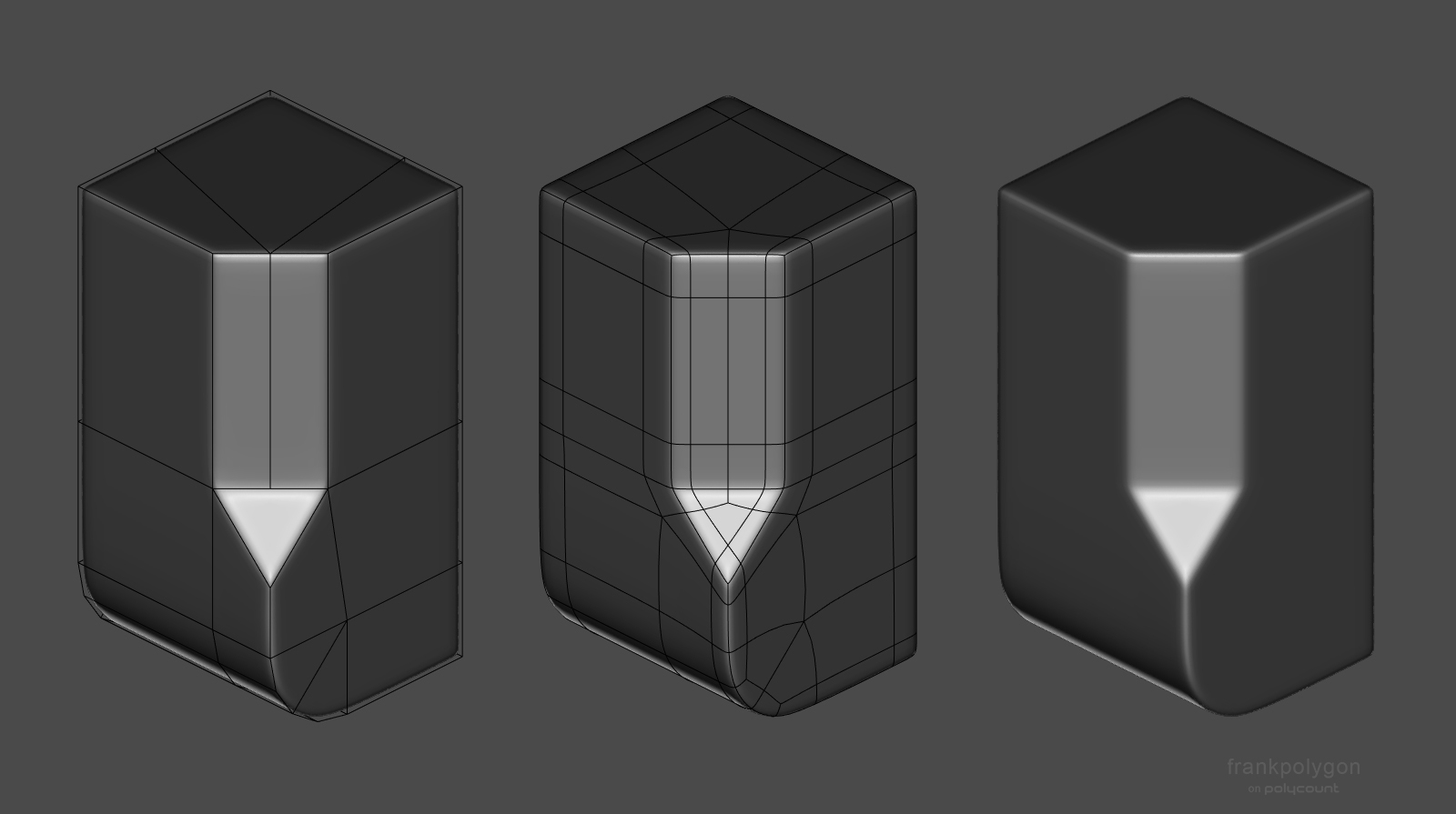
It's generally considered best practice to block out all of the primary shapes, before adding a lot of support loops. This makes it a lot easier to solve topology flow issues without the added complexity of managing individual support loops while modeling the basic shapes. For most hard surface models used to create game assets, as long as the mesh subdivides cleanly, it's fine to have a few triangles or n-gons in the mesh.
Below is an example of just how little geometry is required to create the desired shapes. After the block out is completed and the topology flow is resolved, support loops can generally be added to these kind of models with a simple bevel / chamfer operation. Modifiers can also be used to generate support loops based on face angles or weights. This also has the added benefit of making the edge width easily adjustable by just changing a few modifiers settings.

If there are specific technical limitations that require all quad geometry then following topology layout can be used to bring the mesh into compliance.
 FrankPolygon
Re: Sketchbook : Teng Hin Chan
You can improve overall look if you tweak a few areas , torso been the one that really need help
There is something wrong with hair shader you can see back of his head

 carvuliero
Re: Judah - Realtime Character
He's done! I took @Neox 's advice and took the project a few steps back to rethink the anatomy and clothing. I'm much happier with how the character looks now. This fells much more in line with my initial idea and looks way more realistic. Thank you again to everyone who provided feedback along the way!


I got to make a lot of helpful tools and shaders during this project that will speed up my process tremendously. Can't wait to start on the next character!
 sarasumm
