Search
-
Re: Editing Vertex Colours during runtime
 ya i could do that paint in some vertex data, than animate a scaler value that it is multiplied by by the painted in vertex data. but in that case it would all fade it around the whole map at the same rate, instead of starting in 1 location and spreading out, unless i try to paint the vertex data in as gradients, and if i…
 -
Maya Vertex Chameleon
 Hi polycounters :) http://www.renderheads.com/portfolio/VertexChameleon/ That's where you'll see videos and be able to download the beta of this new vertex colour plugin I've been making for Maya. The idea with this tool is to make much more powerful vertex colour tools than what Maya currently has. We made these tools…
 -
Mudbox: Vertex spike artifact
I'm experiencing an issue where a vertex in my model is spiking out from the mesh. When I turn off the sculpt layers and smooth the vertex on the base mesh it will go away, but when I turn the sculpt layers back on it reappears. If I try and smooth the vertex in a sculpt layer Mudbox crashes. Anyone know a workaround? -
Marmoset Toolbag - Vertex Alpha question / help needed :)
Hello all, I see you can blend vertex colour in the new Marmoset Toolbag update but I wanted to ask if you can blend 2 textures together using vertex alpha and where do i put the blend mask and 2nd albedo texture. I have a stone and i want to add a moss texture blended over it in places, like using the paint tool in UE4 (I… -
Help me with my Vertex Paint Shader, please!
I'm still learning this engine and I've kind of run into a snag with my vertex paint shader. Here's an overview of what I'm going for: I want the Red Vertex Channel to paint in the pipe paint and when I erase, I want it to erase to metal. (my bare metal doesn't look right) I want the Green Vertex Channel to paint in Rust… -
Re: Does having five edges meet here work for this product? What’s a better alternative?

 Your 'Npole' (a vertex where 5 edges converge) in question is located on the transition boundary which will certainly throw shading artifacts once subd is applied so I would suggest a re-routing solution: For example: Hence your 5 vertex polygon is converted to a 4 vertices face that will enable smooth shading and…
 -
Vertex normal workflow in 3ds max
 Hi guys, I am currently trying to get my head around creating custom vertex normals in max 2013. So far I love them but they only seem viable on large flat faces or simple assets because 'out of the box' max makes editing them so fiddly and time consuming they defeat their own purpose. I have read the popular thread…
 -
(Workaround) [Blender 2.8] How to edit a split vertex normal without affecting others?

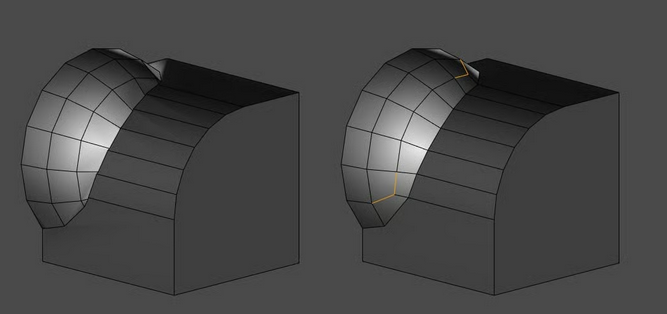
 (This is not a double-post, but a different question.) I am facing a problem which, after transferring normal, I want to edit split vertex normal to fix shading on a particular face, but avoid modifying other normals on the same vertex. To illustrate the issue: step 1: I transferred normal from this cylinder onto an arc of…
 -
Vertex painting on static meshes?
 I have a static mesh with multiple materials on it that I'm trying to vertex plaint but it seems the paint cursor only displays itself on one of the materials (and one that doesn't need the vertex painting effect, at that). Is this standard procedure? I'd have thought that vertex painting was little more than applying…
 -
Re: Vertex Normal Script for Maya
Thanks for the reply Ivars, im using maya 8.0, I can transfer the vertex positions but not the vertex normals, have you had this work before? wouldnt the vertex numbers on the sphere kind of have to match the vertex numbers on the tree?
>9910 results