Search
-
Re: 2nd UV set in max 2009
 It's a feature I don't like and it's wiped out one or both of my layouts before so I stopped using just one modifier. I now handle it by adding a second UnwrapUVW modifier and setting it to 2. Need to change 1, drop down to the first, need to work on 2, use the top. Don't forget that you can save and load UV channels. You…
 -
Re: 3dmax 8 Rigging Problem
If you made a selection and didn't exit sub object mode before going back up the stack, it will screw up your skin/physique modifier. I'm not sure if skin or physique has a "ignore stack selection" check box or not. If it doesn't just go back down to edit poly and either select everything or close it out properly. Also if… -
Re: The Bi-Monthly Environment Art Challenge | January - February (100)

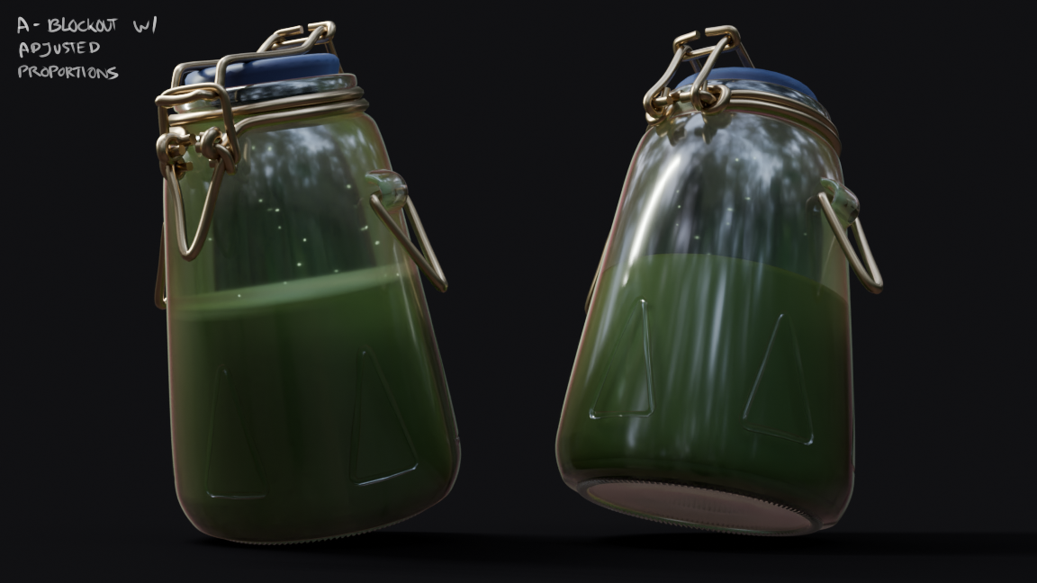 I wasn't planning to join any challenges, but the jar concept is so straightforward and nice I couldn't help it! Here is a mostly non-destructive blockout in Blender with quick shaders. There are a few edges that can only be adjusted once the modifiers are applied, and I'm going for quads to sculpt imperfections in…
 -
AI image straightening tool?
 I have an ortho projected photogrammetry of a racing track rumble /curb stripe . It follows a track turn so is naturally bent . With drain plates going in parallel . I need to straighten it into a repeating texture . Usually do it in 3d package with bend modifier first then a tedious job of UV points matching . re-baking…
 -
Editable Poly v Mesh, projection and topo
 Okay so I've been battling with xnormal again. I've been getting the issue where it claims my cage and mesh are different despite only using the push modifier and 3DS max accepting it as a cage in the projection modifier. Importing my meshes back into 3ds max I noticed that one had an extra vert somewhere which wasn't the…
 -
Maxscript Assign Vertex colours issue
 Hi guys I read this thread here: http://www.polycount.com/forum/showthread.php?t=65348 and I'm mostly using rick's maxscript, just testing things out. I'd like to assign a material's diffuse to vertex colours, and running this script:modPanel.addModToSelection (VertexPaint ()) ui:on$.modifiers[#VertexPaint].lightingModel =…
 -
Re: Turn a Cylinder to a Tube.
 Modifier Method 1. Select and delete the polygons on the ends of the cylinder. 2. Go the the modifier dropdown menu and select the "Shell" modifier to apply it to the cylinder. 3. Set the "Outer Amount" spinner to 0 and adjust the "Inner Amount" spinner of the modifier to what you want. Poly Modeling Method 1. Select the…
 -
Re: BRAWL2 [Vehicle] Bull Dust, sacboi [Tribute]
 @kanga umm...yeah life's unpredictable stuff got in the way :/ But I'm back at it today will have wip shots uploaded shortly albeit if those that didn't make the cut-off are still allowed to post here since as I understand this comp is complete and in all fairness to artists that did? Otherwise I'll start a separate thread…
 -
Re: smoothing groups on maya ?

 Hi, your hard surface workflow is obsolete, now artists use the rounded edge shader (aka bevel shader) of Blender Cycles 2.79.1+ (free) or Modo, VRay, Houdini and Redshift because it works with every topology so you can use substract booleans modifiers everywhere and it works great with text too. The meshes gets rounded…
 -
Re: 3ds max user learning MAYA
They roughly do the same stuff. It's great that you're learning both, I think more people need to get out of their camps and learn both. A lot of awesome tools get created because someone said "yea but in XYZ you can do it like this..." sometimes something better than what both apps have natively gets created. I cut my…
>11676 results