Search
-
Artifact on Curvature map and Object normal in Marmoset.

 Hello!. Who knows what kind of artifact on the Curvature map and Object narmal? There are no such problems on the AO and the Normal. There is only one smoothing group on the model, I reset the normals, I reset Xform, there are no inverted polygons, I tried different file formats. What could be the problem?
 -
Mirrored object baking error
 Hello everyone! I have weird artifacts when baking in Marmo mirrored object, especially around seam. Did anyone have similar problem and maybe could help? Meshes were made in blender. My HP doesn't have UV mapping and double geometry or hidden faces, my LP have standard Mirror modifier Blender v 2.93.6 Marmoset 4.0.2…
 -
Reseting transform without repositioning object in Max?
I have a complex rig that uses LookAt constraints on various parts. The problem is, exporting for Unity as an FBX brings up the message "Warning: Non-Orthogonal Matrix Support." According to this, resetting the scales and transforms should solve this. However, resetting the transforms also repositions the object. Is there… -
maya Error: (Mayatomr.Geometry) : unnamed object is not a mesh, ignored.
 I'm getting this error trying to bake in maya mental gay anyone know what this is? Error: (Mayatomr.Geometry) : unnamed object is not a mesh, ignored.
 -
Texturing large scale objects, without losing texture density?
Hello, everyone! I was wondering on how you'd create large environmental pieces without losing out on texture density? For example, would you create the albedo in a bigger resolution and keep the normals as it is? sound silly, I know. To be clearer, when I say "large environmental pieces" I meant those non-modular pieces… -
3ds max - rotate a object shortcut
 I'm really feeling dump at the moment. I can't find a simple shortcut in my max 2010 manuals, nor a little script with a button to rotate a object or selection around 90 degrees. Most times I use the "r" key to rotate with the mouse then but I would like to have a simple shortcut to do the job so I can save the manual…
 -
Making foliage from an object - editing normals
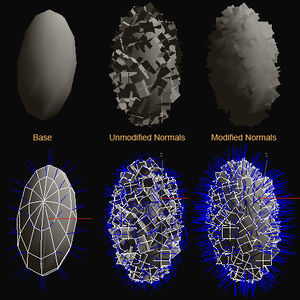 Does anyone know how to create the scattered polygons shown in the picture under the Modified Normals text in 3ds max? I know that this is from another thread but it didn't exactly explain step by step on how to create the modified version of the object.
 -
Object imports into Blender transparent

 I'm a fair hand at Maya, but I'm a full beginner with Blender, so this is probably a basic problem. I built a model in Maya, and exported it as an .obj to bring into Blender. I'm following a tut for Sims4 modding, but when I bring my object into Blender it comes in transparent. When I flip it to "solid" it's just black.…
 -
How to scatter objects in Zbrush
 I'm trying to make a tileable pebbledash/roughcast texture in Zbrush and my plan is to make a bunch of small pebbles and then scatter them over a flat plane, then bake out maps. Does anyone know how I would do that? There's a similar feature in 3DS Max called Object Paint, but I can't find something like it in Zbrush. Also…
 -
Multiple Material ID One Object
 Hey so I've been working on an animation using my friend's model. He uses two UV maps for the creature and to rig and animate through 3DSmax I had to merge them as one object. I used multiple Material IDs but can't seem to bring them into Marmoset Toolbag 3 to view my animation with multiple UVs. Is this not possible?
>26392 results