Search
-
zbrush layer brush ovelappng problem
 Hi guys there is some problem with layer brush can be overlapping fixed when you stroke with symmetry and vanishing point is ovelap at centr?
 -
MAHcut mech brushes (Zbrush)
 Anyone have these brushes saved locally? Everywhere I try to download them from has given me a 404 error or the files have been removed. Would be appreciated if someone could share.
 -
Show all zbrush brushes
how do i get all my brushes to appear when i move my palette to the side? like this Every time i move it i only get like 5 showing up -
[ZBrush] problem with "Multi alpha brush" round cutoff/clipping when using the drag dot stroke.

 When I create a multi alpha brush from meshes (after unify of each mesh) and use the dragdot stroke the 'alpha' is cutoff/clipped round. This depends on brush stroke size. Large sizes have more cutoff. What causes this?
 -
Zbrush - How can I make brushes ignore inactive subtools?
 Hi! I want to imbed some sphere into another mesh. Problem is, that I can't really sculpt the transition in the holding mesh (active subtool), because the brushes are affected by the sphere-subtool. Switching on Transparency makes brushes ignore inactive subtools, but then the scene is hard to read. I will continue to look…
 -
ZBrush Brushes not working
Hey guys I couldn't find any answers that could help me, so i hope someone know how to fix this. Basically my brushes don't work. I can't click on them, they are kinda greyed out i guess. I inserted a screenshot so you can see what i mean. Hope you can help! -
Zbrush 2022.0.8 question about random IMM mesh insert ?
I forgot how I did it and help pages doesn't help really . Both Chat and Gemini know nothing . The whole random system looks like a bug maybe. But I am sure I did it before. it was in brush>modifiers as far as I remember .Yet "Variation" and "variation select" slider in 3 position do nothing. Still same mesh inserted. Hope… -
how the brush works in zbrush? I used trim dynamic.

 and it just happened like this, normally we would expect zbrush gonna draw the line on affecting one face. it just draw across the other faces. what we would expect its logic from this?
 -
Patchy mask brush ZBRUSH
I have been trying to fix my brush for days now. I can't seem to stop the patchiness, no matter the intensity levels. I was wondering if anyone else had ran into the issue, I'm sure it's just my settings and it would take a sec to solve but I just can't figure it out. HELP ! -
ZBrush/SP - 55 Ornament Brushes/Alphas

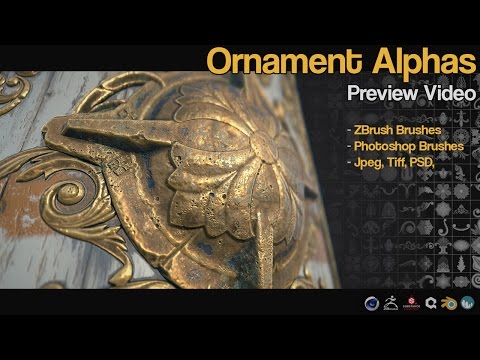 I have created some new alphas and brushes Download and Better previews over at artstation - https://www.artstation.com/artwork/BDwrr https://www.youtube.com/watch?v=h1rn6MgTr7A
>31659 results