Search
-
Creating independant dust/grunge on my floor and objects [maya/max/zB]

 Hey there, I am currently working on an interior scene, and I would like to have this level of details when it comes to the dust and dirty floor. I first thought I could get it with a displacement map [indeed, I can, but then it's gonna be a very long way and take a lot of RAM to duplicate it] I think the best way would be…
 -
Creating level layout
 I'm playing some halo 4 and am analyzing each room I've come across and its made me think. What's the normal process behind creating the floors of levels when you have walls bending and curving all around? You cant just make a square floor while having the walls angle in diagonally. The ground floor in halo seems…
 -
Creating. A mask out of alpha?
 Hi is possible to create out of an applied masking on model in Zbrush a psd file with alpha in order. To be able to exactly. Texture the masked parts instead than manually select them after ? That would save me a lot of time possibly for coloring the details inserted in a model with an masked extrusion ....
 -
Creating texture for windows
 When you create the texture for windows in buildings where you can't see though the windows, how do you make it? Do you use reflection to make the effect of window, or do you put the reflection into the texture or does depend on the engine? I'm trying to figure out how to make some proper glass, should I make it black,…
 -
Great Goblin
 So here is my attempt to create something similar as the great goblin in the The Hobbit. Going to get the topology right first to get it in a nice pose and add more detail. Hope you guys like it.
 -
Creating realistic eyes in Zbrush

 Hello fellow creatives! I have created this thread because I have one question regarding texturing realistic eyes in Zbrush. For this purpose, I collected an image from infamous Rafael Grassetti who has breathed life into the following study. Does anybody have any clue how he achieved this effect on the eyes?
 -
Creating a human inside out

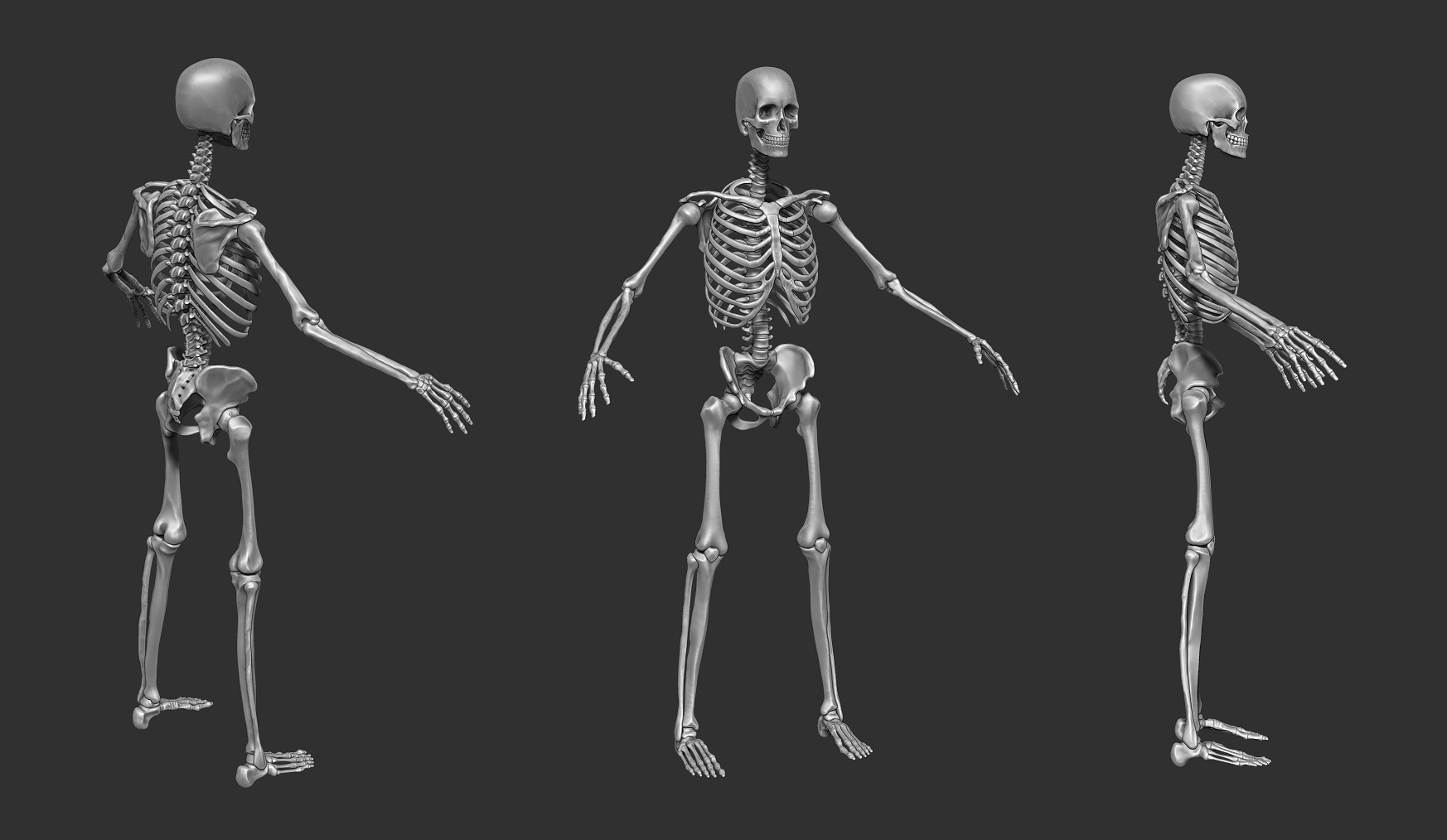 Hi there! For a video game project I am currently creating a human including organs, skeleton etc. As I just finished the sculpt of the skeleton I am looking for some feedback on the anatomy. Anyways, here are some renderings: More can be found over at my artstation. C&C welcome! (:
 -
Solved: Color ID Map creates new color around edges when importing into DDO.

 Hey guys today I tried creating a new project in DDO. I created my material ID maps like I always do. first by taking a UV snapshot and filling it in, in PS. The edges are 100% hard until I import them into DDO. I tried exporting it as a JPG, PNG, TGA, TIFF and the same thing happens all the time. White and black…
 -
Re: Hallway Environment- Modular/Lighting Study | Real-Time Environment

 Looking good so far! The light on the wall above the electrical box, usually those have a visible conduit connecting to the electrical box. Might be nice to add. For the pipe hero asset pics, I would prefer less empty space around the models… get those up close to the camera. Wireframes are easier to read if they are…
 -
Create globe network connecting lines
 I am working on a project and I am stuck on , how to create those jumping network animated lines in 3DS MAX. See the reference link - https://www.youtube.com/watch?v=qfR8oKO4pwc Please Help : neutral:
>88556 results