Search
-
Re: [WIP] Lords of the Fallen - Pieta - need feedback on UV's
 Typically you'd overlay tiling detail maps in-engine and/or secondary UVs to get things like fabric weave. I'm not a character artist so I don't know if 8 sets is too many, but my gut says it is :lol: You probably want to look into layered materials and detail maps if you're unfamiliar with the concepts. I get that its a…
 -
Re: [WIP] Vampire Librarian Character Bust

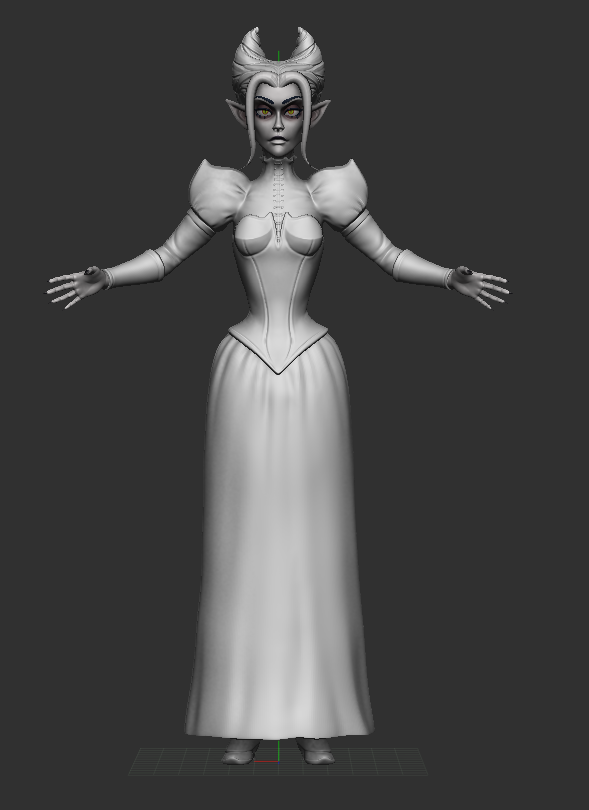 @Quasar thanks for your feedback! i agree, it looks a bit strange, and i can see the difference it made when i started applying some more detail on the skirt. i might go back to refine the blouse a little bit too, but in general i can see the improvement!
 -
Why you should double edge loops in sub-d
 I remember reading the sub-d thread a while back, and racer445 said something about doubling edge loops and how it makes sub-d models looks more professional, well, it's not just that, it's also practical. People asked and he didn't really show why you should, so I thought I'd share my findings. I don't know if this is…
 -
Re: What has the games industry been like for you?
Here is what has happened so far. Short background No studio work before the job I will talk about. I have been trying to get in as a 3D artist but since moving to the Seattle area. I was in need for something. I decided to take one of those jobs floating around I vowed never to take.... yes a tester, Visual Design Tester… -
sulaco APC/getting the most out of my spec maps
 Hey guyse, I'm currently texturing this vehicle model I built. Some of you may recognize it. Here is the normal mapped version w/ diffuse only: Understandably it looks pretty bland, as I purposefully left the metal/paint fairly deconstrasted, wanting to bring out all the dynamic detail in the spec map. Well, here it is…
 -
Re: Can't see UV's in Mari
 check to see if the uvs are in default uv set map1 inside maya. Mari won't read uvs that are not in default uv set
 -
Re: Getting realistic renders the right way??
I suggest you look at training websites like Digital Tutors for visualisation pieces. Creating a realistic render is a combination of several skills - modelling, lighting, texturing and then actually understanding the render settings to make the most of what you have in scene. In regard to Fade1's advice, I believe that's… -
Are you ready to BRAWL?

 For those of you who have been hiding under a rock, a few days ago Polycount officially withdrew from the Dominance War contest. Despite the bad news, the Polycount community was given some good news that we'll be hosting our very own contest. Since the announcement was made, we've worked hard to get this this contest off…
 -
I always combine meshes in Maya first when I want a shared texture set. Am I doing this right?
 Hi, I hope the title is not too confusing! What I meant was: - I model the base meshes in Maya and for sculpting/texturing I place them next to each other and combine them to one asset. I'm also doing the UV mapping there so the combined mesh has no overlapping going on. - from there I export it to ZBrush and then to…
 -
Getting normals out of ZBrush
I've just created a tiling texture on the canvas and am trying to get a good normal map. I just used the simple brush and drug the normal material over everything but I can't seem to get a good map that isn't aliased to hell. Even with render/ best it's still pretty gnarly. Is there a setting I'm overlooking?
>122312 results