Search
-
Re: So what are you working on?
 thanks arsh (and pimm) Bronco: you'll need to make your mesh all quads and distribute your mesh more evenly (less detail for the eye and ear area). there is a tri on your dude's shoulder and the n-gons on the gask mask won't fly well when you divide the mesh in zbrush.
 -
Re: Thread of Awesomeness, Hilariousness, Off-topic, Youtube
 @adam That gets even better if you listen to it without looking at the video and try to figure out how they made the sounds. My guess is pouring thick oatmeal over mashed potatoes. @rolfness that's pretty good, but i'll never take that game seriously until they get rid of those stupid masks.
 -
Seeking Technical Artists/Riggers For Various Polish and Tasks
Hello! I am in need of experienced Maya riggers and technical artists to help with tasks such as polishing weights, adding new controls and joints, fixing deformation issues and general consulting. This is not exactly a typical job of making complete rigs, but in the future it may lead there. Many of our rigs are created… -
Re: Mega Man X Props, Tiles and Modules
 Right now all this noise screams "procedural generated" a little bit, I think. As someone said, I'd try to mask out things and try to add some slight variation so it doesn't look like that. You don't need to paint the actual wear, but maybe use a brush to mask it out in some areas. The mask can be some slightly noisy mask…
 -
Re: [Unreal 4] Terrain Blending Tool (inspired by Star Wars: Battlefront)

 Ah yes, it is absolutely nothing complex, here's the current setup, i wish i was smart enough to work some magic with it. I saw some people do pseudo-softbodies using distance field gradient, or you could probably make some lava lamp like effect with this. Basically i'm using normalized distance field gradient as a…
 -
Re: What Are You Working On? (3D) 2025
-
Re: Painter - height / normal UV discrepancy

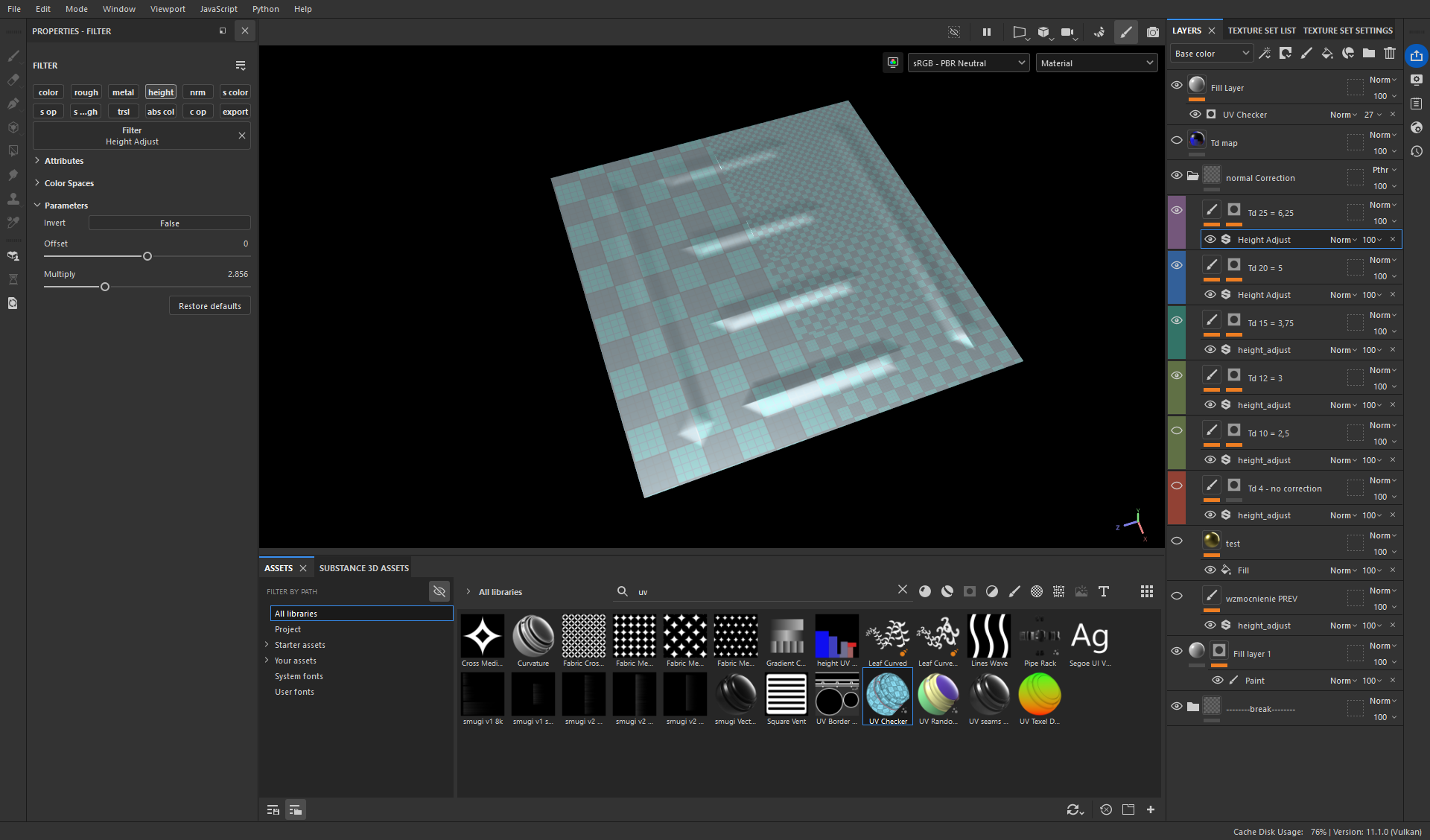 I have found a solution: 1. export the texel density map from RizomUV 2. use it to mask areas with variable Td in Painter 3. use a filter Height Adjust Now to properly set this filter I export a simple plane with all texel densities in my project: say I have 5 different Tds - then I divide this plane into 5 areas, unwrap…
 -
How to paint flow/anisotropic/comb maps in Photoshop.
 After seeing Ben Mathis'/Poopinmymouth's tutorial on how to do flow maps in PaintShop Pro, I realized that there's a very simple way to create flow maps in Photoshop using a simplified version of his method. First, either render out or copy the cone normal from Ben's tutorial: It helps if this cone image is the same size…
 -
Cinematic - Mass Effect dock scene
 CURRENT STATE Hi guys, Just wanted to share this side project I'm working on for fun. Crits and comments are welcome. The idea comes from all those mini cinematics in Mass Effect when you arrive at different planets or stations. I want to do a short animation of the Normandy landing in this space dock. So here are a couple…
 -
The Gamedev Cast is answering questions about PBR!
 PBR - WHAT DO YOU WANT TO KNOW? PODCAST DATE: SUNDAY, JUNE 15TH, 8PM GMT +2 ( 12 PM EDT ) Hi everyone, it's been a while since we last did an episode, and so we wanted to come back with a bang. That's why we've decided to do a PBR-centric episode focusing purely on the topic of physically-based rendering and shading…

>40563 results