Search
-
[Maya] Script for moving only the x of a pivot to ws 0
 So I recognize that this script xform -ws -pivots 0 0 0; Moves the selected objects pivot to the world space center and that the command expects 3 arguments, so if I only wanted this to move the pivots x to ws 0, how would I go about filling in the other two arguments. I am not a Mel scripter, just a 3d animation student…
 -
zbrush pivot question
 zbrush Hi. I've watched a few online vids and read up a bit about pivots in zbrush and i still don't quite get how to reposition my model (specifically its feet) to 0,0,0. The plan is to bring it into maya to retopologise (and eventually into unreal). I'm not entirely sure how it got to this position to be honest. Is there…
 -
Maya Move Pivot Hot Key ?
 Hey guys, I'm having trouble setting a hot key for move pivot. Currently as we all know the move pivot hot key is "insert". But it's quite the stretch on the keys and i'd like it to be something a little closer, say the letter "F". I'm familiar with setting hot keys in Maya, but when I try to set one for "Move pivot" it…
 -
Max -Pivots-Help!
 Ok, trying to do something in max here and will attempt at explaining it as best I can. I have one large mesh I am splitting up into several(into the hundreds) of objects; at the same time I have a duplicate of this mesh that is slightly differet that I need to split up exactly the same way. When they are split, their…
 -
Maya 2016 - Pivot snap alignment doesn't work anymore?
 Hey Guys, We recently updated to the new Maya at work (2016). Now it seems that one little essential doesn't work anymore and I was wandering if any of you guys got a solution for this. So imagine you have a whole bunch of objects scattered around in space, now you want the pivot of those objects to all snap to the zero…
 -
Can you retain Individual Mesh Pivots of different parts after exporting from Maya
 So my question is basically what the title implies. Is there a way to keep the positions of the pivots of each individual mesh as I have them in Maya. I'm wondering since at the moment I'm working on a Flaregun and I have been doing some test renders in Marmo to make sure the textures look good. And well what I want to do…
 -
Re: Change rotation pivot of a group in Maya??
 I'm not sure what you mean by "clicking the question mark button," but I think I can still answer your question. You can change the pivot point of any selected object by pressing Insert to toggle pivot edit mode. From here you can move and snap the pivot to other locations. Press Insert again to exit pivot mode.…
 -
Re: modo: mirror object and pivot
 hmm I can get an object to mirror across with pivot position intact if I freeze it's transforms, but the pivot rotation is not mirrored. it's the same as the original, which is rubbish :/ in that second link, I'm not sure what he means in the second post: 'Playing with this more. In the animate tab I set the center of each…
 -
[Maya] Component orientation to object pivot

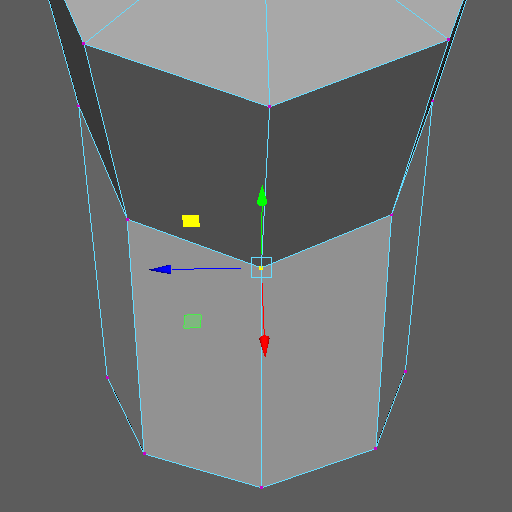 Hi there! I'm new at scripting, so pls don't lynch me. I read a whole bunch of threads, and didn't find what I looked for. I'm trying to write a script that converts the component pivot to the object pivot. In other words, it translates and rotates the object pivot to fit the current component pivot. Getting the…
 -
[Mel] Rotate custom pivot to be aligned to world axes -solved
Hey Guys, I am trying to make my maya mirroring a little bit smarter. If I am in object transform mode it should mirror the object based on my pivot point's orientation, not just its position Even if there are no transforms on the object anymore. I need to work with the manipPivot orientation, to align my object to a world…
>4226 results