Search
-
Maya 2016 UV Editor Overlap issue
 I'm texturing a project and I just downloaded 2016. My problem is, I need some UVs to overlap, but overlapping is turned off and I can't find where to turn it on in this version. I tried UV>layout, but changing the overlap setting there does me no good. Also, I can't select more than one shell at a time. What am I doing…
 -
3DS Max 2016 - Crashes at Startup
 Hi everyone, I'm having issues with 3DS Max 2016. The splash screen will load up, it'll run through all the plugins and will say it's starting 3DS Max and then it crashes. At first it was giving me a dialog box that says the program has crashed but its not even doing that now. I'm not sure whats going on and I can't find…
 -
Re: Maya 2016 mentalray, can´t find final gather map
 Edit: oops that was for 3ds Max. Seems like this might be covered in the Maya 2016 help file. http://help.autodesk.com/view/MAYAUL/2016/ENU/?guid=GUID-67B3D408-76A5-43FA-BC4B-1E1F2243C1F6
 -
Francois' 2016 Improvement Thread

 Since I had one in 2015 and posted non-stop bonkers almost every day, I think I'll do another one but for 2016 but rather go slower and more focused rather than just posting shit and jumping from concept to concept like skankerzero has pointed out before. So here's my first thing I'm working on in terms of anatomy.…
 -
Maya 2016: how to straighten uv fast?

 Hi, what's up How do i create a strait UV map for a curvy object ( like the one shown above ) fast ? note: i made the one in the image manually by aligning the points using the move/scale tool ... it takes too much effort and time, alternative method ? ( i'm using Maya 2016 ) i need to do it this way to use a strait hair…
 -
Maya 2016-17 viewport 2.0 normal map issue

 Hi fellas, I faced some problem with normal maps display in viewport 2.0. This issue exists only since maya 2016 version. Turning off Gamma 2.0 helps, nm looks better, but still incorect, it doesn't solve the problem. I hope somebody knows how to fix this. - viewport 2.0 - legacy high quality viewport
 -
Model Doctor overhauls: The remaking of Kill La Kill characters (c 2016 - 2018)

 I thought it would be great to rework a few older pieces that I left unfinished, or finished without realising that they could be more appealing. This thread will focus on stylised realisations of characters from the show Kill La Kill. At the time I had approached making them as a set, and I do feel that given their…
 -
Helix along curve (telephone cable), Maya 2016

 So far i have this: I would like to have an helix along that curve and I don't know how to proceed using Maya 2016. Every tutorial i found used Maya 2012 or older. I tried using Motion Path and Flow path without any success. If anyone could point me toward a tutorial or just explain it to me it would help me a lot. Thank…
 -
Maya 2016 says "Maya LT 2015" in window
 Okay this is a weird one. I've just installed the student version of Maya 2016, but when I open it it says it's Maya LT 2015. This isn't the case as I have XGen and stuff. So why does it say it? http://prntscr.com/7gnbc1 http://prntscr.com/7gnbek As you can see I haven't accidentally opened Maya LT by mistake. I don't even…
 -
Answered: Color ID script changes my path in Maya 2016

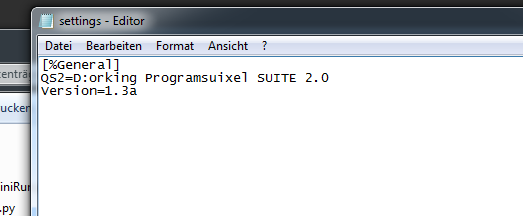 I try to open up the color id script in maya 2016. I did not install the suite in the default direction, but changed the path in the settings.ini and the script editor aswell. When i try to run the script, it changes the path to a weird name. So i can't run it... Screens: Thanks in advance!
>2652 results