Best Of
Re: Sketchbook: Frank Polygon
Subdivision sketches: automotive details.
This write-up is a brief look at how creating accurate shapes can make it easier to generate geometry that maintains a consistent surface quality, while also producing quad grid topology that subdivides smoothly. Which is important for surfaces with smooth compound curves and objects with highly reflective materials. Something that's fairly common on smaller automotive parts and finely machined mechanical components.
Constraining features are key shapes that heavily influence the amount of geometry required to generate clean, quad grid intersections with the adjacent geometry. Blocking out these features first allows the remaining shapes to be developed using a segment matching strategy. Which makes adding the support loops a lot easier, since most of the topology flow issues are resolved during the block out.
The following example shows what this process could look like when modeling hard surface components with a mix of rounded shapes and sharp transitions. Start blocking out the spindle nut by identifying the constraining features. Focus on modeling the shapes accurately then adjust the number of segments in the rest of the model to match. Apply the booleans then add the support loops with a bevel / chamfer operation.

Subtle features are the less obvious surface modifiers and surface transitions that change how the intersecting shapes behave. Things like pattern draft, rounded fillets, shallow chamfers, etc. all play a major role in the actual shapes produced by joining or subtracting geometric primitives. Study the references closely and identify any subtle features that produce sweeping curves, oblong holes, tapered transitions, etc. Merge extraneous geometry to the defining elements of the major forms and use the space between the support loops of the shape transitions to average out any minor differences in the shape intersections. This will help preserve the accuracy of the shapes while also maintaining a consistent flow when transitioning between features with known dimensions.
Cast aluminum wheels often have subtle tapers on surfaces that otherwise appear to be parallel and perpendicular. These slight angles determine how much overlap there is between the cylindrical walls and intersecting shapes like counter bores for the wheel hub and lug holes. The following example shows how a little bit of pattern draft tends to produce shape transitions with a lot of gradual overlap and what the boolean cleanup can look like.
Start the block out by establishing the major forms. Add the draft and rounded fillet on the central counter bore then place the lug holes. Adjust the segment count and draft angles on all of the shapes until the topology lines up. After that, the boolean operations can be cleaned up by merging the extra vertices into the geometry that defines the cylinder walls and the rest of the support loops can be added with loop cuts and a bevel / chamfer modifier. Since the shape of most lug holes are fairly simple and don't require much geometry, the constraining feature tends to be the number of spokes on the rim.

Tiling features are shapes or groups of shapes that repeat across a surface. Simplifying these features into small, reusable elements generally makes the modeling process a lot easier, since a lot of the complex topology routing issues can be solved on a small section of the mesh. Which is then copied and modified to complete the rest of the model.
Wheel assemblies, e.g. rims and tires, tend to have radially tiling features such as tread patterns, spokes, lug holes and other repeating design elements. All of which can be broken down into basic shapes for ease of modeling. Below is an example of what this process could look like. Start the block out by establishing the scale and proportion of the primary features. This will help determine how many segments are required for the larger shapes.
Try to break the complex geometric patterns down into individual features and use local mirroring, in conjunction with radial tiling, to reduce the amount work required to create the base model. Clean, quad grid topology doesn't compensate for geometry that breaks from the shape of the underlying curves. So, keep surface features constrained to the underlying curvature by either cutting across the existing geometry or projecting the shapes onto the basic forms. This will help ensure the consistency of the final surface.

Recap: Identify features that constrain the adjacent geometry and model those areas first. Resolve topology flow issues before dealing with the added complexity of support loops. Plan ahead and try to focus on creating accurate shapes for these features then match the rest of the mesh to those existing segments. Be aware of how subtle changes to the angle of intersecting surfaces produce different shapes. Analyze the references to find subtle shape transitions that generate unique shape profiles. Break down complex, repeating patterns into smaller sections that can be modeled and copied. This will help reduce the amount of work required to create the object and can make it easier to solve some types of topology flow issues.
 FrankPolygon
Re: Sketchbook: Tits
Hello Again!
It's been a little while so I did a couple of more pages in my sketchbook!
First I wanted to try something very simple based on a picture I took of roh and peco a little while back.
I went with a soft gouache background and lines in posca pen but I kind of miss and prefered the soft and tiner lines of my underdrawing tbh.

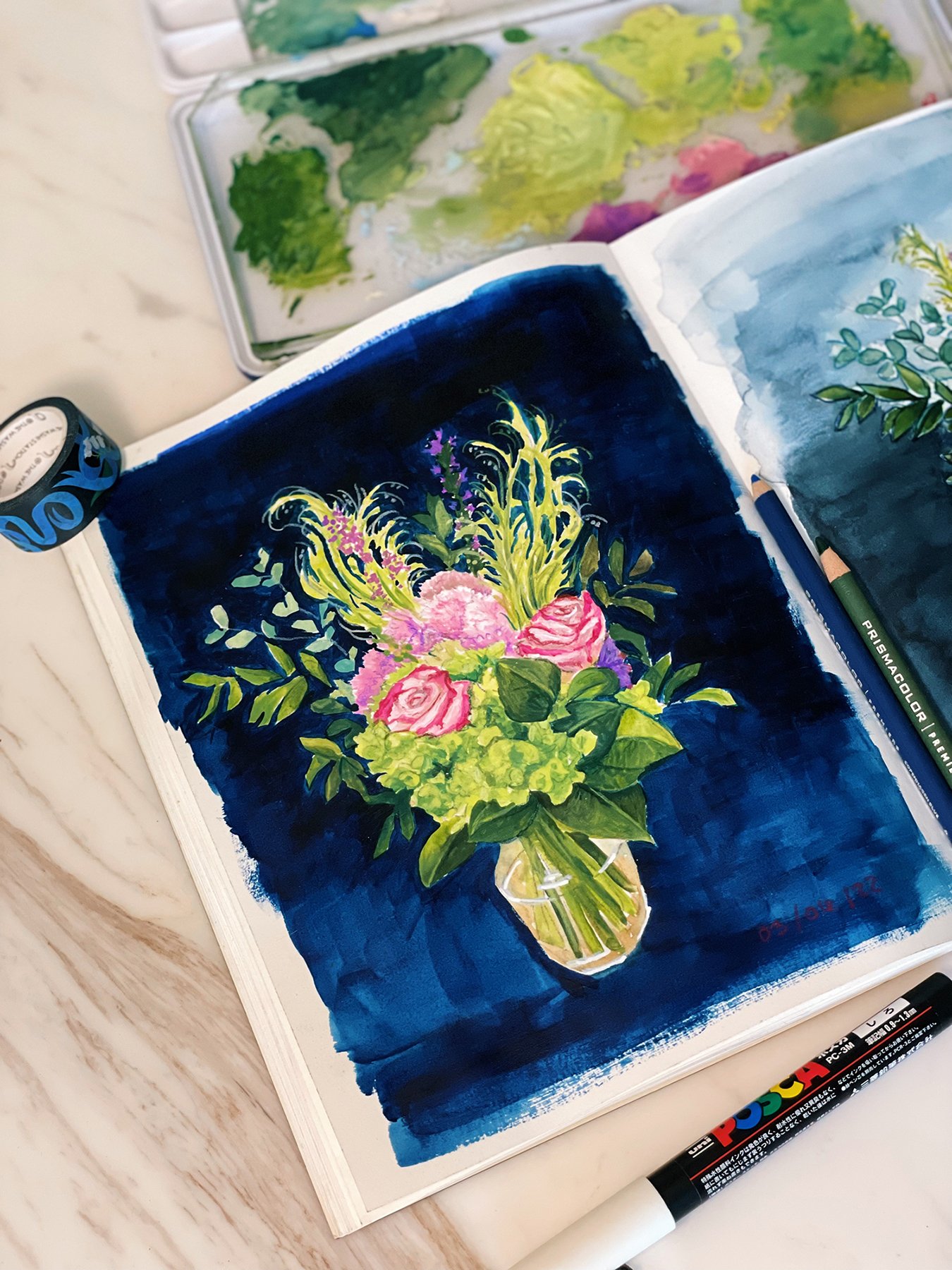
also wanted to paint the bouquet from my 3rd year anniversary, I decided to paint it in 2 medium, one in watercolor and one in gouache (trying to continue epxloring this medium a bit more)
Surprisingly I ended up not really being a fan of the watercolor one, I did ended up painting it outside and it made everything dry way too fast which posed an extra challenge. I went very ballsy with the blue background also and I kind of regretted it...
So I ended up redoing the same ballsy background on the gouache version of course. But I kind of do like it on the gouache version.
I tried to not abuse the coloring pencils on the gouache version. I did use them a bit too much on the watercolor version.

 Tits
Tits
Re: Sketchbook: Tits
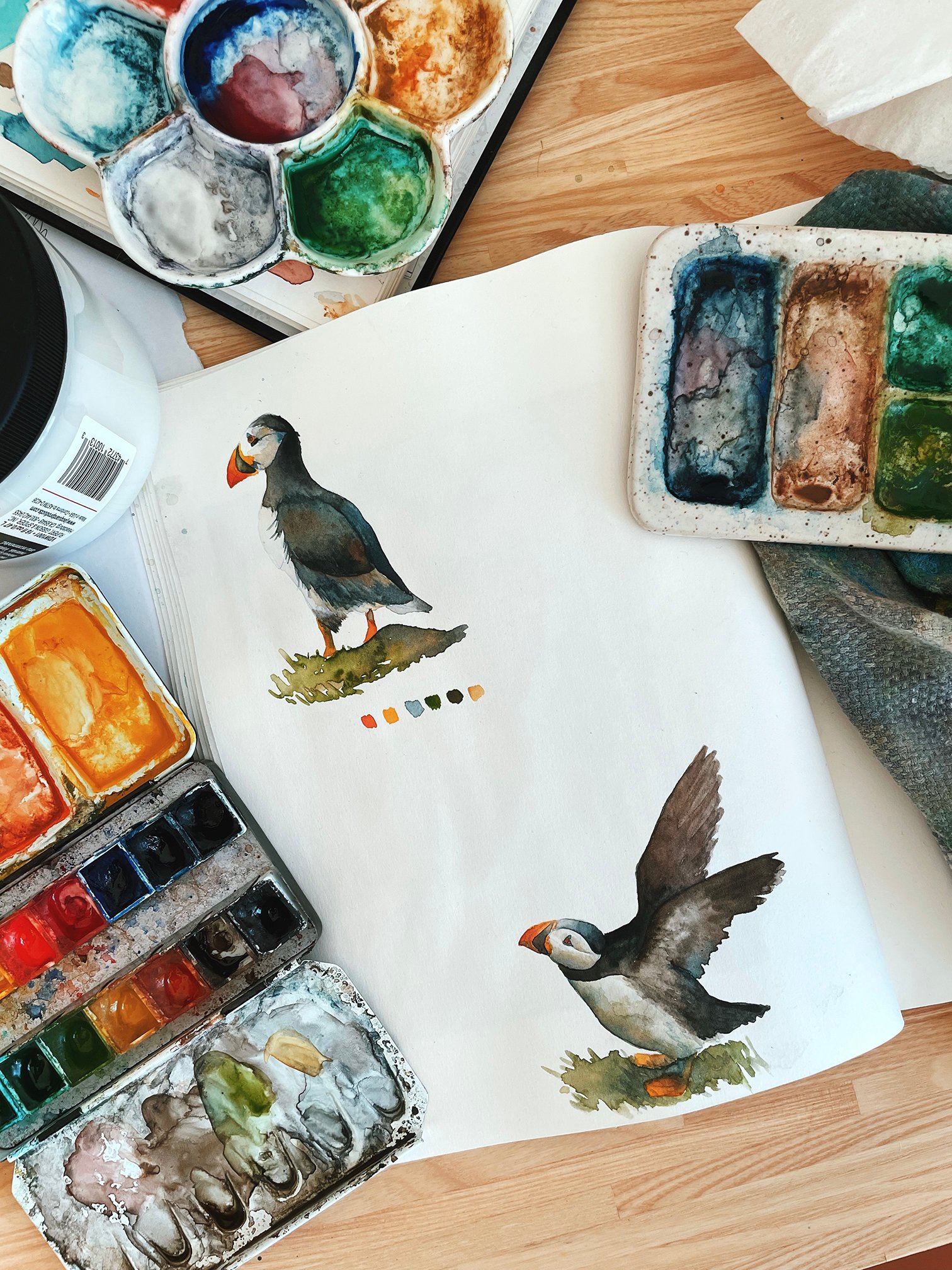
Back to my usual watercolor,
Had a lot of fun last weekend painting those little puffins based on some pictures I took of them in Iceland as well as in the faroe Islands
 Tits
Tits
Re: Sketchbook: Tits
@EricElwell Thank you so much!!
@sacboi Haha Peco has one hell of a personality so definitely could not capture all of it but I tried! Haha I don't do fridge magnets yet 😉
Been doing a lot of ''experimenting'' with new mediums and style lately.
Always been jealous of those cool artist with bunch of filled up sketchbook so I have been trying to use mine more and vary my mediums etc.
First I tried gouache for the first time and it was a lot less like watercolor than I expected and a lot harder too.
Not really happy with the result but I can say that at least I had fun and want to try gouache some more at some point.

Aside from that I had been wanting to try drawing/ painting based on many ''little isolated'' house pictures I took over the last few years traveling.
At first my intention was to do the lines in coloring pencil and then go over them with monochromatic soft watercolors.
But in the end I ended up loving the results with the lines alone and left them that way. Do want to try with watercolor another time tho, but I love the visual impact it has with the lines alone.

 Tits
Tits


Re: The Bi-Monthly Environment Art Challenge | November - December (81)
There's been some solid feedback so far so I don't have much to add at the moment. I'll continue to lurk and look forward to seeing more updates.
I appreciate that the concepts this time around are smaller scale as I don't have much free time.
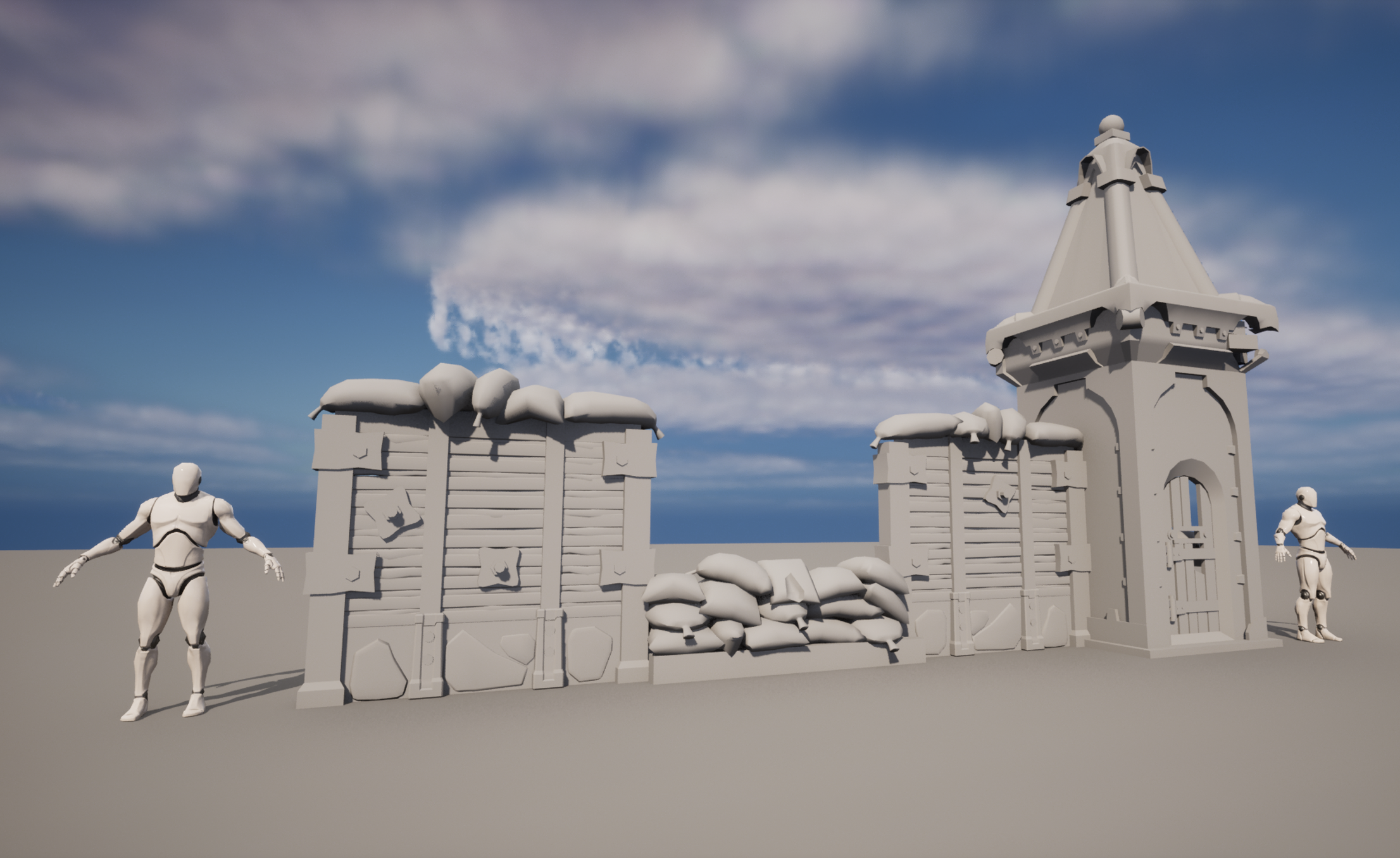
I've decided to go with the Gears 5 artwork. I like that there are a lot of interesting shapes and materials in a small piece. I've been working on pre-production and getting a block-out finished to iron out all the small shapes and the scale of everything. I've been looking at it for too long so it's time to get some other eyes on it, I appreciate any feedback.


 AD_3D
AD_3D
Re: ZBRUSH - All new updates to require Maxon subscription
Also, another word of caution : if one is a user of an older version of Zbrush (for instance because of dependencies on brushes and plugins, or even just as a matter of preference), Maxon support will not provide authorization for a reinstall and will force one to upgrade to the last non-sub version, which is 2022.05. So for instance, the installation file for 4r7p3 is not available anymore, and the authorization server doesn't run anymore either.
In my opinion this is pretty much the beginning of the end of the Zbrush era, especially with many new artists going straight to Blender for sculpting.
 pior
pior
Re: What Are You Working On? (3D) 2022
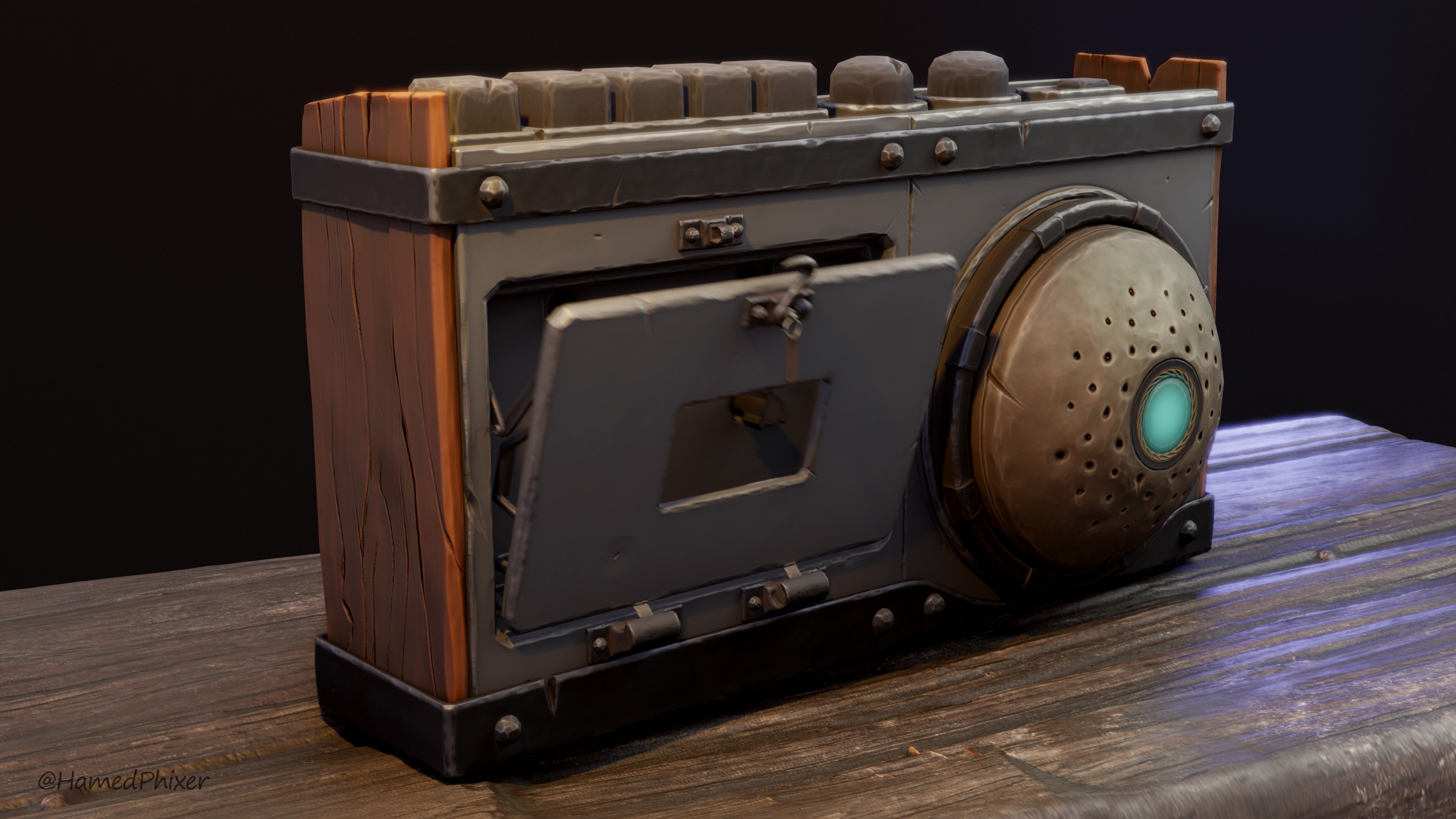
3D stylized cassette player which I designed and created. I also added a small rig and animation for its door.
More pictures and 3d view from sketchfab : https://www.artstation.com/artwork/Ze4g3R
All pictures and the clip are rendered in EEVEE
PS: Working on this helped me release my stress in some level because of the critical situation in my country Iran which the murdering of innocent people and protesters is happening as we speak for basic human rights. Our main motto is Women, Life, Liberty.
 HamedPhixer


Re: [WIP] Horizon FW prop: paper cutter
I've been reworking this piece a bit based on some other feedbacks I've received!

Been working on the rendering in unreal and tweaked my roughness and metallic values a bit to have less harsh variations in the metal. I also lighten the metal albedo up a bit and homogenized the values between the different metal parts so it doesn't seem so different. I also cleaned up my topology a bit.
I feel like this is in a good enough place to let it off for a bit now! Here's my final artstation post for the showcase video, mesh and high rez screenshots: https://www.artstation.com/artwork/xYnWG2
 simonBreumier