Best Of
Re: Is there a protest going on right now at Artstation?
Well first of all it is absolutely possible to design AI-driven tools that have been trained ethically. That's what the team behind Cascadeur did, sourcing their own animation work into a tool that helps ... animators.
But that doesn't mean that an AI-assisted tool, even ethically trained, is necessarily desirable. For instance the 2d side of me would (perhaps) not want some magical AI-driven line smoothing tool even if ethically trained, because it would still feel like leeching on the effort of others. Whereas I don't see that much of a problem with algorithmic line processing (as done by LazyNezumi) because it is 100% coming from ingenuity and clever software design, overcoming the limitations of poorly performing or limited hardware and software.
I also don't know what to think of the inevitable "2D to 3D" AI tools. Sure, they'll be fascinating to watch evolve, and sure enough many designers will love the idea of being able to turn their sketches into 3D renders, skipping manual modeling/sculpting/VR Sketching. But is it really that desirable in the long run ?
Also, I tend to think that a place for artists that doesn't allow any AI-generated imagery (even if ethically trained) would overall feel more welcoming and less toxic. I guess we'll see how all this turns out in practice within a few months to a year.
At the end of the day perhaps it comes down to making the conscious choice of not necessarily being at the forefront of technical progress, for the sake of preserving "slow art". Whether such slow art is commercially viable is a big question, but I honestly don't think that the most successful products are necessarily the ones with the most intricately detailed visuals. See pixel art, Minecraft, and so on.
 pior
pior


Re: What Are You Working On? (3D) 2022
Hello,
Just finished working on the French SMG MAS-38

More pictures here:
 Octopus_3D
Re: What Are You Working On? (3D) 2022
This is a game-ready model of Edison bulb table lamp.

More images: https://www.artstation.com/artwork/3qZVKm
The_Marika


Re: What Are You Working On? (3D) 2022
Another Shameless crosspost. Posted a few realtime VR tools, check the post for more renders! "In Game" Videos available for the Nail Gun and Drill on Artstation.
https://polycount.com/discussion/229629/assorted-vr-tools#latest
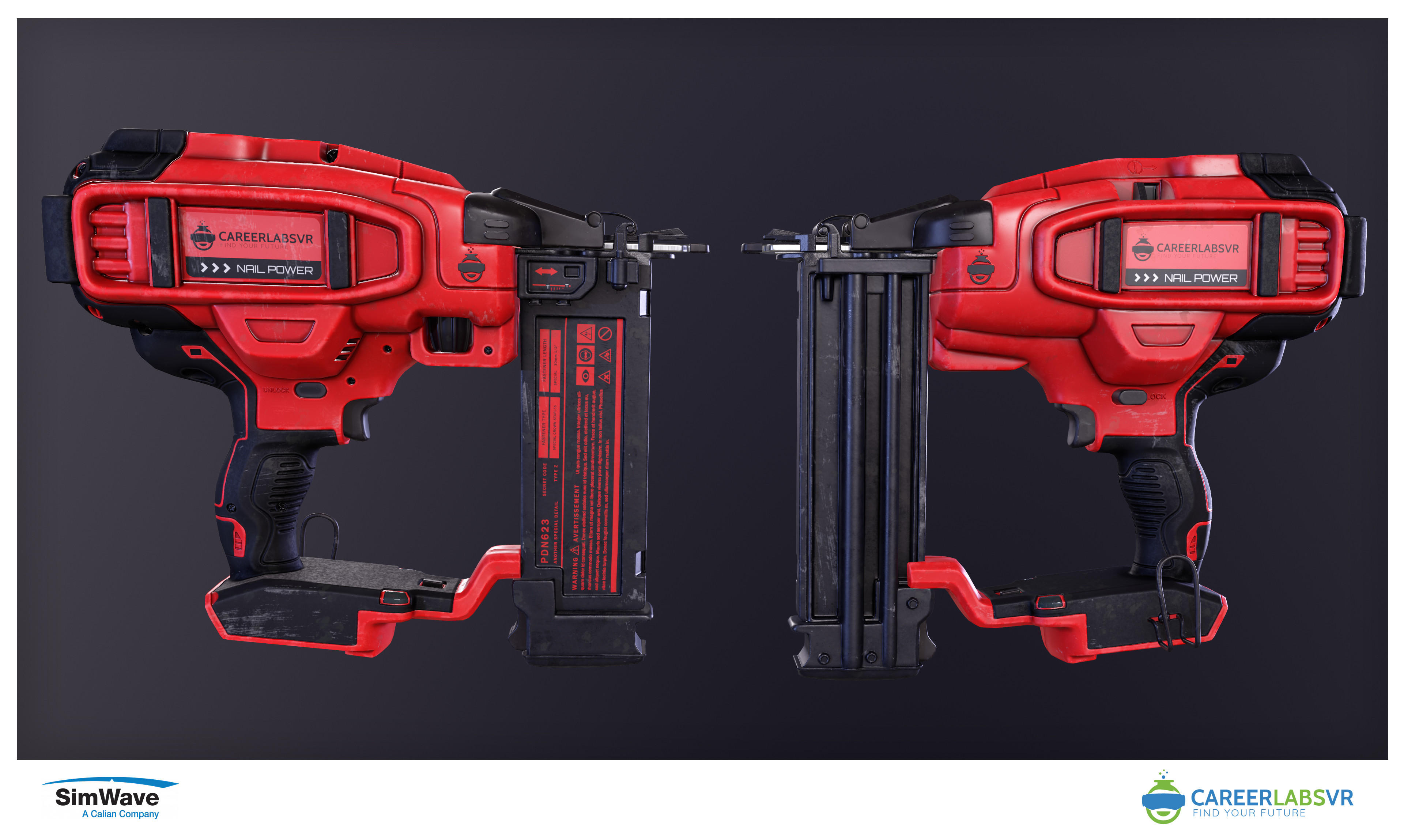
Nail Gun: https://www.artstation.com/artwork/Rn5LzA
Hand Drill: https://www.artstation.com/artwork/YKr3rX
Pipe Cutter: https://www.artstation.com/artwork/LemYEv
Plumber Cement: https://www.artstation.com/artwork/Ze34OG
Blowtorch and Solder: https://www.artstation.com/artwork/DAm0aG
 RabidRabit


Re: How The F*#% Do I Model This? - Reply for help with specific shapes - (Post attempt before asking)
@SkinnyM Both topology layouts are generally acceptable for most hard surface models.
While the quad grid corner is a more conventional choice, the triangular quad corner tends to produce more appealing results for this type of shape transition. Something that can be verified by previewing the subdivision and looking at the mesh from multiple angles.
Comparing and validating different topology layouts also provides an opportunity to learn which loop routing strategies produce the desired results and when it makes sense to use them.

Although most flat surfaces are relatively tolerant of less than ideal topology layouts, as @sprunghunt mentioned, carrying some of these loops across the mesh does tend to produce more consistent smoothing behavior.
Which is why segment matching and controlling shape deformation, that's often caused by abrupt changes in the loop routing, is an important part of preventing smoothing artifacts on high quality surfaces and curved shapes.
So, although it isn't always essential for certain types of hard surface shapes, it is generally considered best practice to have relatively consistent loop paths. Even on flat surfaces.

It is possible to simplify the quad grid layout by reducing some of the edge loops into n-gons or triangles but since the triangular quad layout tends to be more efficient this type of topology strategy is often limited to specific edge cases.
Context is also important. Something that's passable in one situation may not make sense in another. Topology requirements for game art tends to be slightly more relaxed when compared to other fields like visualization, VFX, etc.

Recap: Test different topology layouts and compare the results. If the mesh subdivides cleanly and fits the technical requirements for the project then it's generally going to be passable. When it comes to hard surface subdivision modeling, focus on developing the proportions and shapes first then move on to work through the base topology flow before adding the support loops. This will make it much easier to solve loop flow issues and optimize the mesh.
FrankPolygon



Wingfoxworkshop - 3D Game Tutorials


 Wingfoxworkshop