Best Of
Re: The Bi-Monthly Environment Art Challenge | September - October (80)
@PaulJChris You might already be planning this but if you're keeping the fire as a 3d mesh adding some smaller flames that have broken off or embers might look nice. I also agree with fabi that your getting a bit smooth and rounded in places, mainly the rocks next to the central pillar, I'd maybe use the trim dynamic and trim curve brushes to try and redefine the silhouette.
Slow progress from me, first time making trim sheets but I think I have it mostly planned out now. Ignore the texture colours, I just quickly slapped them on to get an idea of proportions before working on highpoly.

 atunnard
Re: Need help!
@Manta丶 Welcome to Polycount. Consider checking out the forum information and introduction thread.
There's also a dedicated modeling thread in the technical talk section. Which has a lot of great examples provided by community members. This is a great place to ask questions and look for answers about how to solve modeling and topology problems.
It's generally considered best practice to block out all of the primary shapes, before adding a lot of support loops. This makes it a lot easier to solve topology flow issues without the added complexity of managing individual support loops while modeling the basic shapes. For most hard surface models used to create game assets, as long as the mesh subdivides cleanly, it's fine to have a few triangles or n-gons in the mesh.
Below is an example of just how little geometry is required to create the desired shapes. After the block out is completed and the topology flow is resolved, support loops can generally be added to these kind of models with a simple bevel / chamfer operation. Modifiers can also be used to generate support loops based on face angles or weights. This also has the added benefit of making the edge width easily adjustable by just changing a few modifiers settings.

If there are specific technical limitations that require all quad geometry then following topology layout can be used to bring the mesh into compliance.
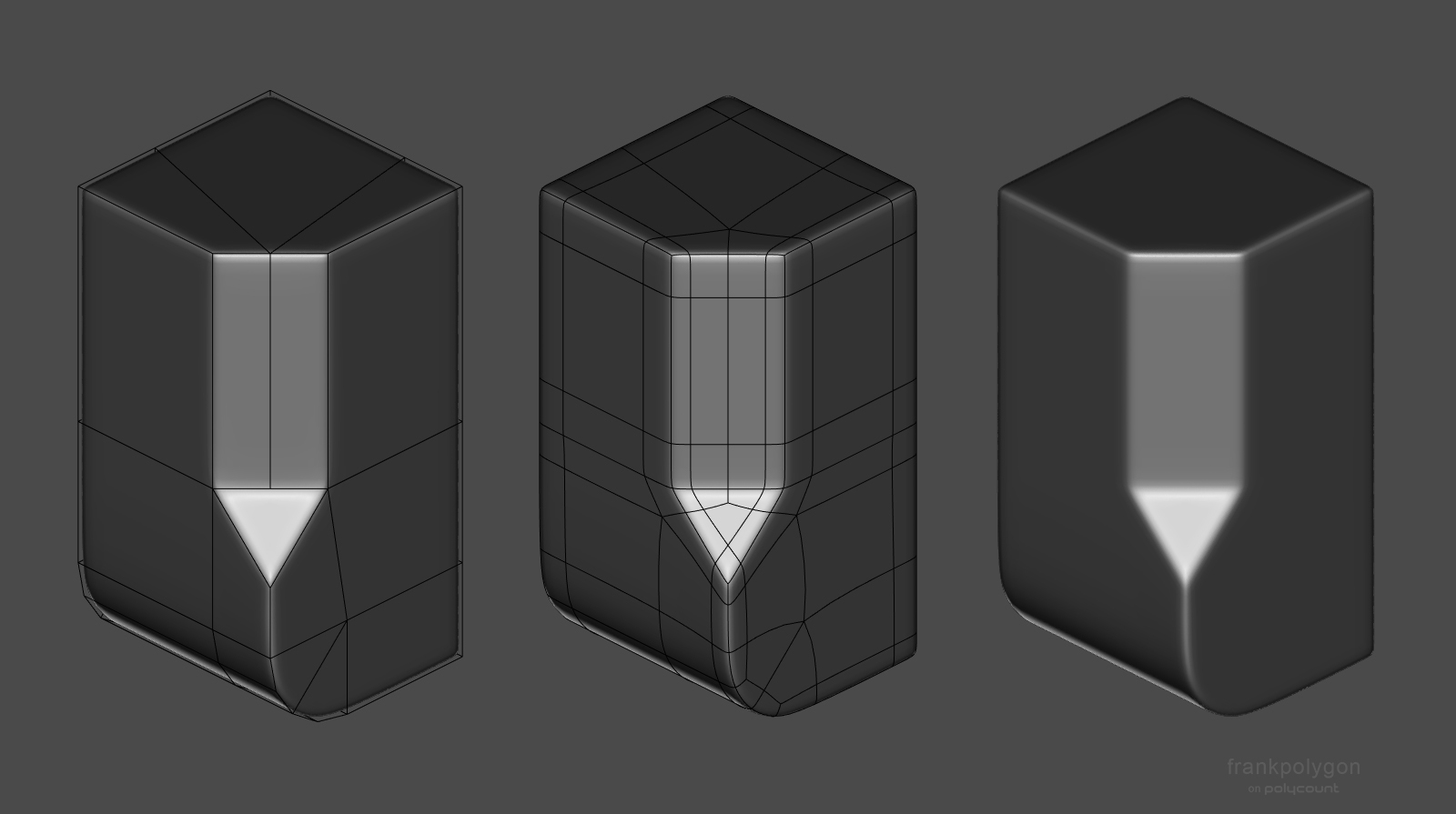
 FrankPolygon
Re: Sketchbook : Teng Hin Chan
You can improve overall look if you tweak a few areas , torso been the one that really need help
There is something wrong with hair shader you can see back of his head

 carvuliero
Re: Judah - Realtime Character
He's done! I took @Neox 's advice and took the project a few steps back to rethink the anatomy and clothing. I'm much happier with how the character looks now. This fells much more in line with my initial idea and looks way more realistic. Thank you again to everyone who provided feedback along the way!


I got to make a lot of helpful tools and shaders during this project that will speed up my process tremendously. Can't wait to start on the next character!
 sarasumm

Re: Development log - Building a complete car from scans - VR Game dev
 AlecMoody



Re: The Bi-Monthly Environment Art Challenge | September - October (80)
incremental progress today:
 PaulJChris
Re: The Bi-Monthly Environment Art Challenge | September - October (80)
Ive added the sand, plants and some particles to the scene. Also fixed the line thickness of the line weight on the trim sheet. I think I'll have to fix the black lines on the egg statues and make them blend in more as well now to match. Gotta figure out the mossy areas and the lights that fill up the ground. Never done those kinds of effects. Thinking about maybe doing decals in unity. Or floating geo with an alpha? Kind of the same but also open to suggestions!

 squarebender