It starts May 12, and ends Oct 17. Let's see what you got!
https://polycount.com/discussion/237047/the-brawl²-tournament
Best Of
Re: The Bi-Monthly Environment Art Challenge | May - June (78)
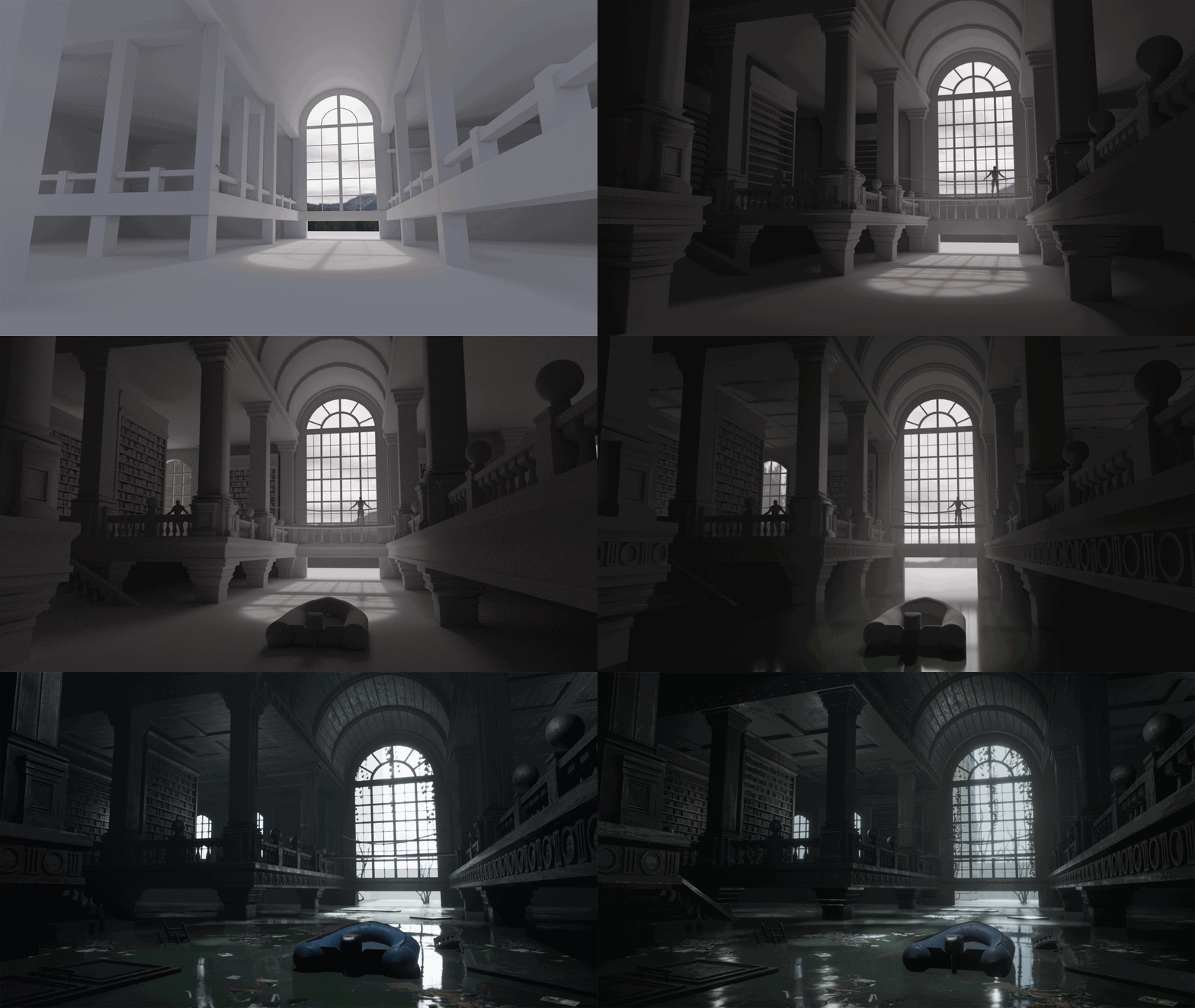
Hi everyone! So here's my final result. I got some of the dead trees from Quixel, along with the hanging vines and debris floating on the water. I'm really happy with how everything turned out and it was a lot of fun to work on. I hope you all like it too! I posted it on Artstation in case you want to view it there as well: https://www.artstation.com/artwork/G8VPvz


 Its0urFate


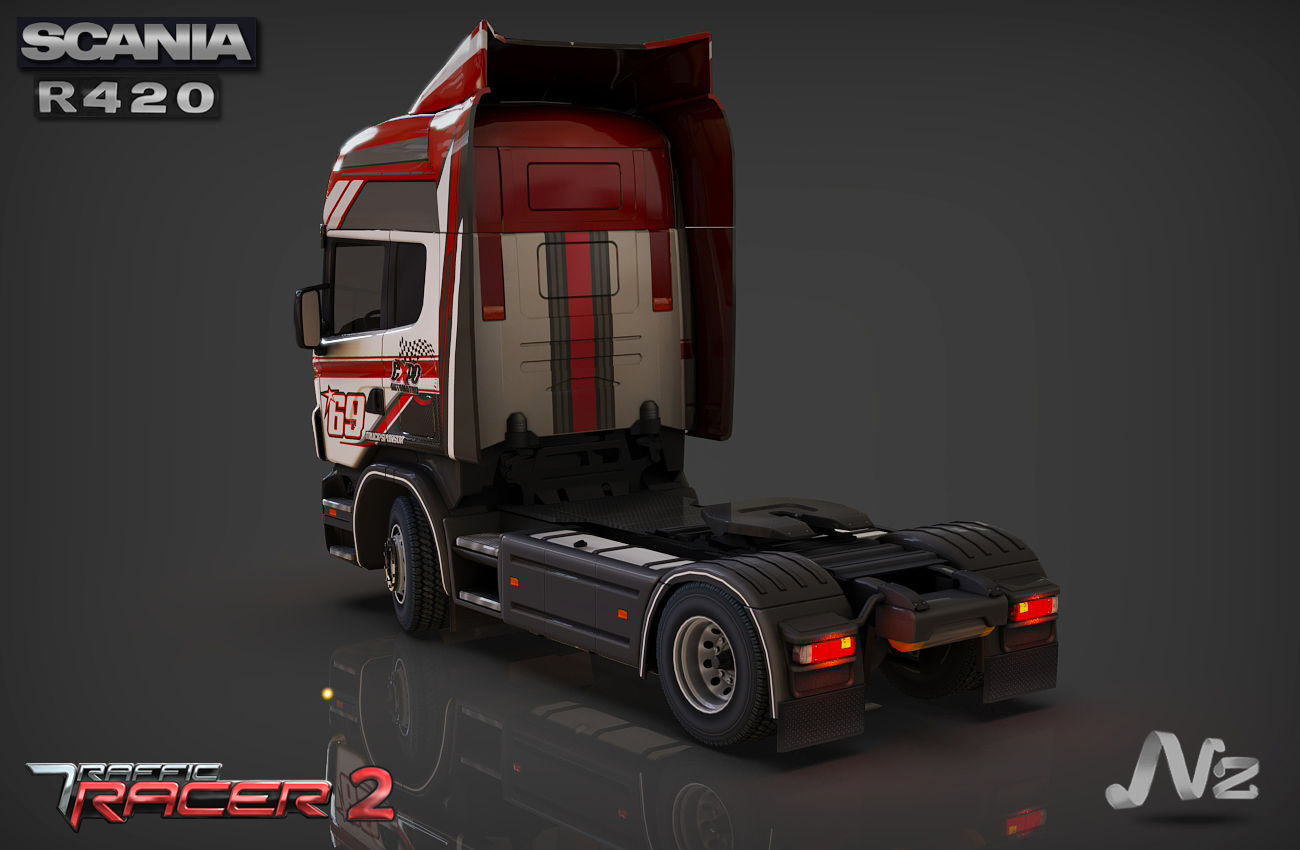
Scania Truck Model.
Hello everyone ,
I am a freelance 3d Artist. Some low poly trucks i did for a upcoming mobile game.
Model just with a diffuse textures. Done in 3dsmax , Photoshop. Rendered in keyshot.
My Artstation : https://www.artstation.com/nazeer3d
Website : www.nazeergameart.com






 Nazeer3d


Re: How The F*#% Do I Model This? - Reply for help with specific shapes - (Post attempt before asking)
@macaron10 Welcome to Polycount. Consider checking out the forum information and introduction thread.
There's a few different topology layouts that would work for this kind of shape but the answer really depends on how "beautiful and correct" is defined... Quad grid topology can be nice to look at but it isn't always practical or necessary. This may be a bit overly pragmatic but it's unlikely that the average player will care about or even see the high poly wire-frames. For most game art workflows, as long as the high poly model is easy to edit, subdivides without any major artifacts, and provides a clean set of bakes then the topology is usually going to be considered passable.
It's generally considered best practice to:
- Block out the major forms then resolve the topology flow issues at the lowest level of complexity.
- Use the geometry of the existing shapes as support loops around shape intersections.
- Match the segments of the intersecting shapes whenever possible.
Intersecting support loops, which often occur around shape transitions, can be resolved by topology flow that either terminates, reduces or carries one of the adjacent loop sets. Constraining topology changes to the areas between the remaining support loop will help reduce the visibility of any minor smoothing artifacts generated by terminating or reducing the intersecting support loops.
N-gons or triangles, when supported properly, can be used to terminate support loops in shape transitions.

Triangular quads [four pointed triangles] can be used to reduce support loops and join them to the edge segments in adjacent shapes.
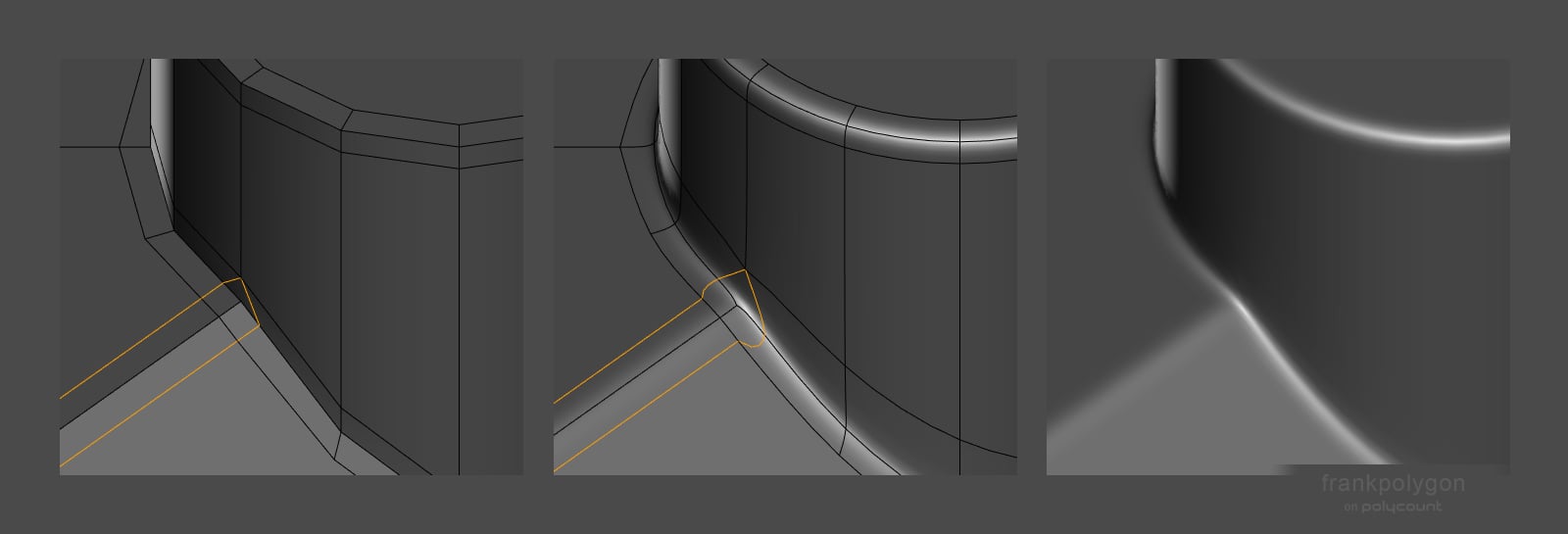
Segment matching can be used to carry existing support loops across the intersecting shape without deforming it.

Loop termination and reduction strategies can often be used to join existing shapes but may produce minor smoothing artifacts on curved surfaces. The visibility of these artifacts can often be reduced by constraining the topology change to a small transitional area between shapes or averaging out the error over a large, preferably flat, area where it's less likely to be noticed.
Segment matching tends to require adjusting the amount of geometry in one or more shapes. Which tends to increase the overall accuracy of the shapes but can also lead to a lot of unnecessary re-work or added mesh complexity if the topology flow isn't established early on during the block out phase.
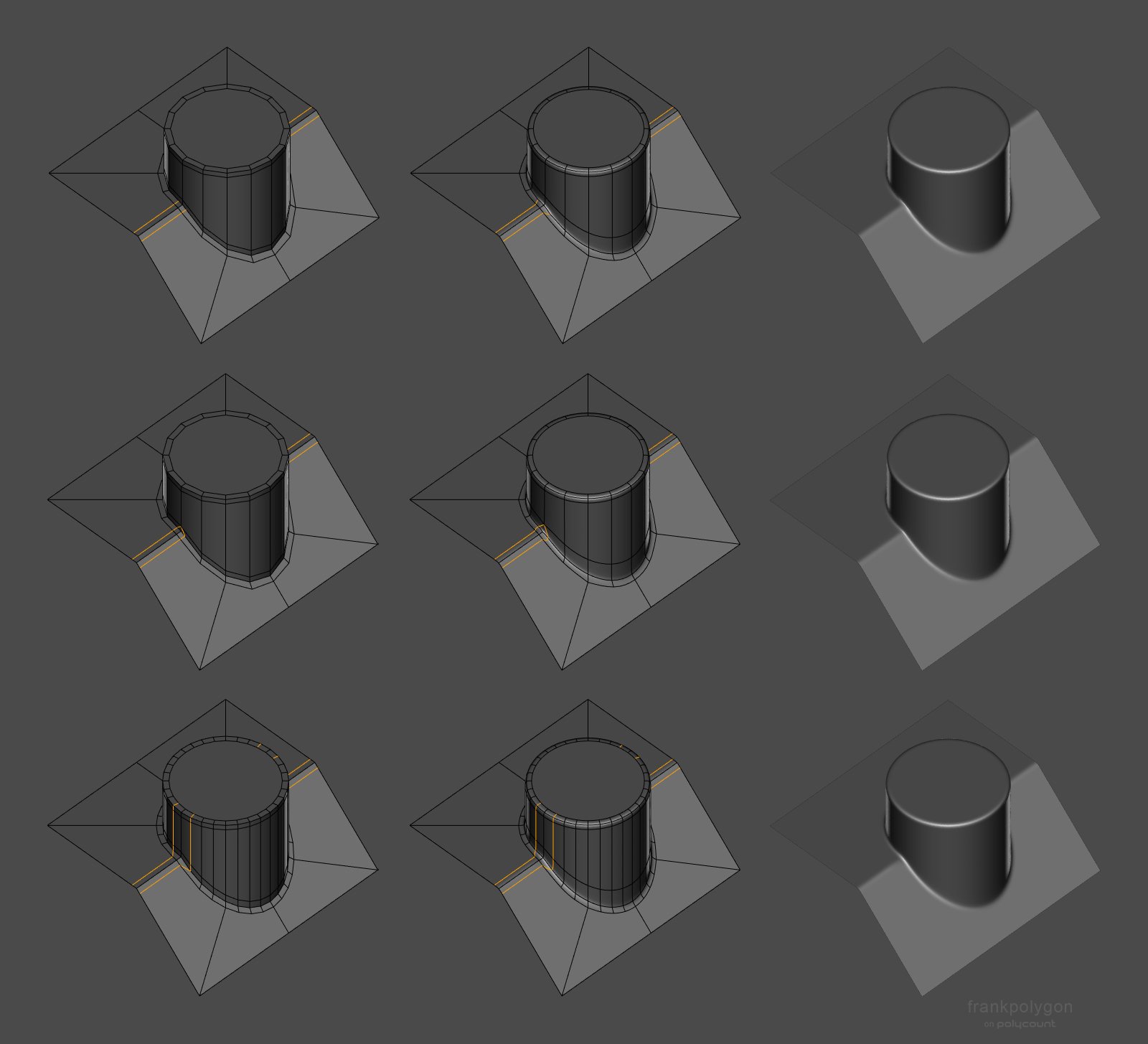
Once the shape intersections are fully supported, coplanar [flat] surfaces are largely unaffected by changes in topology flow. This means flat areas can be a great place to organize the mesh and reduce unnecessary complexity by removing extraneous support loops from the adjacent shapes.

Arbitrarily increasing the amount of geometry in all of the curved surfaces is another strategy for solving topology issues but after a certain point there's very little visual improvement in the quality of the surface and the editability of the base mesh drops off rapidly. The effective use of subdivision really comes down to making tradeoffs between shape accuracy and modeling efficiency, while balancing the overall mesh complexity with the final model's intended use.
Which topology layout and modeling strategy is right for a given project often comes down to answering the question of "How good is good enough?" Time spent polishing something that players won't ever see probably isn't the best use of time. Especially when it comes to manually placing and organizing every single support loop. It's much more important to focus on getting the shapes right and resolving the topology flow before moving past the block out stage.

Having a simple block out with good topology flow means that most of the major support loops can be placed with a couple of bevel / chamfer operations and little to no manual clean up work is required. Modifier based workflows take this to another level and can generate support loops based on edge weight, face angle, group, etc. Which makes the majority of manual loop cleanup operations redundant.
The example below shows how a relatively simple base mesh and modifiers can be used to generate a subdivision high poly. Both the basic shapes and the edge width can be adjusted as necessary, without having to manually re-route the topology. It's not the be all end all for subdivision modeling but it gets to MVP a lot faster than manually slicing and dicing the mesh to route support loops around unplanned shapes.
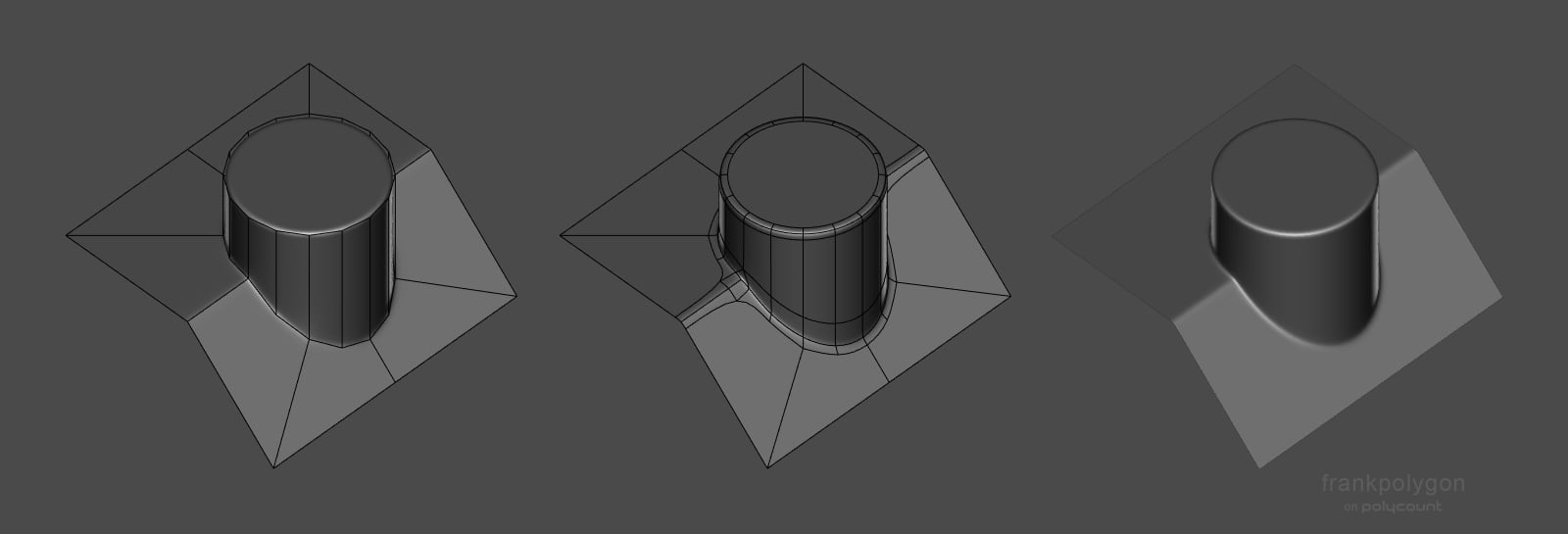
Recap:
Try to resolve the topology flow issues during the block out. Add all of the major forms and adjust the shapes so most of the segments line up with the edges that need support loops. Use flat areas and the shape transitions between support loops to remove unnecessary loops.
Additional resources:
Many artists have contributed to this thread over the years and there's lots of great examples of how to model other shapes. Definitely recommend skimming through the discussion here and taking a look at some of the other write-ups.
FrankPolygon
Grubber modeling practice
Hi,
Did some late night modeling practice.

Quick texturing and render in Marmoset Toolbag. Let me know what you think.
Thank you!
 Grubber
Re: How The F*#% Do I Model This? - Reply for help with specific shapes - (Post attempt before asking)

 https://youtu.be/oKJagvumvCIFrankPolygon




Re: Portfolio Review
I think you need to change your outlook my dude. The people you refer to as 'snobs' are just other artists trying to ensure the games or shows they're working on meet a quality bar. If I'm hiring, and looking at a portfolio, and 50% of that artist's work is substandard, or looks amateurish, I'm going to assume 50% of the work they will do for me will look amateurish. When I get work from other artists who did things to a below standard, I have to spend my time fixing stuff, and I don't want to do that. Bad work also slows down production, because the art director or clients or supervisor will look at work that doesn't meet the bar and tell you to redo it. It puts strain on production times. Speaking of strain on times... If I'm looking through portfolios, and I come across someone who has 40 projects, and maybe 3 or 4 of them are production quality, do you think I have the time to put aside the other 80 applications to sift through that artstation in order to assess if that person actually has the talent required for producing quality art?
Taking critique is a skill if you're an artist. If other artists are suggesting doing a cull because of lack of quality, instead of calling them snobs, take what they're saying into consideration and figure out why they're saying it. Whether you're aiming for a AAA company or a small studio, the competition for both is fiercely competitive.
 Ashervisalis
Re: The Bi-Monthly Environment Art Challenge | May - June (78)
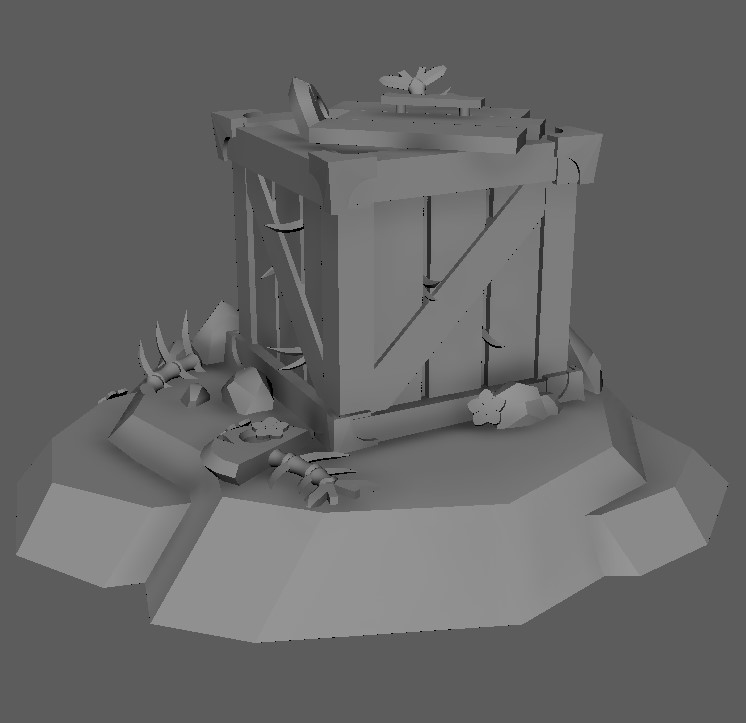
Hey everyone :)
Here is a progress picture of my initial blockout in Maya prior to moving into Zbrush. I will keep you updated. :)
LloydScribble