The BRAWL² Tournament Challenge has been announced!
It starts May 12, and ends Oct 17. Let's see what you got!
https://polycount.com/discussion/237047/the-brawl²-tournament
It starts May 12, and ends Oct 17. Let's see what you got!
https://polycount.com/discussion/237047/the-brawl²-tournament
Best Of
Re: Advice with secondary forms
Interesting method. I think I get the approach you're referring to. I've used it before when making hard-surface stuff. It's not likely I'll be using this for where I'm at with this particular project, but it is something I could make use of in a future project. Especially if I ever do an ecorche of the body.iam717 said:Not Tldr; Explaining what i once did, polygroup/muscle group dynamesh method:Just tossing in an idea i had to one day use cause i wanted things to look "amazing", when it comes to musculature.It might be a bit "long" process at least for me but.https://www.youtube.com/watch?v=RpT31z6LErs (video explains extracting the general idea, make bones and actually wrap the muscles to the bones accurately, will kind of save time instead of the constant redoing to get it "right", at least like this you have 100% control over the results. i just expanded the polygroup shape method to a more detailed version with some extra stuff, i made a tutorial back in the day (an image, that is now privated/removed) but the video explains it the same way in a way.
The extract mask method ( polygroup: muscle grouping method) for muscles (so actually build the entire body as we are made) works great with dynameshing and retopologizing and then possibly reprojecting the dynamesh back down, results vary, i used smooth brush a lot on a super low setting and claybuild. The idea is you are making the muscle group strands and adjusting them to the bones and you save multiple copies (backups) so if you ever want to change anything you just go back to the backups.So i split the parts like this:Arms, Legs, Upper Torso, Stomach, hands, face.Each a separated group, bones and muscles, you can use a random piece as a "skin" object to cover the "holes" in the actual muscle group, where there is more bone than muscle. I subdivide all the one group from the mentioned when i like it and feel its at a decent state, i dynamesh all parts of the one group with the highest setting 4096, make a duplicate retopologize it and reproject the dynameshed copy, and fix any issues that look strange manually, using the mask option so i do not make mistakes.https://www.youtube.com/shorts/iof0OeqwdHY (this video explains both what it should look like before dynameshing and how each group "turns inward", you'll get it just do a bunch of research about the connecting tissues. it will help, best part about this later on you can "configure" the next projects anatomy with this new "saved" final anatomy and make more portfolio pieces.)This video is what i mean by muscle group before dynameshing, APART from the coloring, if wasn't 100% clear.Hope it helps, i really should've made a video about this but i figured someone else did or would've "borrowed" the jpg and make $ and videos about it already. Perhaps it is not very time saving but the results are amazing to me, when you fix it to your liking adding your own learned spin on things.Tldr:you should try messaging the author of the work you are trying to replicate or any of his buddies and see if they will respond about what you are attempting to achieve.
Also, fear not, I've been in touch with the original artist right back when I started this project.
 I recently reached out to him again to get some insight into his approach for secondary forms. He said he'd help out when he has the time. I'm guessing he's super busy working on the latest Doom game though.
 DustyShinigami
1 ·
Re: Game-Ready Fire Extinguisher
Thanks for the feedback! You're right most fire extinguishers have a glossy, non-metallic red paint. I'll adjust the shading to better reflect that look next time
 Miedo
Miedo
1 ·
War torn subway (Feedback Wanted) UE5
Hey all,
This is a project I have been working on and off for a few months. This is before I have dove into post processing and colour grading but I wanted to ask for any feedback you guys would have. I am a 3D artist with a few years experience working in games under my belt but I am always trying to improve my scenes.
Here is a link to a video of me running around in 3rd person
https://drive.google.com/file/d/1fdZ7WUQ-VL13byZPXYHf7YUfemyvc1Dx/view?usp=drive_link
I would really appreciate any feedback.
Thanks everyone!

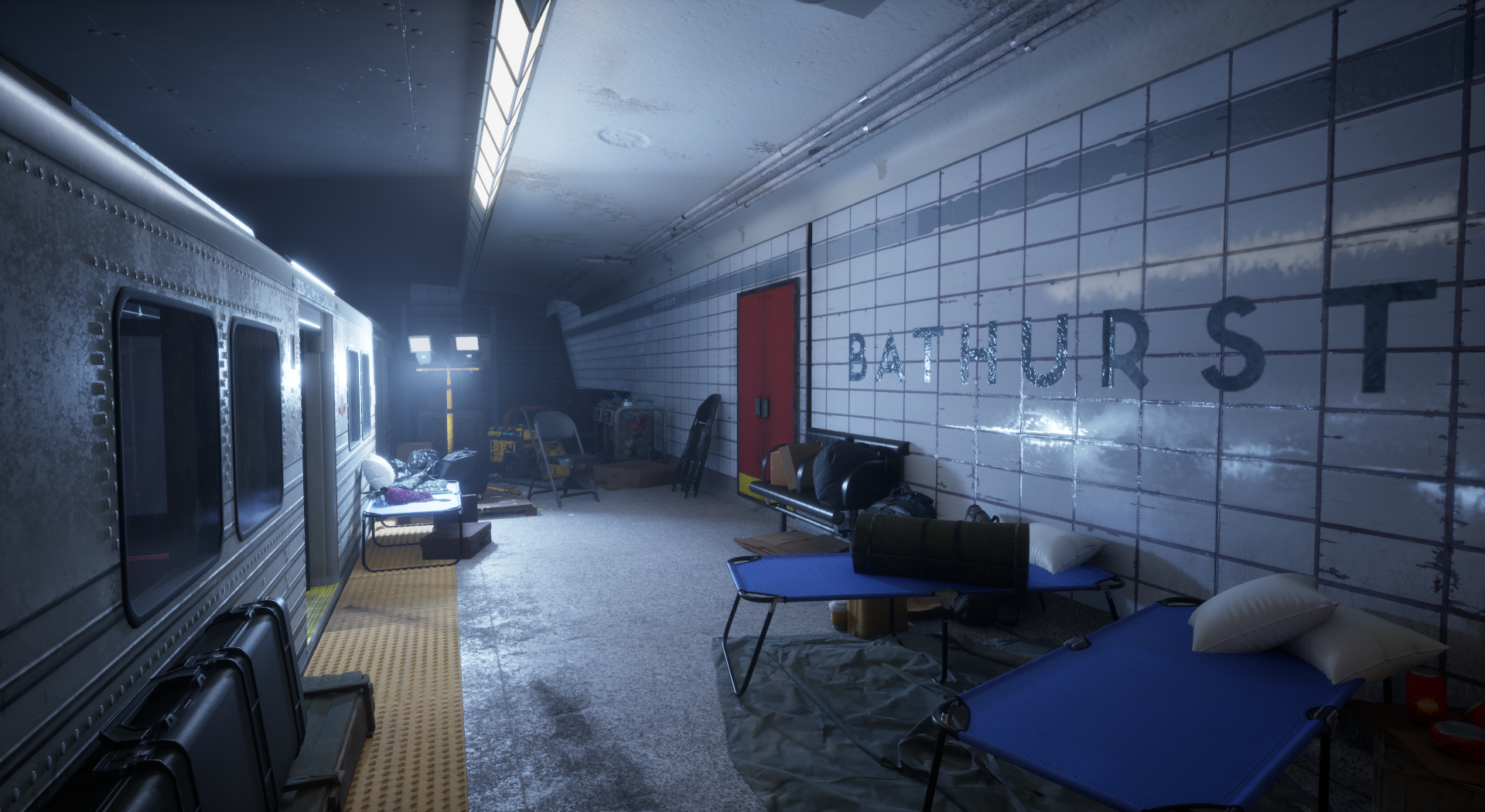


This is a project I have been working on and off for a few months. This is before I have dove into post processing and colour grading but I wanted to ask for any feedback you guys would have. I am a 3D artist with a few years experience working in games under my belt but I am always trying to improve my scenes.
Here is a link to a video of me running around in 3rd person
https://drive.google.com/file/d/1fdZ7WUQ-VL13byZPXYHf7YUfemyvc1Dx/view?usp=drive_link
I would really appreciate any feedback.
Thanks everyone!
 Grego
Grego
1 ·


Re: 3ds Max model cleanup
Retopology Tools are worth a shot.
https://help.autodesk.com/view/3DSMAX/2023/ENU/?guid=GUID-57B77A00-5300-47CB-99E1-22B9C536B060
 Eric Chadwick
1 ·
Re: Halloween scene on Unity
A quick way to do realtime animated mist & fog is to use UV distortion and a scrolling "clouds" texture. Pretty effective if you tweak it. If you advance to about 0:16 in the video, you can see the maps that go into it.
 https://www.youtube.com/watch?v=H2vLwOAu0UI&t=16s
There's a bit more about it on the first page of my sketchbook.

https://www.youtube.com/watch?v=H2vLwOAu0UI&t=16sThere's a bit more about it on the first page of my sketchbook.
Eric Chadwick
1 ·

Re: What made you feel good today?
was at the track on friday for the 2025 F1 season opener first peek at all the cars in race trim:
and yesterday's quali shenanigans -  https://www.youtube.com/watch?v=Mr7T8TC-cZg
https://www.youtube.com/watch?v=Mr7T8TC-cZg sacboi
1 ·
Re: Building a GPU powered painting program.
Here's a dumb fun little feature. When you save it now does a sweep of light across the ui. (it looks better not as a low fps gif)

 Muzzoid
2 ·
Re: The Bi-Monthly Environment Art Challenge | March - April (95)
Hi,
first off, thank you @Klawd and @Paxwort for the suggestion and answers. Even though I like the challenge of going efficient and compact as much as possibe I focused a lot on game assets throught my 3D journey. For this project I will try a more detailed approach and not go for optimized. Thanks a lot for the suggestion since I was not sure how I would approach it in a live pipeline environment.
@virtualmanyour models looking good so far.
- my suggestion on the drawer would be offsetting the wood texture. It's visibly across the whole front and since the they are different pieces ofsetting the drawers themself would help that pattern feel not projected.
- Furthermore I have the suspicion your normals might not be hardened. It feels like the shading suggest there is a curveture in the front.
- I also feel like the edgewear is a bit too much. If you multiply a grunge texture for example over the edgewear mask you can get rid of the continous edgewear and break it up. I feel like giving it a bit more of an orange / beige tint would give more of a wooden feel.
- one last thing: you can do this even after uv's and texturing - but with caution! - try some slight deformation and bending some of the straight lines.
@Charlie_Temerald looks great! There is a programm called f-spy to help you set up reference images for your viewport. I know it works in combination with blender, other programs not sure. Roomscale and blockout looks great thou!
@Paxwort looking good. Only suggestion would be to add more cuts and offsets in the wood panels to give them some depth. Love the texturing and models so far thou. gj
For my part:
I am getting close to finishing the modelling part. I will go for a Mid-Poly workflow and try to not go overboard with texture maps x) My goal will be to do closeups and give each part the attention to detail I can. There is still some unresolved parts like cables and on the bottom shelf but getting there.


 MRpnut
8 ·