Search
-
3Ds Max: Scale distance between objects, but not objects themeselves.
 Is there any way to scale the distance between objects but not the actual objects' geometry? Say I got this: I want to scale the distance between the three objects so they are closer together. If I use the scale tool they will all be scaled in toward the center and will all become smaller: What I want is this: Any way to…
 -
single or multiple objects into one uv map?
 I'm a student learning 3d modeling for games in Korea, particularly for environment assets. I've learned that it's good to combine multiple objects and unwrap them into one uv map whenever possible, for optimization and to control consistent texel density, rather then creating uv maps per object. For example, like…
 -
Question about normal maps HP , LP Obejcts
 hey guys, i have a generall question about normal maps, especially for the LP and HP objects. When creating the LP object from the HP object, do i need to care that all the LP polygons are above the HP ones? Or is it equal ? The same question when creating a HP from a LP obejct, after applying turbo smooth to the LP and…
 -
Re: object space normal maps in 3DS max 2009
 Ah so the line is usually crossed from object to tanget if there's ANY possibilty of "organic" defomation? For example, if you had a hand model. and you had to have fingers rotate in the horizontal plane, will it be possible/beter to use object space? but the vertical and horizontal deformations would be the same thing…
 -
Re: [3ds Max Script] miauu's Objects Replacer

 miauu's Objects Replacer version 1.3 is available. Changelog: - Changed how the replace each group object works with Open groups. Now when the obejcts that ara members of open groups are selected the script will replace only the selected object and will keep the hierarchy. - removed the [Disable undo] option to prevent…
 -
Switching Between Objects' Sub-Objects (3ds Max)?
 There was a thread about somewhere on this, but I can't find it. If I have an object with modifiers in its stack, what's the quickest way to select the object and get to the sub-object mode at the bottom of the stack (ie. Select the object and be at Editable Poly - Vertex)? Ideally, is there a way to exit from an object…
 -
[Maya Script] Patch FBXASC codes in object names

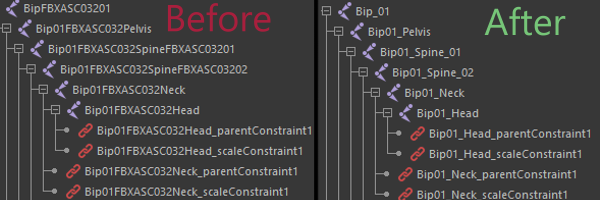 Would like to share my script to replace all FBXASC codes to underscore symbol. You can download the script and find all instructions here. NOTE: for now its only works for objects that derives from transform object class
 -
Re: [TOOL / ADDON] VmBaker - GPU-accelerated texture baker (Maya, Blender & beyond)
Thanks for the feedback.. yeah I get it. I'm missing quite some info in the docs it seems. I'll have to update it and add some more info about these kind of things. But to give you an explanation, the selection workflow works this way : For traditional High to Low : You can use the both tabs the EdgeBevel with the enabled… -
Creating a grouped object *inside* an object? 3ds max
 Hi all! I've been modelling for a couple of years now but I'm not too hot with the technical side of 3ds max, I just model cute low poly stuff and cross my fingers that I'm doing it right haha. I have a quick question. A character that I have modeled has a fur collar which has a lot of 'hair' cards (in this case fur cards)…
 -
3ds Max - Do NOT exit sub-object when pressing the sub-object button?
 Autodesk 3ds Max 2008 I've had this issue forever and it drives me insane. When in Unwrap UVW mode, you can press the number hotkey to enter sub-object mode (vertex, edge, polygon, etc...) Pressing the same button again will exit you out of sub-object mode. This drives me absolutely bat shit crazy when working. I'm usually…
>26409 results