Search
-
DDO - Profiles / Hard Edges?
 [FONT="]Hi,[/FONT] [FONT="]just got some questions concerning DDO (Suite).[/FONT] [FONT="] [/FONT] [FONT="]1) Is there a way of incremental saving? Cause I'm a bit concerned about saving over and over just on the same file.[/FONT] [FONT="] [/FONT] [FONT="]2) How can I use smoothing groups (hard…
 -
Re: [FINISHED] - UE5 Realtime Metahuman - Ryan Gosling: Drive

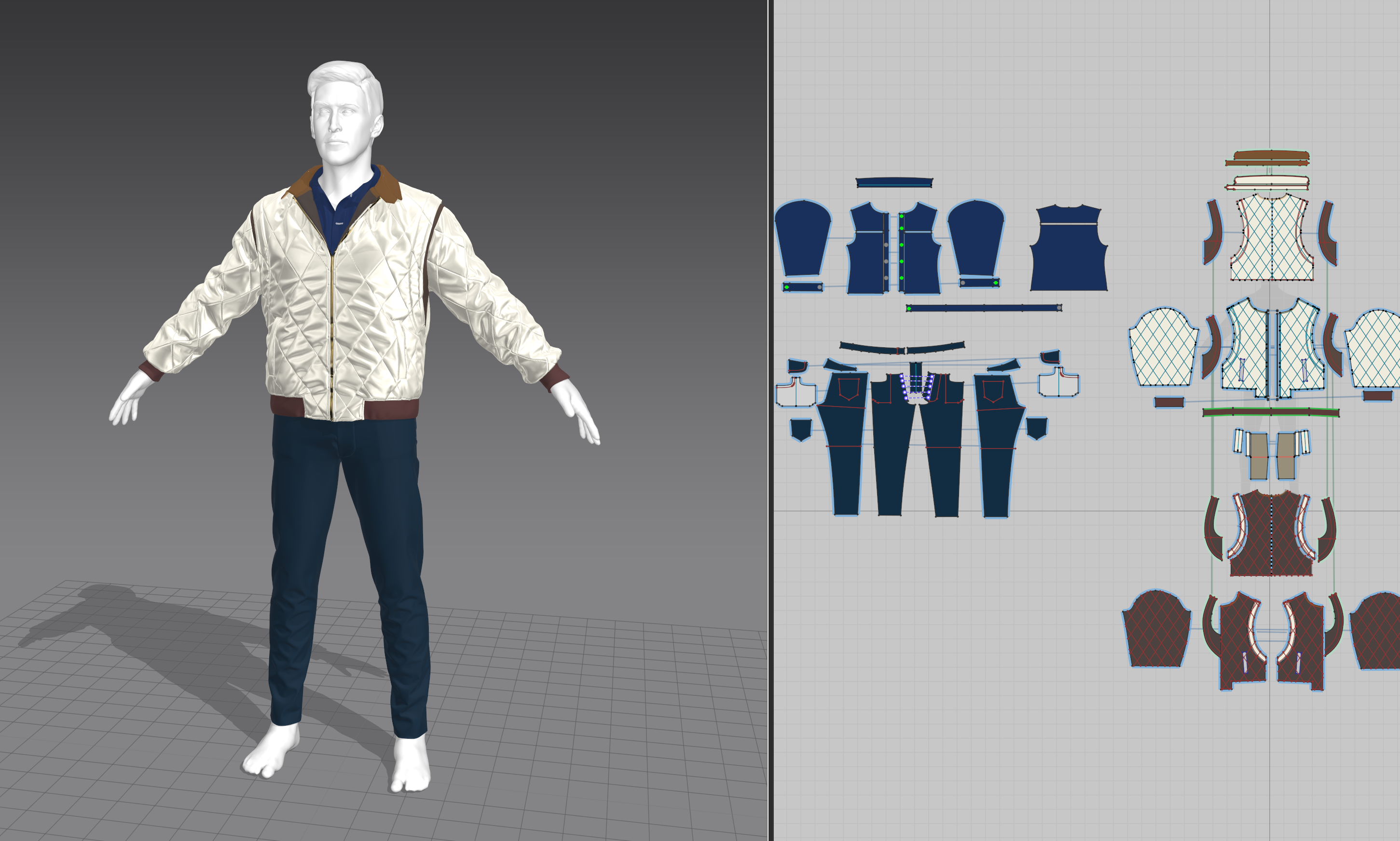 I'm kind of close to the end I think, I'm fixing some bugs and running renders through MRQ now so I should really catch up on the posts. Clothing creation was really problematic and I think one of the things I spent the most time on. There's a lot I could talk about but I guess I will focus on 2 things I realized: 1.…
 -
Maya16 Question: Possible Edge Bevel Improvements
Hi everyone I have been trying tons of thing now to improve mayas beveling result but with little success. This may just be due to my imcompetece or i just miss the forrest for the trees by now. using maya 16 Extention 2 In the images you can see the model of which i am trying to bevel all hard edges in a single stroke.… -
Maya/arnold, Normal issues on the edge of the mesh.
 Hey Im encountering a problem with the normals on the edge of my mesh and I cant seem to figure out how to fix it. It renders fine using Iray in substance painter and blender cycles, but not with Arnold in Maya. Anyone know what could be causeing the black areas and how I can fix it? Apologies if this is posted in the…
 -
editbl poly subobject: edge->poly selectn transfer
A friend of mine showed me 8 months ago how to create a selection in 3DS Max (v6) on an editable poly in edge mode and transfer that selection to the polygon mode by doing something like holding down shift and clicking on the polygon button. I tried it last night and couldn't get the edge selection to transfer over. Does… -
Maxscript - Move Vertex to nearest Edge of Reference Geometry
Hola Folks :) , I want to wirte a Script where an Object moves his Vertices (selected) to the nearest Edges (per Vertex) of an Reference Geometry. Maybe someone knows the easyest way to calculate the position where the Vertice has to move to find the nearest Edge. My Idear so far was to catch the two nearest Vertices. Then… -
How to lower poly count around edges of this object?

 I'm trying to make a shape like this: Currently I have this: I'm trying to get rid of the edges that are very close to each other on the upper right corner. To clean up the inner corners (circled), I used diamonds to allow for evenly spaced quads in the center (as I want to add more shapes), but I am unable to do the same…
 -
Re: Can do Edge Slide & Clamp in 3ds max ?

 Yes, you can Edge Slide in max. You need to use Constrain to edge and move the edge around. I am pretty sure you can also clamp but not sure where, haven't used Max since I moved to blender last year.
 -
Re: [Blender] Extrude edges and rotate them
Maybe not directly rotation but try this : Extrude an edge loop > Alt+S aka Shrink/Flatten > check in "offset even" in Shrink/Flatten dialog or make your own shortcut with "offset even" on > then GG to slide edge loop to what you need. ps. shrink/flatten move things along normals so in some cases you need to make an extra… -
Giving UV Faces of Beveled edges breathing room, how?
Hello, In Maya, I often use multi-segmented beveled edges but the trouble that I have is when I flatten the UV Shells of the mesh in Headus UVLayout, the faces of the beveled edge come out really tightly packed so that they're not one pixel across even at higher resolution. Is there an automated way in Headus or Maya to…
>24967 results