[FINISHED] - UE5 Realtime Metahuman - Ryan Gosling: Drive

polycounter lvl 8
20 Jan 2026: The project has been finished!
Check it out on Artstation here: https://www.artstation.com/artwork/QKvgAZ
Hi!
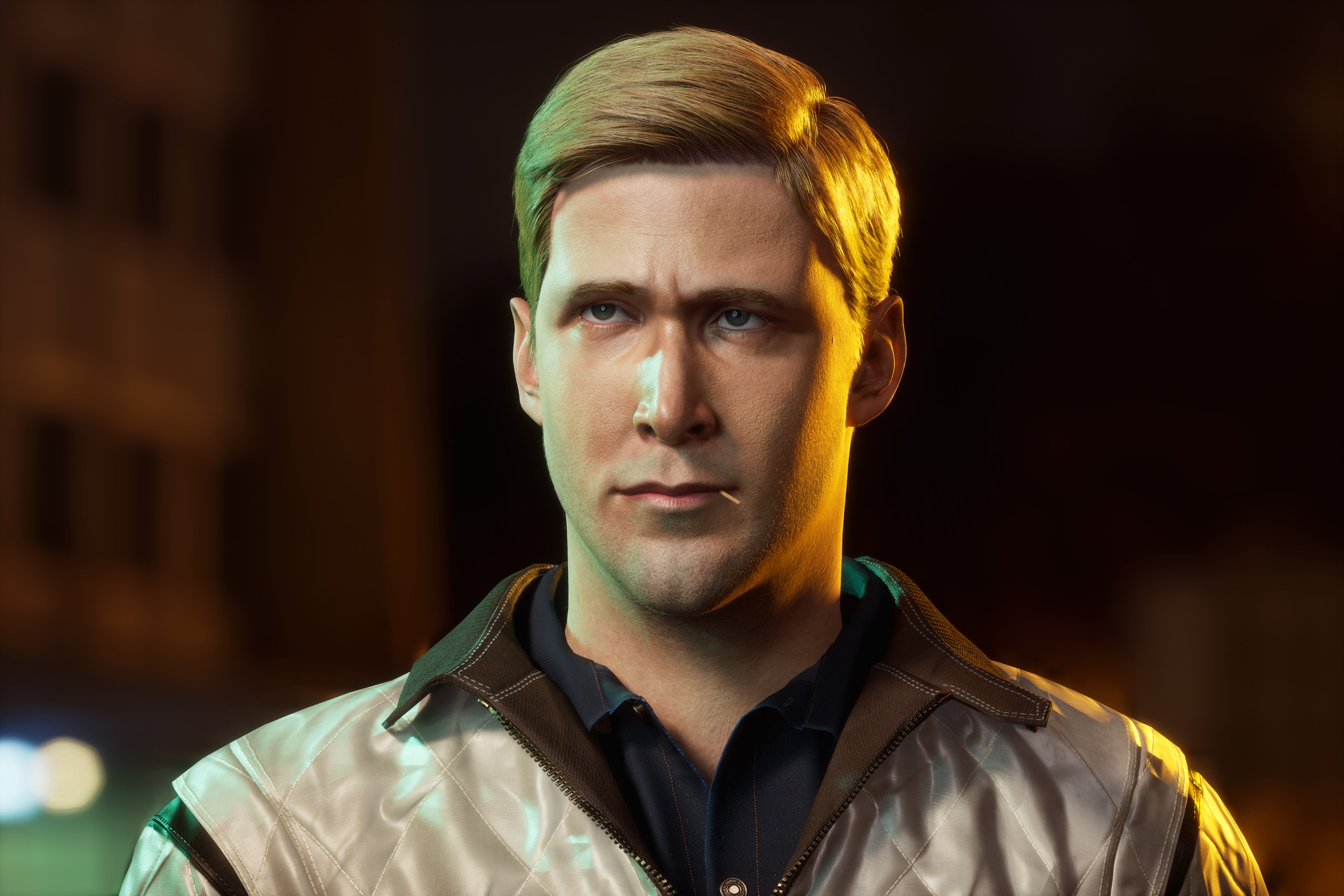
What started out as a school bust sculpt turned into a full character art project that blew out of proportion.
The project is Ryan Gosling, specifically from the iconic movie, Drive.
I am still looking to break into the industry and figured I needed more quality portfolio pieces. This is another step in that direction. The journey has been incredibly long with hiatuses, other work and shifting goalposts but I'm almost near the end, I think!
As I learned a lot of things, this will be a journal for me to chronicle my process, for future me to reference when I inevitably forget. It will also be for me to talk about some of the issues I faced (and some solutions I found) that I hope other people can chime in on. I hope to learn from others!
Actual progress:
Thanks for reading.
Check it out on Artstation here: https://www.artstation.com/artwork/QKvgAZ
Hi!
What started out as a school bust sculpt turned into a full character art project that blew out of proportion.
The project is Ryan Gosling, specifically from the iconic movie, Drive.
I am still looking to break into the industry and figured I needed more quality portfolio pieces. This is another step in that direction. The journey has been incredibly long with hiatuses, other work and shifting goalposts but I'm almost near the end, I think!
As I learned a lot of things, this will be a journal for me to chronicle my process, for future me to reference when I inevitably forget. It will also be for me to talk about some of the issues I faced (and some solutions I found) that I hope other people can chime in on. I hope to learn from others!
Actual progress:
Thanks for reading.
Replies
Chronologically, it's a mess, so I'll try doing sections to make it coherent.
Starting from the beginning, I'll post the sculpt I submitted for school so we can all laugh at it:
Among many likeness Youtube tutorials, one technique I gleaned that worked for me was to rapidly turn on and off Spotlight to be able to sculpt the 'impression' rather than trying to match exactly the shape for every photograph or screenshot (though I see some sculpt masters on Youtube do this).
It got a step closer than where I began, but it wasn't enough. I then bought a face pack from TexturingXYZ, VFace #89 Oleh, and started texture work. I did basic noise with Noisemaker in Zbrush first. I then wrap the VFace model, projected to my mesh, took the textures into Substance+Photoshop, and painted, layering on stuff to get more variation. I knew Ryan in Drive was a very tired man since he always worked night jobs, so I went a bit heavier on the eye circles.
Zbrush evolution:
Thanks to JHill's Youtube videos, I ripped out eyes from Metahuman, roughly adjusted their eye shells to fit my character, and placed it in.
Unreal evolution:
The rightmost sculpt stage in the Unreal shot above is around the 1/3 mark of the changes I made since.
Also, you can already see it above, but I will circle back to hair at a later post.
TL;DR: Sculpting likeness is very hard. Even after this process I can only hope I got better at it.
I think that's it for now, I'll probably talk about clothing next.
Clothing creation was really problematic and I think one of the things I spent the most time on. There's a lot I could talk about but I guess I will focus on 2 things I realized:
Ryan's jacket was based off a bomber which I began cutting into and modifying. And with this being a touch and go stage in the entire character pipeline, I foresee this being a constant thing I will have to do in future projects. For that I'm very glad people are kind enough to upload pattern/clothing tutorials online.
2. The retopology to low poly process
This was the painful part. At the moment, I don't feel like there is a reliable and established workflow for taking Marvelous to game model.
For retopo there are a few options- Marvelous' inbuilt retopo tools, or doing it in an external application. After giving Marvelous' tools a try, I need to say that it is still at a very basic stage. It also doesn't seem great for complex shapes like the jacket I have.
- Highlighting vertex connections at pattern edges is a very nice feature they have. Maybe the only good thing.
- You can easily overwrite your existing patterns with your retopo patches (I don't know why they allow this)
- Patch quad tool has a lot of limitations to use reliably
- No way to 'relax' topology
- Cutting, subdividing, sliding edge loops, etc. doesn't exist. You just have to manually click each point
I ended up just doing it in Maya with the conform workflow. But that also brought the next stage of problems.Because you don't have the 'vertex connections at pattern edge' feature, you have misaligned vertices at your pattern edges despite having the correct edge vertex count after conforming. Manually target welding is a tedious process. And if you have to make any adjustments again before this stage, good luck, you need to target weld all over again. It's a timesink.
Next is adding thickness to this retopo model.
There is the ZBrush method, but panel looping and eventually reconstructing subdivision levels is a coinflip.
I also found a Geometry Nodes tool by Outgang for blender that will do this process, but that is also a coinflip. No kidding, I felt like I brought in the same mesh to run it through the nodes, no changes, just reopening the scene and importing my mesh, and it will work maybe 4 out of 10 times.
You might be able to understand why I felt like running my head through a wall
MD has been around a long time already, I really hope for better tools to improve this process soon.
UV and texturing was straightforward. Past the tediousness and frustration of the previous stage, it was nice to see things coming together.
Then I started trying to place everything by hand. I quickly realized that was probably not the smartest nor fastest way to work given the shorter hairstyle, so I gave up on this and refocused on the hair strand goal.
I went to XGen, saw some tutorials, had that one Gordon Freeman artwork as a reference and went to town.
I think it's alright. XGen obviously has a very high skill cap, and I do not have the intuitive feel for the modifiers and guides to know how the artist created such natural hair for the Gordon piece yet.
I can bring that into Unreal easily. The next step is, if I hypothetically wanted to make hair cards, how do I get it to match this groom I already have?
I think the solution is Unreal's Hair Card Generator.
For this shot I actually used values that were a bit lower in the parameters, if you give it slightly higher numbers, you can get a better result (including the hairline). I tested this but didn't take a screenshot since I ended up not using hair cards for the project.
I don't know if it was just me or Unreal, but I also did have a lot of bugs getting the HCG to work, concerning Python modules then groom bindings in UE5.6. I posted my solution in the link above for the Python stuff which I think works, but for the groom bindings, the bindings for my eyebrows and eyelashes just caused the project to crash on startup. I don't know why or the solution for this. But I think it somehow works now also. Either way it was a very buggy and tiresome process to troubleshoot.
Also, along the way I blindly decided to convert my mesh to Metahuman, which of course brought its own set of quirks.
- XGen depends on a scalp mesh that is not the shape of the converted Metahuman head.
- I needed to recreate the texture to the new Metahuman head UVs.
- Because I didn't start with Metahuman topology, there will be some minor volume differences during the conform process.
The solution for XGen is to use blendshape for the scalp mesh. But for points 1 and 2 there is also a lot of back and forth wrap projecting between the Metahuman head basemesh, my current head mesh, and the projected Metahuman head mesh. Each is transferring different data like the shape or texture detail from one to another for the end result. Since I didn't start with Metahuman in mind, this is a lot of additional work.In Unreal, the main thing is that Metahuman just has a lot of subsurface scattering, no clue why. Adjusting the subsurface profile has limited effects. It will still look overly waxy.
This is exacerbated when you load a custom head/skin texture, which I did, see below. Left is a normal material on my original mesh. Middle is the converted Metahuman.
On the right is the Metahuman, but this time I managed to modify the material enough to allow me to control roughness and the subsurface scattering amount. I had to drop it down to basically zero. Even then, it still looks like there is some subsurface scattering applied as it is much brighter than my original mesh (discounting the lighting difference which I was messing around with).
In case anyone is interested, you just have to insert these nodes into this section of the Master material of the Metahuman skin shader. You can then control SSS and roughness in the MI after.
Learning, discovering and fighting against all of this took tens of hours. I went back and forth on giving up on using Metahuman. But here we are.
Next I might talk about rigging, if not then I'm just jumping to my lighting and artwork posts.
For the SSS thing, I agree that the default metahuman material is a bit waxy, but you can edit it in the actual material:
There's also edits for spec and rough if needed too
Also I really liked your Jedi artwork, I had a lot of questions to ask when I saw it but I didn't want to clog up your thread at the time 🫣
I'm not sure how, but I eventually settled on the idea of placing my Metahuman head onto my body mesh. Which, it seems, is also how many others go about this workflow.
Initially, I created a rig with Advanced Skeleton, but I don't have much experience with weight painting, so I ran into trouble with the armpit areas of the jacket and so on, as is the case for any humanoid rig. A little hesitant to spend time on it, I looked for auto rigging solutions, and came across AccuRig, which thankfully had a free version. In a matter of minutes I had a rig of surprising quality! It solved all my weight painting problems.
It handled all the armpit areas and such just fine, and has Maya and Unreal targeted exports.
I stumbled through and figured out how to use Advanced Skeleton's NameMatcher to import this Maya rig from Accurig, to recreate the standard AS controls on this new skeleton. This allowed me to do my posing and all that in Maya if I wished, make edits to the mesh, etc. yet allow me to export it right into Unreal after.
So, I brought it into Unreal, hooked it up to my Metahuman, created a Control Rig for it, and also experimented with the Game Animation Sample Project, retargeting and bringing my character into a playable one.
However, I did encounter a few problems, much of which I don't know the proper solution to, and just had to work around in Unreal.
1. The imported/created spine is very short. Accurig does not allow you to control spine length placement (at least in the free version) so I was at its whim.
In Unreal, this basically meant that I couldn't get very natural torso rotations, and much of the rotation from the 3 available Spine controllers would occur at the hip. And yes, this is the case even though my character is rotating very naturally along the torso in the Accurig GIF above. You also can't visualize the bones from within Accurig. I don't know why this spine issue occurs. I was able to mitigate it by spacing out the spine chain a bit, using Spine01 to Spine05 as opposed to just Spine04.
2. Making any edits to the rig in Maya will result in head breaking when you parent it to the Body mesh in a Blueprint.
This was definitely not fun, the neck flare was huge. If you unparent the Face mesh it fixes, but then you get tracking issues since the Head pivot is actually at origin but the Head mesh is whatever height you built your Metahuman at.
My solution for this was unfortunately just to avoid any rig edits, and to utilize the Face Anim Post Process BP for the Head.
3. Rotations were weird. I encountered this for the fingers mainly, where if I rotated it along its axis to bend the fingers during posing, it would elongate- as if the joint of the rig was not properly positioned at the joint of the fingers itself. However, I thoroughly ensured that I had correct placement during the Accurig process. With me trying to avoid rig edits for point 2, I couldn't do anything about it, and settled for positioning fingers manually during posing for shots. It only really affected my posing, it didn't seem like an issue during GASP gameplay.
There were many other small things that I tackled but I think these were the main points of this workflow.
With that though, I eventually still got a working character into the GASP. It's really fun to just run around with a character that you just made!
I have my Artstation post ready in a bit, the only thing left to talk about really is just lighting and rendering in the next post.
My character is much simpler in comparison, but I took what I could in terms of how to present work well.
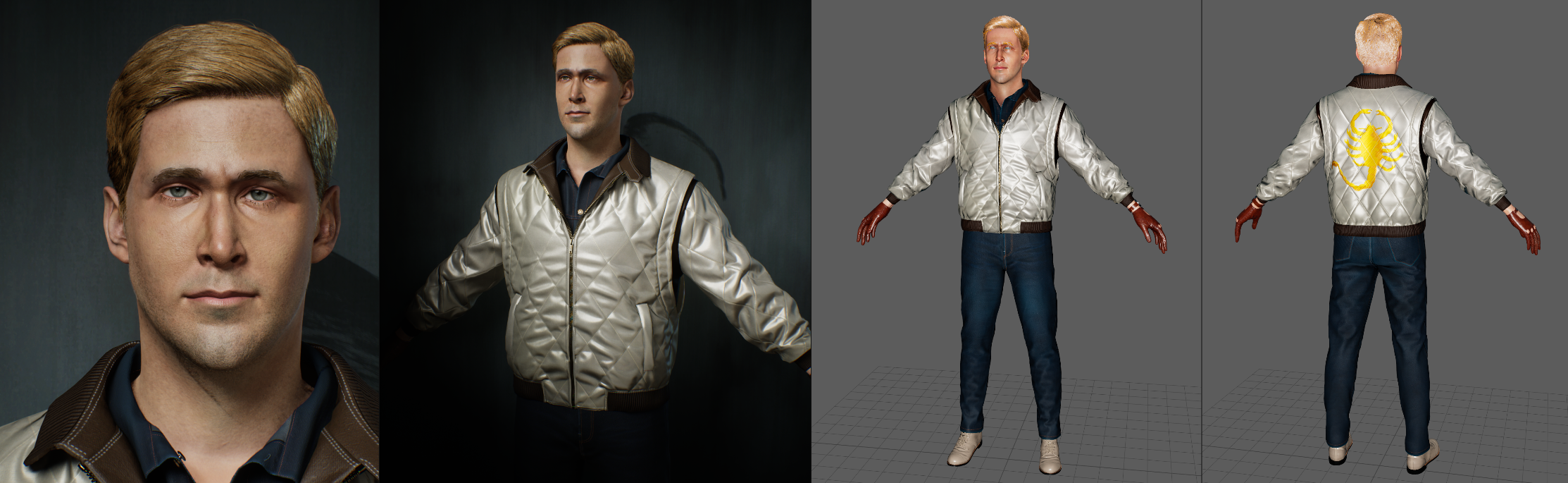
So I took some headshots in Sequencer and MRQ, and also took some screenshots of my behind-the-scenes stuff to put at the end of the post.
I then worked on the character showcase shots, both fullbody and macro. It was then I discovered that Unreal 5.6 has a Depth of Field bug that renders everything jagged in MRQ with Cinematic Quality settings. I didn't keep shots of this bug but you can easily find examples of this online. Yay!
There was no workaround so I turned it off where I could, and where I needed to, I swapped to a UE5.7 cloned project just to render DOF properly.
Also, separately, trying to get proper reflections in eyes for my character shots and on normal objects was a seemingly simple but massive task.
But it was well worth, it makes a big difference. Here's an example I was happy with.
Apart from the standard character showcase shots, there were 2 shots that I wanted to take in different directions.
First is the iconic elevator shot. No spoilers, but it's one that stuck with me ever since I first saw it, and it's a shot that showcases the back of the jacket very well. This particular shot made me realize that my initial jacket texture (in the 2nd shot) was severely lacking; I had made some choices such as 'not having the jacket stitching overlap the scorpion', etc. I went back and amped up the detail, and I think it turned out a lot better for it. Very glad to have noticed it.
Next was a character fashion editorial spread-type shot. I'd been watching Wisdom Kaye reels, and noticed that Ryan actually has some branded drip going on in the movie. Jeans, Gaspar gloves, a Patek watch, Stacy Adams shoes, and so on. Feeling inspired by Wisdom, I wanted to make a fashion spread for him, just for fun.
This was the overview of the evolution of this shot from left to right. The bottom right is the shot I ended up with.
And of course, the last thing was an evaluation of my work. It's certainly not the best but having spent so long on it, I'm ready to call it done.
I took a screenshot of the Artstation homepage, and realized that I had no shots that stood out, or anything that would pop on the homepage in comparison to everything else. The most suitable shot I had was the fashion one, and it wasn't good enough. Everything else was relatively flat, modified Metahuman lighting.
So I went back and pumped out another shot, creating a brand new one with a new lighting setup. This would double as the opener for the post and the thumbnail. Again, here's the shot evolution.
Bottom right is the final.
I then did some Photoshop edits, and so on. We're ready! The AS post will be soon.
If you know of solutions to any of the issues I mentioned, or better workflows to follow, please share! I would like to learn
Thanks for reading and going through everything. I hope it helps someone.
https://www.artstation.com/artwork/QKvgAZ