Search
-
Maya Duplicate instance with transform
 Hello to all. There is nice feature in maya to duplicate object with transform. Select object, Shift+D, move/rotate/scale new object, Shift+D again and it repeats the actions. How to make same thing but create instances with transform, not objects. Maybe "Smart transform" option in "Duplicate special" tool can help with…
 -
3ds Max custom icon sets (maya Inspired)
 Because I use both Maya and 3ds Max (that has some really crap default icons) and I love Maya shelves, I decided to create several new 3ds Max icons sets to be able to have some decent icons in 3ds Max as well. To do this I used both some original Maya 2016 factory icons as well as some of Nightshade v2.0 icons (Martin…
 -
Re: [Maya-Python] to import sub directories?
 Ok let's choose the following one: -|scripts (Maya defaul scripts directory) ---|_SAMA_LIB|PY|OpenGL|SAMA_ExportToOpenGL.py Maybe easier like this> "C:\Users\sama\Documents\maya\2009-x64\scripts\_SAMA_LIB\PY\OpenGL" The right command to import the SAMA_ExportToOpenGL.py file with his function is : from _SAMA_LIB.PY.OpenGL…
 -
Maya. Copy a vertex's normal value to another vertex

 Hello. I need to copy a vertex's normal value to another vertex. ( I know how it do it by hand. But it is long time ) Maybe do you know Maya script for this, i didn't find it :( Thx Need similar script like in MODO https://community.foundry.com/discuss/topic/145483/copy-a-vertex-s-normal-value-to-another-vertex
 -
[Maya] Hotkeying Shading -> Wireframe on Shaded
 Hi guys, I'm learning Maya coming from Max right now. I've been trying to set hotkeys that are more familiar to me. I can't seem to find this Wireframe on Shaded command anywhere in the hotkey editor. Is it in there somewhere or is that something you just have to script? Also is there an easier way to search for specific…
 -
Make Branches follow Surface Normals in Maya
 Eh all, I'm working in Maya 2014, and I'm trying to get some tree branches to follow the surface normals of the main trunk. I've currently had no luck between using the trunk as a live object, paint effects, or particle object instancer... Any ideas or tips anyone can give? Maybe I'm not using the setting right on one of…
 -
Re: pose confusion .. maya rig in tpose? or relaxed?
 Unity has the option of sampling whatever bind pose you had in Maya, or enforce T-pose to move the arms into T-pose, when configuring the avatar. so maybe give that go before you start redoing everything in T-Pose. I believe FBX will attempt include maya bind pose in the export by default
 -
[Maya] Export Selected Command not working in Maya 2018 MEL
Guys, I've been using Maya 2017 for a while and have always used a simple MEL script that moved my object to the origin, froze transform and then launch export selected so that I could export it to engine, but here at work I'm using Maya LT 2018 and for some reason export selected doesn't work. I can't find any… -
Re: Maya - Bevel using control edges possible?

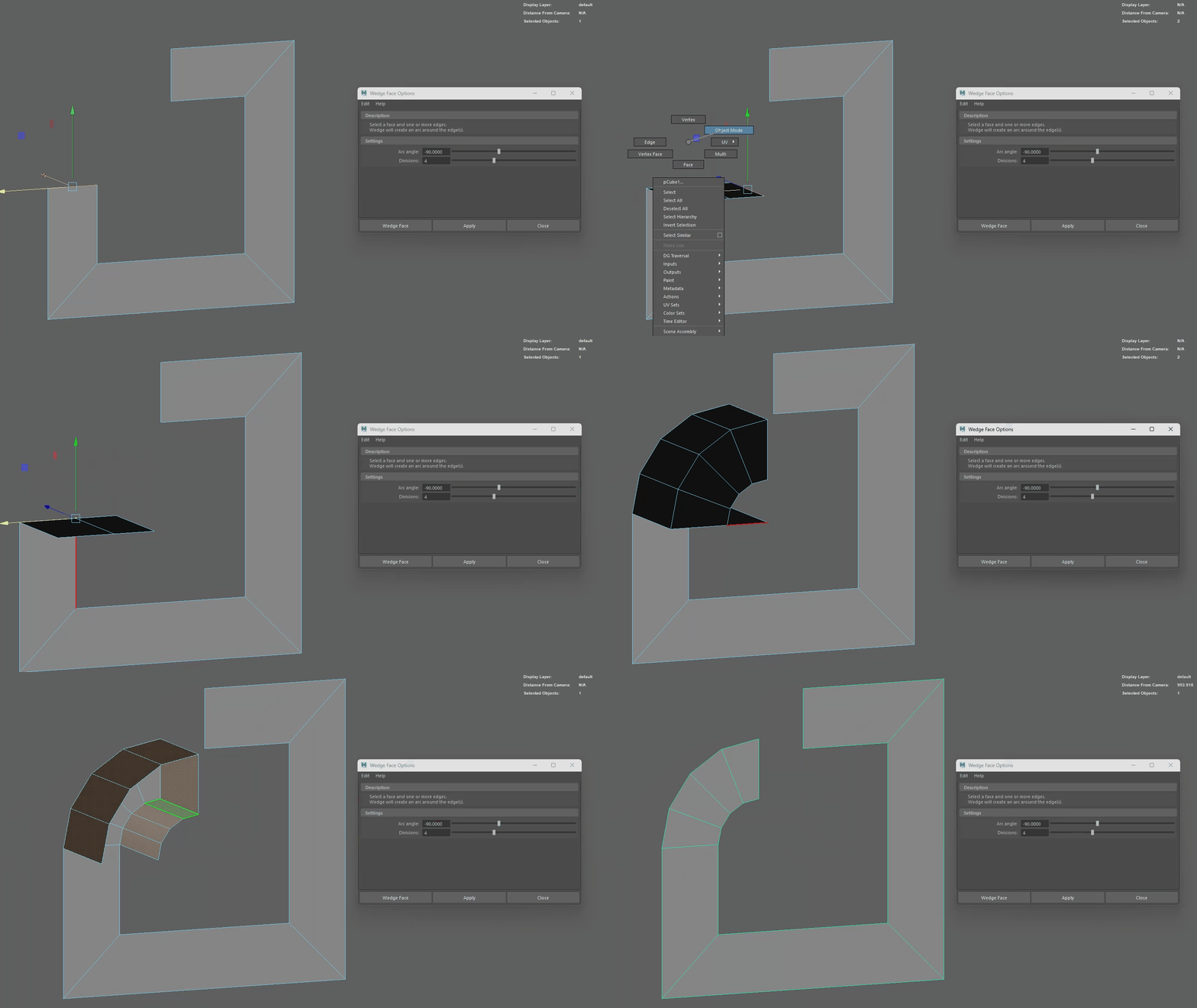 I always did this type of rounded bevel with the spin tool in Blender. I've also been looking for the equivalent in Maya but so far the closest I've come across is 'edit mesh > wedge'. I hate that it's the one tool you have to be in multi mode to use, also you have to delete the extra faces afterwards :/
 -
Re: Maya 2009 polycount wishlist
 20 - "When editing geometry in a subobject mode, it is very easy to select other meshes by accident. This can be very annyoing when trying to work on a specifc piece of geometry and you keep selecting the geometry behind what you are working on by accident. This behavior is also problematic when you want to clear your…
>63145 results