Search
-
Re: Study Group - Environment
 Not to be a nit picker, but that whole process of selecting edge loops could have been so much faster by just - drag select once horizontal loop - Drag de-select above and below to get rid of the vertical selection Literally 3 mouse clicks, and same thing for verticles.
 -
Re: How do people get so much resolution in their textures on low poly models?
 The artist will create only one section of the helmet. Then make UVs for it. Then duplicate those UV'd triangles to make the whole helmet. The duplicated sections of the helmet all use the same initial UV space. So then when you paint the single helmet-section of texture, it shows across the whole helmet. You can try this…
 -
Re: [Max Script] Adding a Bone without Influences
 When you are done with your weighting, you can convert all the vertices to "Modified". This will allow you to add bones without any of their weights changing. When a vertex is tagged as "Modified" changing the size of the cross sections no longer updates the influence on the vertices, and the influence can only be changed…
 -
Re: Ni'ah - Final Year Game Dev Project

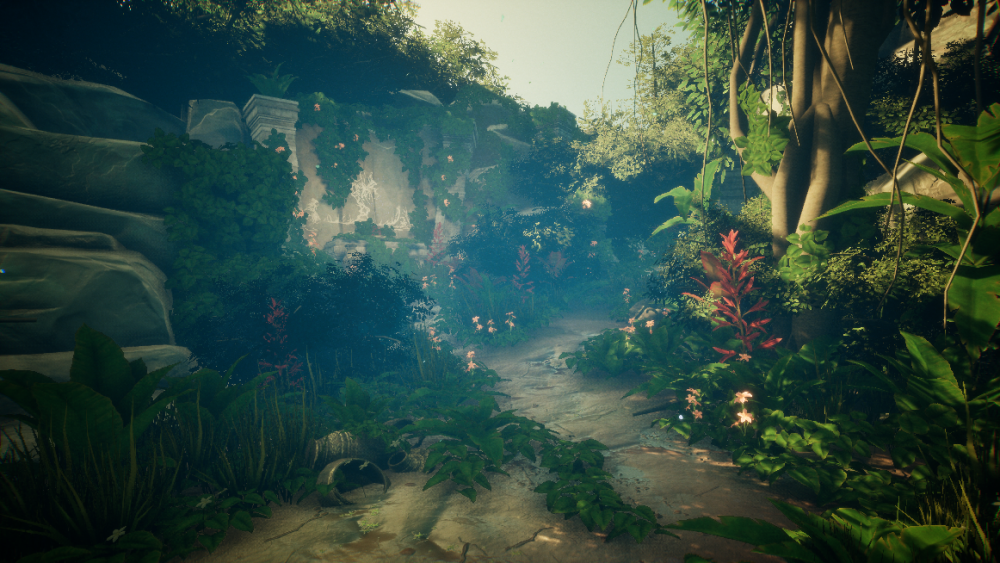 Here are a couple shots of our game level for the vertical slice demo, Kai was responsible for the set dress and lighting.
 -
Re: Maya ---> Zbrush
 Yeah, if you use just the Delete key on edges, it leaves all the vertices behind at the intersection points. Ctrl + Delete will remove the intersecting vertices. You can try making a marquee selection through the center part of your model while in vertex selection mode to grab any stray points, then press Delete (not Ctrl…
 -
Re: What Are You Working On? (3D) 2026
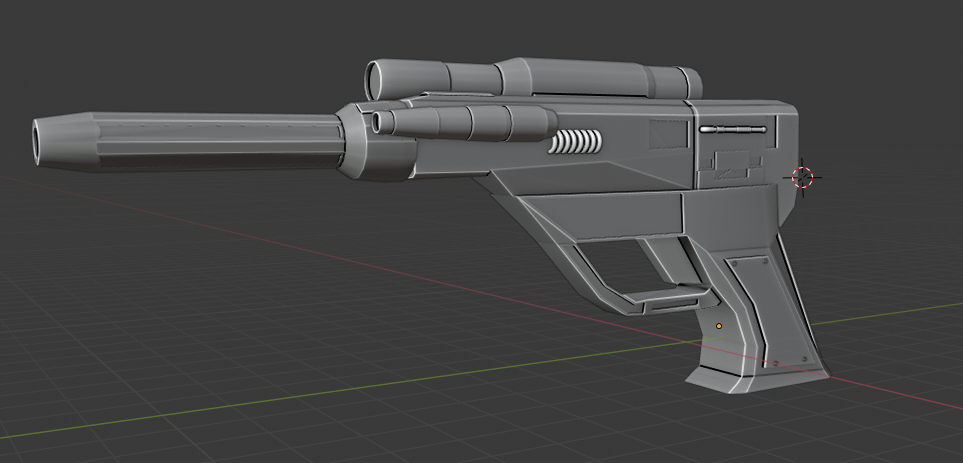 Extremely new to modeling. Working with a Star Wars mod team to make models that go in game. I wanted to make a blaster that fits in universe but not exactly one that would be in the shows or movies. I used a Kotor Blaster Pistol as the reference for the shape. It has to be mid tier poly for First Person views. Currently…
 -
Re: My first game-ready weapon: Judge Dredd Lawgiver
 Sorry this is a bit later it took me a few min to make it. 1) This could be a quarter of the size it currently is 2) These two could be combined 3) This could be half the size vertically 4) This could be cut in half vertically 5) Same as 3 6) Same as 4 7) Same as 4 8 ) Could be in half horizontally 9) Could be in half…
 -
Re: Washroom Environment - looking for C&C Please
that is odd...its all verticle on my end. Even on my other computer they are all aligned vertically. Might be an issue with your browser settings/resolution? yeah mirrors need to be added as I said in first post. N yeah i 'spose the plumbing is a lil too shiny, got carried away with making a shiny/fake reflection… -
Re: Sketch A Day.
 Looking good, like colors and highlights on the railing but wouldn't the closet vertical part be higher than the one on the other side? That might make the composition feel kinda weird with have such a stong verical line so close to the viewer.. just a thought ^^
 -
Re: Unreal 4 seams at UV center edges
 https://www.youtube.com/watch?v=VyTH0Xtn_D4 if by chance it is the lightmap, check this tutorial, and see if it helps. I've had that problem myself, usually live AdvisableRobin mentions, it's that the vertices are not welded. This is how the problem usually occur. in 3ds max. When you're modeling and have the Unwrap…
>7637 results