Search
-
Re: Weird light artifacts after baking and exporting
 Hmm, maybe i've skipped information. I meant that every tutorial i've watched the mesh is never in tris, like, in the video you can see the topology the entire time and ppl don't tend to triangulate it, then they export it back (mesh still in quads) and the shading looks fantastic. That's why i'm hitting my head against…
 -
Weird light artifacts after baking and exporting
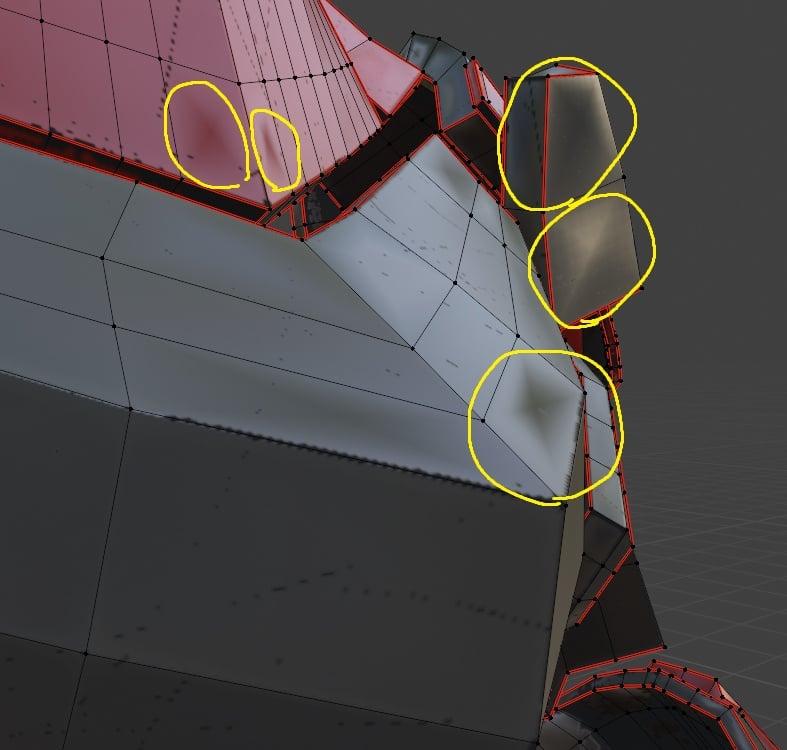 Hi! i'm having issues with the normal map (i think). It's giving me these weird light artifacts when i import the textures into another software My workflow is: UVs in blender, then bake and texture in substance, then export textures and import them in blender this is how it looks in blender substance painter Also tried…
 -
Re: Weird light artifacts after baking and exporting
 There is a checkbox to Triangulate on export without using a modifier. So if "bake-mesh" topology was triangulated in those tutorials you might not see it unless it was specifically shown in Substance Painter. The triangulation result should look the same way as Blender presents mesh by default (I think?). So when you…
 -
Re: Weird light artifacts after baking and exporting
 Hi! Blender has a Triangulate modifier (keep normals option to preserve shading), which makes it easy to work with quads and triangulate on export. I recommend triangulating to ensure topology (and as a result mesh shading) is the same across softwares. Since you shared UV layout, I'll note that there's a lot of unused…
 -
Re: Weird light artifacts after baking and exporting
Hi! Nice that you were able to fix it. Many tutorials leaving this out is unfortunate. Whether the issue becomes apparent or not depends on the specific geometry. If this had happened with the tutorial mesh, they would have to deal with it as well. You could use the Polycount Wiki as additional reference: Texture Baking I… -
Re: Weird light artifacts after baking and exporting
Hi! thanks for your answer, yeah i did as you said and the problem seems to be fixed, though it's really weird to me that every Blender to Substance tutorial doesn't even mention to triangulate the mesh i'm supposed to be baking and texturing, and after importing their texture it has a perfect lighting/shading and…
6 results