Search
-
Curve loops in zbrush
 Is there a way to make the two ends of a curve flow into each other without a normals break? I'm using the Stroke > Curve Functions > Frame Mesh method with an insert brush atm, and it creates stretching if the end point is on an angular surface: And on very simple shapes, when the insertMesh is applied to the curve the…
 -
SOLVED: Curve based, Joint-bound rig setup for Unreal

 I’m using joints attached to curves to control the eyebrow, eyelid, and mouth deformations. My nodes are as follows: curveShape.worldSpace > pointOnCurveInfo.position > joint.translate What this allows is, for example keying the bones’ position along a curve. This works really nicely in making the eyelid bones curve around…
 -
Maya - How to remove the "hidden twist" from curves?
 Hey all, got a recurring problem when using curves to build geometry, whether using motion paths, extrudes or Mop's renderable curve script. Frequently a seemingly smooth curve will have a twist in it that only becomes apparent after using it to create geometry - I've tried all sorts of stuff to prevent this, including…
 -
Zbrush 4R4 Problems: Shorten curve and inverted vertices
 Shorten Curves: In the Zbrush online manual I read that you can extend and shorten curves. I know how to extend curves but I haven't found a way to shorten drawn curves. This seams like an import feature to have. Subtractive Meshes have inverted vertices when drawin out in Dynamesh. This makes it difficult to see how the…
 -
[Blender 2.81] Snap points from physics simulate curve
Hi! I'm trying to simulate a softbody dynamics in a curve, and there are old videos (from before Blender 2.81) showing that, once u have the curve parented to sth, the curve's first point become stuck/snapped to same position and the rest fall simulated. I'm doing the same thing and the whole curve falls. I've even hooked… -
Re: Mel script edit cvs of maya curve.
 Assuming you always want the very first CV, it will always be position [0]. So curve1.cv[0]. If you want your script to work on any curve selection, you can store your selection first { // stores current selection string $curve[] = `ls -sl`; // for loop allows script to work on any number of curves at one time for ($i=0;…
 -
Maya - Weird behavior when doing Surface Extrude with 2 curves

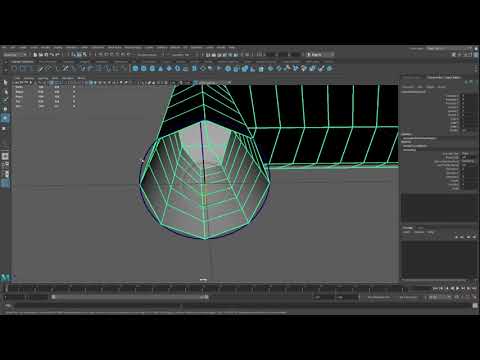 I was trying to model a simple handle when I came across some weird behaviour using surface extrude with 2 curves. I am using a 1 degree curve made with the EP curve tool and I snap to the Maya grid. Whenever the control vertices are snapped to the grid, the final tube is not uniform, there is some weird skewing going on,…
 -
Re: -HOW DO I CUT OR BICECT ONE LONG CURVE INTO 2 PARTS AT A CERTAIN POINT IN ZBRUSH?
 Assuming you're using a brush that is completely curve-based (topology brush or zremesherguides), you can just draw a second curve that bisects the first one. A point will be created at the spot where the curves intersect, which will essentially split the curves into multiple segments. You can clean up curve segments by…
 -
Is it possible t oTwist a curve in Zbrush?
I am wondering if it is possible to twist a brush drawn out with Curve mode? Maya has a similar function when you extrude a face along a curve then you can adjust the twist of the extruded Segment. I know in zbrush you can use the Size and Curve falloff to taper the curve. But surely there must be a way to apply a twist?… -
Deform object with curves in Maya
 Hello, I could use the help. I'm trying to place hair cards and I want to accomplish in Maya what the "path deform" does in 3ds Max. I want to bind a hair card to a curve and to be able to control the hair card by manipulating this curve. I want to be able to rotate the geometry as well, by somehow using the curve.…
>12679 results