Search
-
Re: Sketchbook: Tim Smith

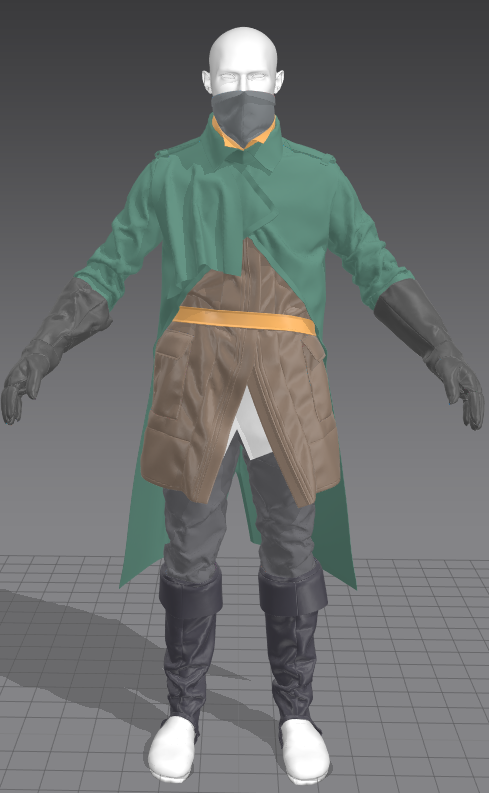 Update on the progress of this project. Pushed the clothing further in MD, optimised it in ZBrush and Maya, and now I'm refining and pushing it all further in ZBrush.
 -
ZBrush Hotkey Assignment is buggy
 Hi, I've tried to assign hotkeys for the brushes, but it only works from number 1-4, everything afterwards is always "popup+5" etc. I've tried to edit the hotkey file manually in deleting the "popup" line and did reload this file in zbrush, put it doesn't work. Is this a bug? Thx
 -
Still struggling with ZBrush cloth
 Ive taken photos of myself with a normal T shirt on with my arm in every general position (T, raised, tucked, and relaxed). This has helped with placing my general folds in correct places but im having brush problems. To start folds i usually operate on level 4 subdivision, so generally low poly. I use the flatten brush…
 -
zBrush pillar sculpt
Hey there, iam on it to make a pillar in zBrush. but i got some problems how to get the round and curvey parts done in a good and correct way. My question is special for the rounded bottom parts. i tryed it out with radial symmetry and with the standart and clay brush. i also tryed some masking but i get no good results.… -
Zbrush Object Scaling Issues
 Read a few threads online about this but can't seem to wrap my head around this. Exported an object with the correct scale from Max, unit in mm. Exported into zbrush with the correct size, but the brush size is too small. Using the unify under deformation will help but messes up the scale. any way to fix this? thanks.
 -
Variations for Zbrush nanomesh
 Is it possible to use randomly variations included in my nanomesh brush somehow? In a similar way it works with ordinary insert multimesh brushes
 -
Strange results when using wrap mode in Zbrush
Hi! I just found the rocksculpting tutorial by Arif Pribadi(found here: http://arifcreations.com/blog/2012/01/21/tileable-rock-texture-in-zbrush/) and thought I'd try to follow it. Sadly I didn't make it past the stage of trying to set up the plane to sculpt on, instead of it following it correctly i got this: where it… -
Re: "Smooth Group Import" plugin for zbrush???
 The Smooth Group Import plugin is only compatible with Zbrush 3.5 You can download it here: http://www.pixologic.com/zbrush/downloadcenter/zplugins/#zbrush3.php As far as I know, they were working on a ZB4-compatible plugin. Have you tried contacting tech support? They might be able to give you more information on the…
 -
Zbrush: Cavity Mask
 Hey guys, dont know if this is a common issue or if im just completely missing something (Cant get anything out of Google). For some reason I cant enable "Cavity Mask", its just greyed out. Im using Standard brush with RGB enabled and Zadd/ZSub disabled. Ive tried restarting Zbrush too. Any help would be appreciated!
 -
Re: Zbrush and sharp edge
 Hi, thanks for your advice I using softimage, and softimage crease is not supported by brush. I usually add support edges where needs in softimage but as you can see zbrush tends to move and smooth this edge I added, also the zbrush process for support edge is a bit... strange.
>31659 results