Search
-
Re: Beauty or Execution? Which one is better to ace as a Junior?
 this really depends on what work the studio has to offer to a junior. IMO choose what seems more appealing to you and tailor your portfolio around that so that you get hired to do what you want to do, and if you don't get hired at least you'll have had fun. Realistically you will need both, and there are like... a small…
 -
How to recreate One Piece anime-style shading & glow (Paint Tool SAI 2 + After Effects)?

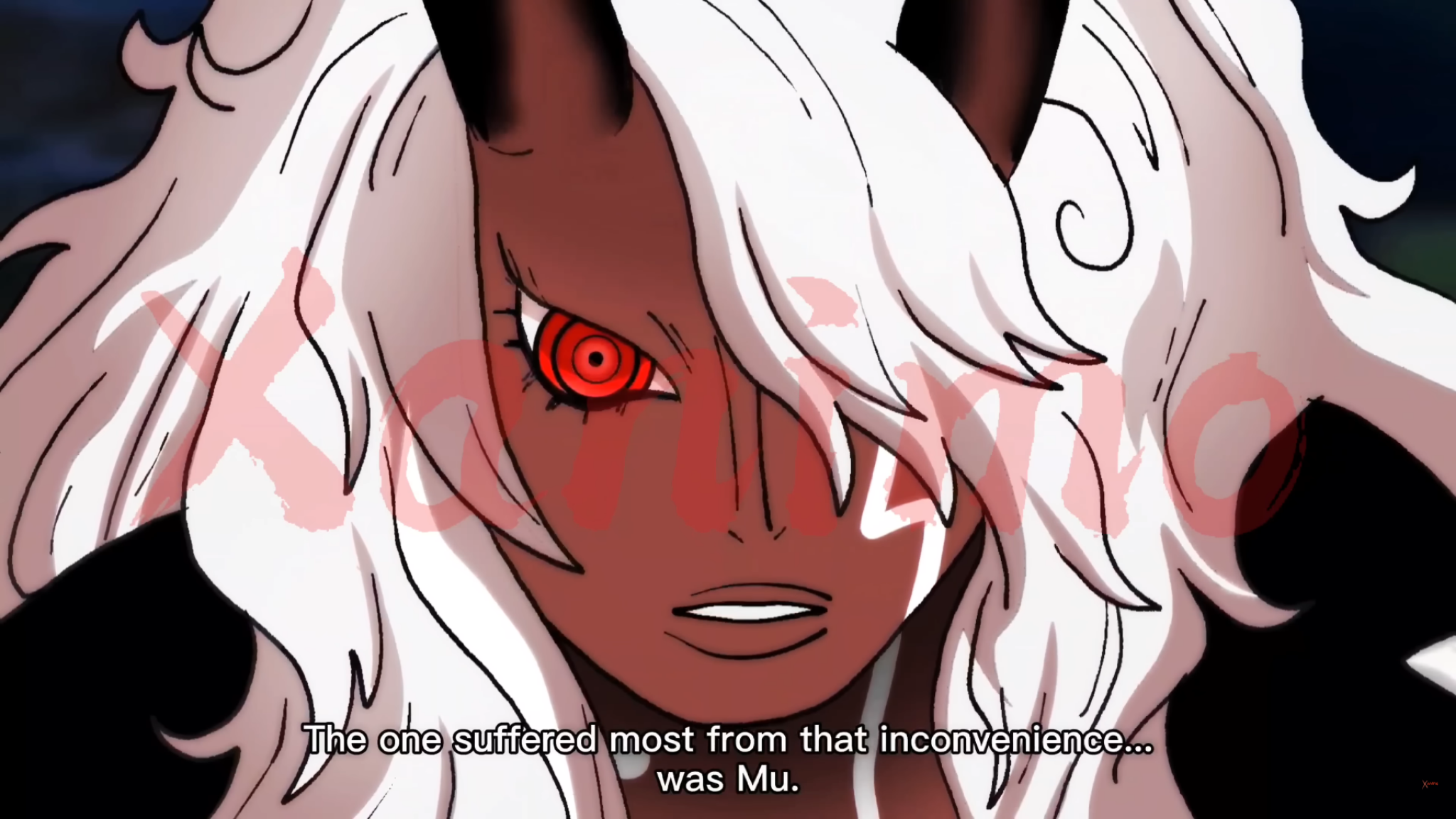 Hi everyone, I’m trying to recreate this kind of anime coloring/shading style from One Piece (image attached). What I’m specifically trying to achieve: * Strong cel shading with soft transitions in some areas (like the face and hair) * Intense glow/red eye effect * Clean but dynamic highlights in hair (not overly…
 -
Re: A short explanation about custom vertex normals (tutorial)
 Wow, thanks man! I followed your steps and realized that it was the mitering type set to "none" that made the desired effect. Mine was unchanged (auto), that's why it did not work. I also tested this with an object that had bevel history and one where I deleted the that history node. In both cases, if mitering type was set…
 -
Re: Sketchbook: Zetheros
 No lowpoly yet, but more polish. Replaced the internals with synthetic digestive organs protected by a removable internal panel. Added rivets and hooks. This is a great example of how functionality drives aesthetics. Everything is designed with intention and not because it "just looks cool", and the art is better served…
 -
Xoliul's Shader for Softimage 1.6 Alpha
Hi I got a friend of mine to convert Xoliuls great viewport shader to work in Softimage XSI . Most of the features work but there a few things that dont ,this shader is provided as is and should be treated as an alpha version. If someone with some shader code knowledge would like to fix the bugs then that would be awesome… -
UV Squashing in Borderlands 2 on masks for color tints.

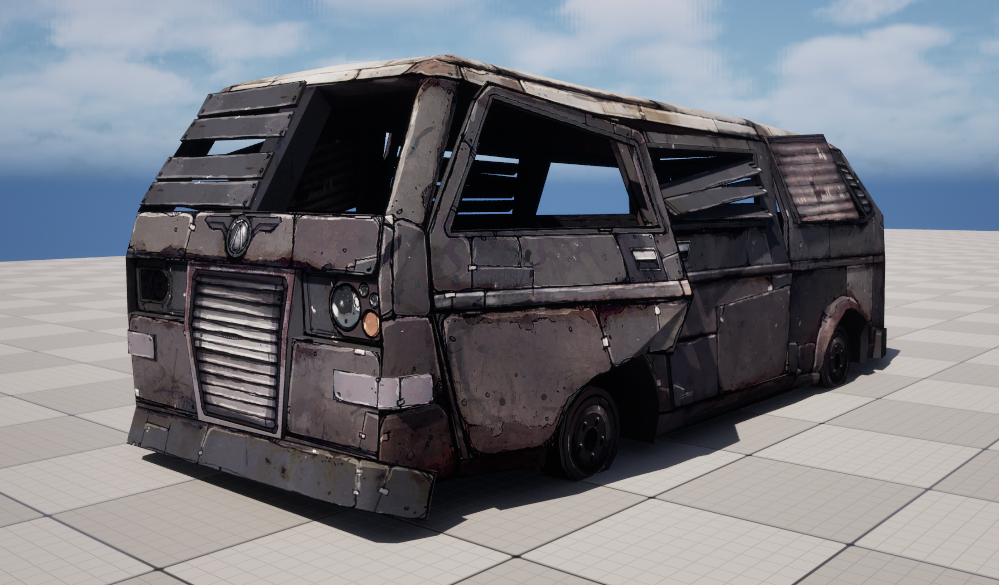 I wanted to share something I came across while looking at models and textures from Borderlands 2. There is a 3D model called WreckedVan that is used all over the game. It comes with a 2048 diffuse map and a second packed mask texture. The size might seem large for 2012 but given that it was standard practice to give…
 -
Re: Egg shape creation
 This could be a way: http://puu.sh/tckFf/f2bdd69503.png . Squash your circle shape, tilt it, and move it over to the right a bit with the transform node. And set the symmetry mode to 1 in your symmetry slice node. Also make sure that the tiling of your shape node is set to "no tiling".
 -
Re: IN PROGRESS: How to use Quixel with High Poly models?
 There is no code in it. It's just a node group: you can select it and pressing Tab you'll see what's inside it. You can import it in your own blend files as a node tree :) When you press Shift+A in the materials node editor, under the Groups category, you'll have it available ;)
 -
Re: The M I R A G E effect [Help]
 Hey all, thanks for the replies I am reading them and some are actually really informative, but I should solve a misunderstanding here. Shader forge is a node-based shader editor tool just like the one that is used in Unreal or CryEngine, Or the one that is used in 3DS Max. So yeah, nothing automatic or magical happenes…
 -
Re: Unreal3 TOON Shader Network Creation?
 stop thinking that it is too complicated! it is junior high level math, not the nodes themselves for sure, but the connections in that shader are all just addition and multiplication - if you just want to copy what is there, why do you need a video? http://polyphobia.de/public/tutorials/TF2shading/shader.jpg just create…
>37248 results