Home Technical Talk

How to recreate One Piece anime-style shading & glow (Paint Tool SAI 2 + After Effects)?

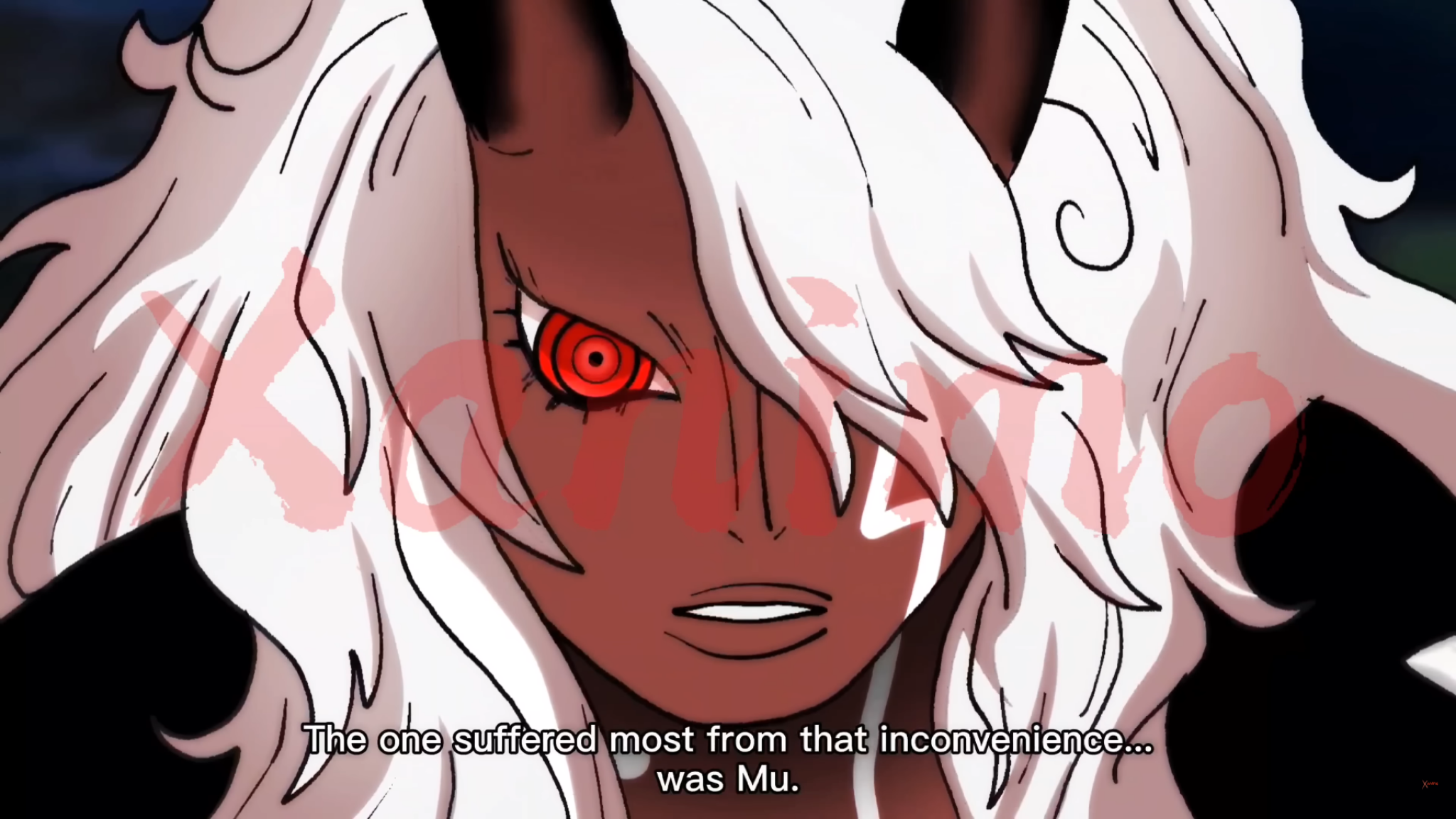
Hi everyone, I’m trying to recreate this kind of anime coloring/shading style from One Piece (image attached).

What I’m specifically trying to achieve:

  • Strong cel shading with soft transitions in some areas (like the face and hair)
  • Intense glow/red eye effect
  • Clean but dynamic highlights in hair (not overly airbrushed)
  • Subtle gradients on skin while still keeping that “flat anime” look

My current workflow:

  • Lineart + base colors in Paint Tool SAI 2
  • Then compositing and effects in After Effects 2022

What I’m struggling with:

  1. How to balance hard cel shading vs soft shading without making it look muddy
  2. How to paint those hair highlights so they look “anime accurate” instead of random
  3. Best way to achieve that glowing eye effect (should I do it in SAI or only in AE?)
  4. What blending modes / layer setups are commonly used for this style?

If possible, I’d really appreciate:

  • Layer structure examples
  • AE effects (Glow, blending modes, color grading, etc.)

Thanks in advance 🙏
Replies

  • Eric Chadwick
    Can you show a screenshot of what you've achieved so far with your own art? Kind of impossible to give any feedback without seeing what you're seeing.
  • IvanShio
    Can you show a screenshot of what you've achieved so far with your own art? Kind of impossible to give any feedback without seeing what you're seeing.
    This is as far as i can go, i don't know what to do to match the first screenshot, it looks really different as mine. I use android samsung tab s9 fe with stylus pen
  • Eric Chadwick
    The first thing that stands out to me is the colors are different. I would suggest picking colors directly from the reference, and filling your art with those.

    The next thing that I see is proportions. The reference face is shorter overall. One trick I like to use is to put the reference and the art right next to each other. This makes it easier to spot differences.


    The next thing is the reference has added shadows to the hair.

    After that, I see each line of yours is the same thickness along the whole length, while the reference uses variable line weights. This may be simply a limitation of your hardware. I doubt the Samsung Tab has pressure sensitivity, which would help you solve this.

    Another thing that would help you is to start drawing more from life, draw the things around you in the real world. Developing your skills at drawing is probably the most fundamental skill needed to become a high-quality 2D artist. Ctrl Paint is really good for this: https://www.ctrlpaint.com/library

    Anyhow, keep going! This is a great start!

  • IvanShio
    The first thing that stands out to me is the colors are different. I would suggest picking colors directly from the reference, and filling your art with those.

    The next thing that I see is proportions. The reference face is shorter overall. One trick I like to use is to put the reference and the art right next to each other. This makes it easier to spot differences.


    The next thing is the reference has added shadows to the hair.

    After that, I see each line of yours is the same thickness along the whole length, while the reference uses variable line weights. This may be simply a limitation of your hardware. I doubt the Samsung Tab has pressure sensitivity, which would help you solve this.

    Another thing that would help you is to start drawing more from life, draw the things around you in the real world. Developing your skills at drawing is probably the most fundamental skill needed to become a high-quality 2D artist. Ctrl Paint is really good for this: https://www.ctrlpaint.com/library

    Anyhow, keep going! This is a great start!

    Thanks for the reply, and put the images to understand better, as last thing, do you think that the refference has some soft , gaussian blur at the end? because it looks like it was all layers flattened and added some blur in all the image, or i may be wrong? ty
  • pior
    Offline / Send Message
    pior grand marshal polycounter
    I think you've already got a good understanding of how this kind of anime post-processing works based on your initial post (a faint blurring on a duplicate of the lines layer, some glow effects on the flats, some color correction, and so on). But, attempting to recreate it on your own lines and flats loosely based on a ref seems a bit besides the point IMHO. Why not go to the source art of the frame and learn by reconstructing it, focusing *only* on the post-fx ?


    At the end of the day the look comes more from the character design and the draftsmanship of the key animators and inbetweeners than from the post-effects applied to the line and color layers (which are really quite simple and only contribute to the image in very minor ways).

    Speaking of analog stuff : even if the flats and post-effects are indeed digital the main component remains the hand-drawn linework done with pencil on paper. So in order to get that look you probably want to start there. Good old pencil and paper is faster and gives more control anyways.
Sign In or Register to comment.