Search
-
No More Pinkish Maxscript Listener UI.
 Hi there... Starting from 3ds max 2020 update 1 you can modify maxscript-listener ui colors.Explained in maxscipt 2020 help document, the listener window can be modified with few lines of code. Or you can use this script to modify the listener ui .
 -
Python tab in maya 2016
 Hello it might seems like a stupid question but I cant code Python in maya 2016 LT. Do you have any Idea how i can open the python tab in the script editor? i'm not a scripter I just need it to launch something. thanks
 -
Reccomend some Maya tools, along the lines of digitalRaster?
 Anybody use any external Maya tools/scripts to make life a little easier? Had a look at DR tools: http://draster.com/nex-1.5/faq.html but I wonder if anybody else has had experience with other useful packages? Cheers :)
 -
Maya 2012 plug-in_ MAYA .ENV file
 during installation of the crytek plugin for maya 2012, there comes a point where you need to edit a couple scripts in the maya.env file, as you can see in the image my file is at 0 KB and when I open it in word pad it contains no data.
 -
Do you copy along spline?
with 3ds max9, I'm currently trying to copy any object along a spline with the spacing tool of course. But is there a way to copy an object along spline, as a modifier like a loft so I can edit my spline and the object just folow it?? mabe there is a script? cheer -
Unity Workflow?
 finally i subscribed. my first test is somewhat disappointing. maybe i am doing something wrong. my first two purchases where 3d plants. exporting from bridge to unity via script. the model has no lods it is flipped 90 degrees and has no material setup!?
 -
Form 1.0 for 3ds Max released
Form is a new modeling system for 3ds Max that allows to quickly and easily create models. It contains a Form modifier, a Form Sphere helper and a Form Tools script. More here. [ame="https://www.youtube.com/watch?v=wRWAB1DLI4w"]Form 1.0 - Overview - YouTube[/ame] -
(MAYA)KTHolePuncher

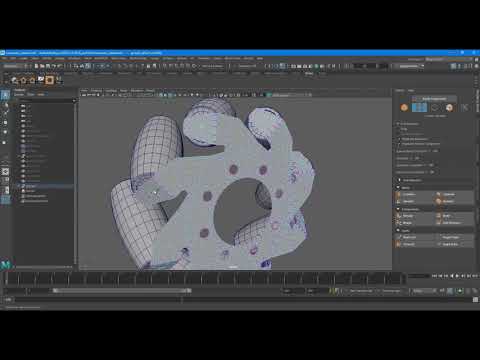 Wrote a script that saves time creating Holes in objects. Works on multiple component selections(Vertices and Faces) for Maya 2018 - 2020. https://www.youtube.com/watch?v=I913wBznX9A Available at Artstation storehttps://www.artstation.com/marketplace/p/KLV1/melktholepuncher Gumroad https://gumroad.com/l/nRvNV
 -
Re: Advice with clothing texture seams

 This is the warning. At least on my laptop. I think the number was different on my PC: // Warning: file: C:/Program Files/Autodesk/Maya2023/scripts/others/texShellArrayContains.mel line 56: Converting string "" to an int value of 1168. Another one says 97 at the end. This is how they're looking at the moment: And then…
 -
Technical 3dsmax question
 How can I get this? _^_^_ Can this be done with materials or options, or hack scripts? What I want is to be able to hide or remove edges form one model but keep them for another? The detailed version is sculpt, and the obvious lower detailed version is the new topology. Help!
>11555 results