Search
-
Re: Road To Perdition Character

 :D yeah, that was my "I can´t decide which material presents forms and details better" phase. and just like that, mere 15 years later I´ve decided to revisit this model as if dozens of my other personal projects (published or not) were all finished already...
 -
Re: Help! Multiple subdivisions on multiple objects!
 Are you merging down gradually, or merging all at once? Merging down will keep levels as long as they are on the same number at the time of merging.
 -
{WIP} 1970s GM New Look bus model.
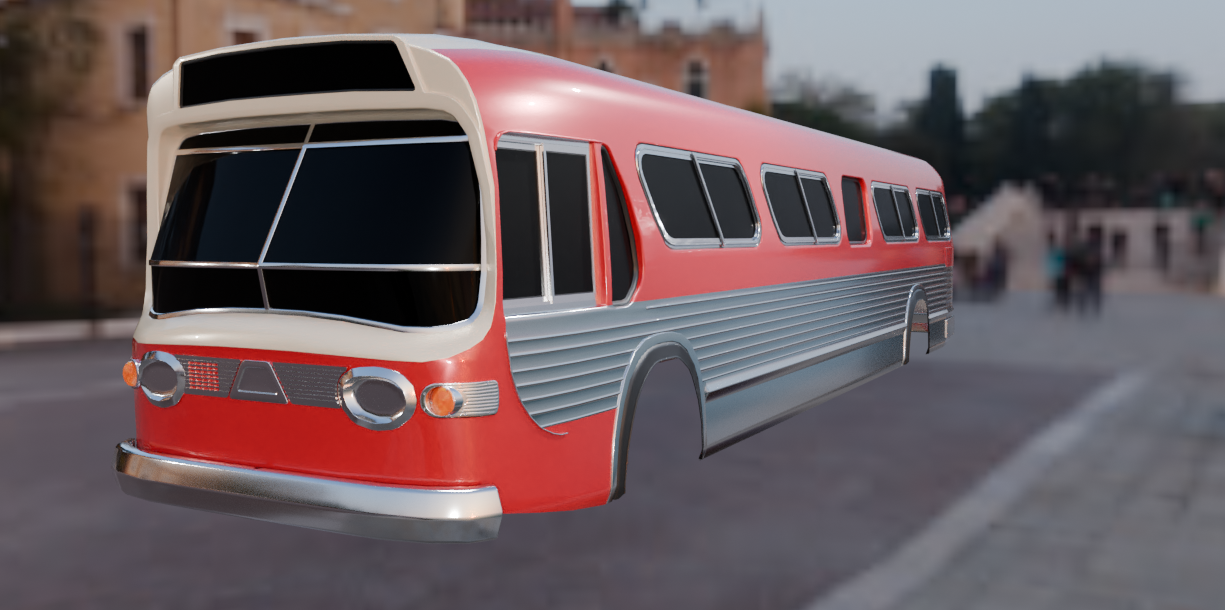 Hello. I've been working on this model of a classic GM New Look bus also known as the "Fishbowl", I intend to keep it roughly around 100k polygons for the finished model while maintaining as accurate looking proportions as I can. When the model is done (hopefully soon) I intend to make some renders of it with a heavy…
 -
Re: Early-Late 2000s CGI/Game Models
 Ah okay I see, what about ears? What is a common method for that? Realistic character wise? Modeling separate and then merging it together?
 -
Re: Unwrapping and texture question on model
 Yeah looks like has turbo smooth on it but as said above, if importing your model doesn't make your system want to turn it's toes up at the mere thought, I'd personally just hit import also I think SP has triplanar projection which will be the only option I'm afraid, since your model isn't re-topo'd nor UV'd.
 -
Re: Unreal Engine 5 Tangent Space and Triangulation Problem
 Well, this could also simply be incorrectly laid UVs, or, UE displaying the texture as mapped to an incorrect channel receiving an automatic unwrap. @nattemre : simply provide your source file (as exported from your scene/as imported into the engine) for people to have a look, otherwise any advice would be a mere guess.
 -
Re: Zbrush Subtools export
 You have to merge all your subtools, don't be afraid, it will keeps your polygroups. To do so : in Subtool Seciton, look down for Merge => Merge Visible. Then a new Subtool will be created name as " MERGED... " now just hit export ;)
 -
Re: Holy crap. XSI problem!
 OH LOL. this is how it works. jesus i totaly forgot. this drove me up a wall the first time. when you have 2 objects and you want to merge them, xsi creates a 3rd object that is the merged one. it leaves the 2 objects as they are in case you want to go back. haha with it's history saving feature and this whole thing, it's…
 -
Re: The Bi-Monthly Environment Art Challenge | November - December (93)

 Hello, Everyone! How are you doing? For past few weeks, I have been sick but thanks god I catch up the progress. Hope no flu in winter! Everyone is healthy! I have created the props such as: Pickup/ Carton/ Aircon /Barrel /Crane /Bar&Ropes in the truck /Newspaper /Tape on the floor /Coke /Plank Kit /Pipe /Manhole Cover…
 -
Re: How to enlarge multiple subtools ?
In the SubTool Subpalette, you can merge down (which may require you to change the order of subtools, which you can also do there using the arrow buttons) and merge visible, similar to merging layers in Photoshop (there's a newer option to merge similar, which might even work well in this case and save you a few extra…

>6861 results