Search
-
UDK scene: Ancient temple - Sanctum (WHEN ENTERING THIS THREAD, CRITIC!)
 My work so far! I could call it finished, but If someone has any ideas to make the scene better, do tell please! After started and (kind of) finishing a awesome mech-tank I am now starting on a new portfolio piece called: Sanctum. (My old thread: http://www.polycount.com/forum/showthread.php?t=116199) I will make my first…
 -
Re: Specular and gloss maps tutorials ?
 Hello, Are you looking at creating spec/gloss maps for PBR? Substance Designer has spec/gloss and metal/rough PBR shaders and material workflows. We have an archived live stream that was given on working with PBR in Substance. https://www.youtube.com/watch?v=LP7HgIMv4Qo&index=2&list=PLB0wXHrWAmCxOEZkYTabwzTEvAE9gBuPY Here…
 -
Re: Material setup - Metallic / Specular (using DDO)
 Unreal will use an automatic value for the spec which is pretty accurate for most dielectrics if you don't plug in a spec value (generally it's recommended in UE4 to NOT use the specular input). Besides that, a spec value of .5 is incorrect for most non metals. Generally non metals have pretty low spec, see this chart from…
 -
Re: finishing an old(er) character
 nice work man I only noticed a few things on it that I'd fix. First, his bald head seems a little flat... maybe add some slight color variation or a couple veins or something to add interest. The other issues are mainly with his torso anatomy. It looks like you got the pecs right on the model but raised and changed them in…
 -
Re: Specular map question
 Cool guys. Lots of discussion on the subject here - it seems like a problem alot of us have come up with before. I'd actually thought of the bump map/ spec map with small, fine bumpiness - should give a "wider" specular highlight, driving home after I posted the question. However, when I got around to trying it that night.…
 -
Re: Nice Specular material?
 I am mostly asking about metal and metal painted surfaces. I guess I am just asking are you doing anything fancy to highlight your Spec map that you generated in Photoshop. Like I said I am just creating a new material for my assets and for the spec just plugging my map into the Spec input and boosting the spec power with…
 -
Re: I got my dream computer. Here's how that went bad for me
 UPDATE: I have an update! SUBHEAD: Unexpected Pitfalls So I got sick of microslop's shit for the very last time in November of last year. I didn't post on microslop's forums that I was switching to linux, and then keep using microslop's products. I just did a buncha research about which distro would be best for me and…
 -
Re: Specular level/power vs specular color vs gloss
 Spec Power and Glossiness are the same thing. They are greyscale maps that dictate the size of spec highlights (not to be confused with brightness). A higher gloss value (like white) will make the spec high light very small, simulating a very glossy surface. A low value (like dark grey) will make the spec highlight large,…
 -
Re: [FINISHED] - UE5 Realtime Metahuman - Ryan Gosling: Drive

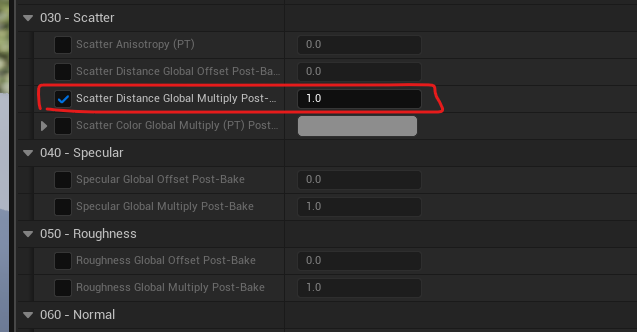 Super cool to see all your work on this. I have also had to deal with the whole xgen file into a metahuman mesh before and it's not fun :p But your results are looking great! For the SSS thing, I agree that the default metahuman material is a bit waxy, but you can edit it in the actual material: There's also edits for spec…
 -
Re: Simplest way to create specular map
 Usually as I work I have a Spec folder, which houses alot of Layer Adjustments in it with masks for specific areas. Its good because it updates as your diffuse updates when your polishing. But when the diffuse is done I spend a few good hours on tidying up the spec map, making sure the right areas are specular and never to…
>40355 results