Search
-
Maya 2014-2016 issue! exporting from Maya to Photoshop CS6, then importing back to Maya.
 Trying to import from PhotoShop CS6, already made my UV map. Trying to export to Maya 2014-2016 either one. My Static mesh is not showing UV map image? but instead just showing the mesh? where did i mess up at? I enclosed 3 images in a zip file, of screen shots of Maya and Photoshop. Thanks for the help!
 -
Re: zbrush update 2020 1.4 borked
 go into your licenses and download the older installers. i can go down to 2018 officially tho, 2019 is not supported anymore. which is fun because some of our clients are still on 2019 and we couldn't switch to 2020 even if we wanted to...
 -
Re: Early-Late 2000s CGI/Game Models

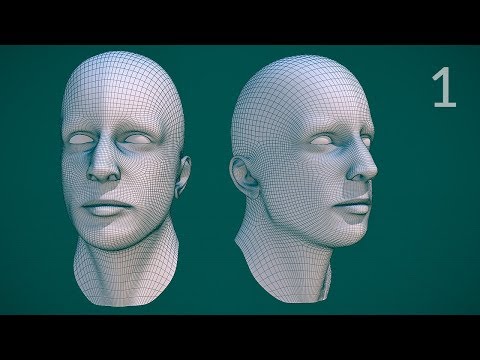 Johnathan Williams still has some public videos of his edge modeling and facial topology series from the late 2000's and early 2010's. This is fairly representative of how things were typically done prior to digital sculpting. At least for those using open source tools from the period. Tool sets do vary but a lot of the…
 -
Cant Stop Symmetry in Maya 2014/13
 I have no idea whats going here.. I just downloaded Maya 2014 because I hated 2013 and was hoping 14 would be better.. I was having this issue with 13 where I cant get maya to NOT do symmetry when moving a vert around.. Its so frustrating.. I have to use 2012 because it doesnt have this issue.. but I would love to know how…
 -
[Help] Convert Maya 2018 scene to Maya 2015 ?
Can anyone help me, I cant open my scene on Maya 2015 but I have no way of changing it to a 2015 scene. I need it really urgently right now. -
Voxel Remesh for 3dsMax

 Voxel Remesh is a multi-threaded & C++, volume based remeshing plugin for 3dsMax developed by PolyDesign. - Volume based Voxel Remesh allows you to:* Create closed surfaces from self intersected meshes, * Create a high-poly mesh for baking with round edges, * Create a lowpoly mesh from highpoly, * Generate a better…
 -
Maya 2012/13 causing system freeze with custom shaders
hi All I`ve recently upgraded from Maya 2010 to 2013 and I`m getting complete system freezes when working using our game engine shaders. I`ve tried the same scene on another PC and it runs fine, and it also works with standard maya or vray shaders. I have installed the latest nvidia drivers, gone though my system, bios,etc… -
Re: 3ds Max 2017 - Layer Explorer gone boom, anyone seen this before?
 Looks like Dictionary was introduced in Max 2017.1. The best you could do is install 2017, update it, use this startup script there, and then Save As 2016 format. To keep working in 2016. Sorry. http://help.autodesk.com/view/3DSMAX/2018/ENU/?guid=__files_GUID_39A9FDB8_E508_413F_BF58_EC8F52BE7CA9_htm
 -
Still having issues with Maya 2011/2012...
Im still having the disappearing act going on with my geo... I thought maybe it was a 2011 bug, but it does it just as bad in 2012. Someone suggested making sure that polygon transparency sorting was on, which I looked up how to do online and sounded like it would fix the issue, but no luck. The description of what it does… -
Re: 3DS Max 2013 - No XView displayed in viewport
 CPU - i7 6700k RAM - 32GB DDR4 3000Mhz GPU - Vega 56 OS - Windows 10 LTSC 2019 I also don't have this issue on 3DS Max 2012 & 2019. It's just with 2013. Edit: Aha! That was the problem. Switched from Nitrous to Direct3D, and voila. Now the XView shows properly. Thanks man.
>20152 results