Search
-
Check which object file was imported?
 Hi, this is a very stupid question, but is there any way that I can check which 3d object file was imported in Substance Painter? I got messed up with my file directory while I was working on stuff and I have no clue which is which now. It'd be helpful if there is any way to check which mesh file is being used in the…
 -
Interact with objects - flowchart node available?
Hi! I must be blind, but I just kind find any way of using objects in the game? Say I´´ve got a valve static mesh in my game and the player should be able to open it by turning the valve wheel. Is there a flowchart node "use" anywhere? Anything I can interact with my world? Press buttons, pull levers, etc... Thanks, Oli -
Need help : Sub object to face Script
 Hello, I would like to create a script that will convert any sub object selected to faces. So if vertex than convert to face if edge convert to faces if element convert to faces Can anyone tell me what are the script lign for that. Thanks in advance. Massimo
 -
Artifact on Curvature map and Object normal in Marmoset.
 Hello!. Who knows what kind of artifact on the Curvature map and Object narmal? There are no such problems on the AO and the Normal. There is only one smoothing group on the model, I reset the normals, I reset Xform, there are no inverted polygons, I tried different file formats. What could be the problem?
 -
Reseting transform without repositioning object in Max?
I have a complex rig that uses LookAt constraints on various parts. The problem is, exporting for Unity as an FBX brings up the message "Warning: Non-Orthogonal Matrix Support." According to this, resetting the scales and transforms should solve this. However, resetting the transforms also repositions the object. Is there… -
Mirrored object baking error
 Hello everyone! I have weird artifacts when baking in Marmo mirrored object, especially around seam. Did anyone have similar problem and maybe could help? Meshes were made in blender. My HP doesn't have UV mapping and double geometry or hidden faces, my LP have standard Mirror modifier Blender v 2.93.6 Marmoset 4.0.2…
 -
maya Error: (Mayatomr.Geometry) : unnamed object is not a mesh, ignored.
 I'm getting this error trying to bake in maya mental gay anyone know what this is? Error: (Mayatomr.Geometry) : unnamed object is not a mesh, ignored.
 -
Texturing large scale objects, without losing texture density?
Hello, everyone! I was wondering on how you'd create large environmental pieces without losing out on texture density? For example, would you create the albedo in a bigger resolution and keep the normals as it is? sound silly, I know. To be clearer, when I say "large environmental pieces" I meant those non-modular pieces… -
3ds max - rotate a object shortcut
 I'm really feeling dump at the moment. I can't find a simple shortcut in my max 2010 manuals, nor a little script with a button to rotate a object or selection around 90 degrees. Most times I use the "r" key to rotate with the mouse then but I would like to have a simple shortcut to do the job so I can save the manual…
 -
Making foliage from an object - editing normals
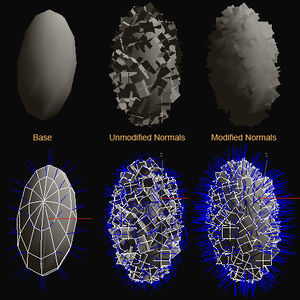 Does anyone know how to create the scattered polygons shown in the picture under the Modified Normals text in 3ds max? I know that this is from another thread but it didn't exactly explain step by step on how to create the modified version of the object.
>26394 results