Search
-
Displaying Input Node Labels?
 Hi, I've made a function which takes various image input nodes, however how do I display the labels for these inputs so I know which is which? It would be nice if the bitmap showed the name of the texture file too...
 -
Red wire when connecting my tga normal map bitmap to the normal node in SD
 Hi guy's, Just can't believe i have to ask here such a simple question but i am Googling for a solution for more than an hour without success and the substance designer documentation is useless on this. I just have a series of normal map render from 3ds max in the tga format and i cannot connect them to the normal node, i…
 -
Re: [3DS MAX] Moving UV shells after peel mode does some wierd stuff!
 You had a pinned vertex in Peel mode. That's why it was behaving like that. Also, quick tip for Peel mode: turn off 'avoid overlap' so that all your islands don't get jigged around every time you enter the mode.
 -
3dsmax's "Peel Mode" - Maya equivalent?
 Hey, in 3dsmax there the amazing "Peel Mode" where I can pin verts and pull and push the UV's to get straight results really quickly. Wondering if theres a Maya equivalent? :)
 -
Re: Coke Commercial
 [ QUOTE ] now if coke were still made with actual fucking sugar instead of high fructose corn syrup in this country, that might be a different story. [/ QUOTE ]You can't get regular Coke in the US now? What sort of madness is that?
 -
different colors in game mode
 I have a post process chain applied to my scene that is only visible in game mode. However when I try to play the game I get very different color and contrast than what appear in the editor window. What causes this?
 -
Re: Simple, artist friendly version control?

 You're right, I should add that we're developing it actively and currently use it at our studio for 2+ years now. While we were building it to improve our pipeline internally, we realized it's this is also problem a handful of other Artists and Studios had so we spun it off into an open source project of its own. The…
 -
Weird Graph Nodes
 Hi, i have a problem for which I can't find a solution. And my own experience with Designer is not big enough to solve it by myself. My project has the dimensions 512x512. I have (successfully) created the usual maps (PNG - AO, normal, curvature, opacity etc). In other programs the maps appear completely correct…
 -
How can I improve my baking in SD6? my normal/height maps come out blurry.

 I hope the image explains what Im talking about. i made a panel with 4 screws in the corners, if I bake in Blender they come out perfect, nice and flat, and but in SD6 they come out terrible at a weird angle. any suggestions?
 -
Re: Does anyone know how to get custom made trees in Blender working correctly in Unity Terrain Tool?
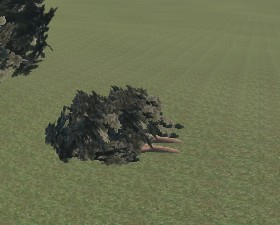 Hello, @seanwink You’re actually hitting 3 separate problems at once, and they all come from how Unity’s Terrain system expects trees to be set up. See below details 1. Tree sideways In Blender: Ctrl + A → Apply Rotation & Scale Rotate X = -90° OR fix in Unity using a parent prefab 2. Tree half underground Set tree base…
>58108 results