Search
-
Re: TexTools 3.0+
 Great work, renderhjs. Is it possible to specify the Photoshop it opens? I'd like it to open 32-bit, but it's opens 64-bit by default (but not if the 32-bit version is already open, so not a huge deal). Thanks.
 -
Re: 3dsMax UV-Islands to Smoothing Groups Script.
 Wouldn't TexTools built in tool for UV->SG work? Why would you want every face to explicitly be a different SG? Like @monster mentioned, there are only 32 smoothing groups, and you most likely will have more than 32 islands.
 -
Re: Normal Map Baking Artifacts - Maya 2014
Thanks for your reply. Yes I saved out at 32 bit .exr from maya an it fixed the issue. Problem now is that when I convert to 8 bit I get a lot of noise. Is there a way to bake as a 16/32 bit .TGA? -
Re: TexTools for Blender

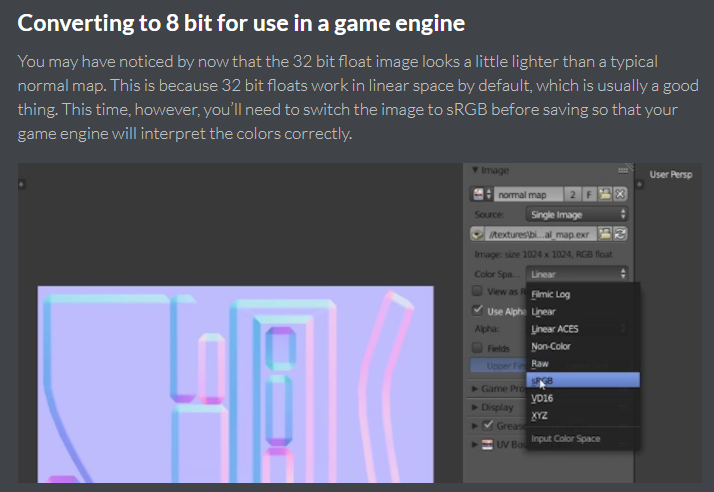 @kamilozo Likely not gamma corrected 32 bit float. From: https://www.cgcookie.com/articles/bit-depth-how-compression-affects-normal-maps Perhaps I make the 32 bit float optional in the settings
 -
Re: Maya Bump Map stepping - how to fix?
 Use 32-bit texture formats. Basically if you're using 24-bit textures, you have 256 levels of height. That leads to stepping. Save your textures as 32-bit single channel greyscale textures.
 -
Re: Farcry Wii
 [ QUOTE ] I wouldn't blame the tech, but the artist's who are convinced they need powerful tech to make good looking art. [/ QUOTE ]Yeah, damn spoilt brats. Give me 100 polys and a few 32*32 textures and I'll rock your fucking world.
 -
Re: Dual Monitors Different Sizes Yea or Nay
 im running a 32" and a 21". Before the 32(my tv), i had a 19 full, because i didnt have a widescreen tablet. I never had an issue. You get use to whatever you have
 -
Re: Marmoset Toolbag - MASTER THREAD
 I'm having trouble getting alphas to work, im using a 32 bit PSD with an alpha channel, but that wont work as a diffuse or an alpha, it shows up as black. Photoshop wont save TGAs in 32 bit for some reason
 -
Re: Computer spec's and 3d Work
Can I run a 32 bit application in a Windows 7 64 bit environment? My version of Softimage Foundation 6.5 is only 32 bit. But I have other apps that can use 64 bit. Thanks folks. -
Re: Bugs! We got 'em!
 Fixes posted for 27 and 32: 27. User Title is showing old rank titles in some users' Profiles, which looks like a duplicate rank. (fixed 8/10) 32. Missing icon for Sketchfab embed button at far right end of editing toolbar. (fixed 8/10)
>4126 results