Search
-
Re: Cel Shading
 Shader Forge has an outline mode built-in to the shader editor, worth a look if you go back to this. Shader Forge is really very easy to use, if you've ever used any node-based editors, like Hypershade.
 -
Re: Autodesk Maya 2016
 nope sadly not :( we don't use any modelling nodes on these, just mesh and texture applied and assets put in layers sometimes the layer disappear, sometimes the materials, sometimes the meshes, sometimes combinations and sometimes all of it alltogether. It is horrible.
 -
Need help using the Simple_Hair_UV script for creating hair uvs
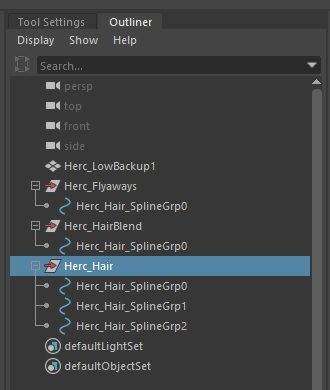
 Im using the Simple_Hair_UV script found in the Xgen UE documentation however when i imported my IGS alembic file that i exported, it has 3 different description and multiple splinegrp . How do i add multiple groups and curves in the script? Tried using " ; " and " , " in between each group and it doesn’t work.…
 -
Need help using the Simple_Hair_UV script for creating hair uvs
Im using the Simple_Hair_UV script found in the Xgen UE documentation however when i imported my IGS alembic file that i exported, it has 3 different description and multiple splinegrp . How do i add multiple groups and curves in the script? Tried using " ; " and " , " in between each group and it doesn’t work.… -
Re: Game Industry Layoffs - WTF?

 [moderator note: this was originally posted in a new thread; it has now been merged into the larger discussion] If admin/mods want to more clearly clarify which specifically you are obviously more than welcome to "fix" the title: Feel like he is still kind of kissing arse but to each their own thoughts.…
 -
Re: Blender 2.5 Crash Course (Not For Retards)
 That was a great video! I actually took some notes! I have a couple points I want to add on to your video: Multiple Component Selecting Mode- you can press Shift and select multiple component modes, like Shift select both Face and Vertex mode, or all 3. (similar for the transform widgets rotate, scale and translate) You…
 -
Re: Distorting Procedural Textures in Blender
 Ohh i didn't looked too deep into the nodes.. after seeing the missing coordinates.. and additionally to what @Michael Knubben said.. using a value and/or a vector and then mix using any color modification node (linear ligth, color ramp) might be a not so clever idea.. better use any Math node or Converter -> Float…
 -
Re: Maya fbx import only wireframe visible
 That is typically a good way to clean up a mesh. :) Models also have a Drawing Overrides section in the attribute editor for both the transform and shape nodes, this was probably set to Template mode. Something to check out if you run into this again later.
 -
Re: Substance Desginer to Unreal, basecolor map turns out tinted in the material editor?
 Probably too late but if someone is asking the same thing... i fixed my issue this way In your substance, add a 'gradient' node juste before your baseColor output. Your baseColor output will be set to color mode and not grayscale.
 -
Re: (Solved) Substance PBR export appears more glossy in Maya
 Looks good matey, have you shared the ShaderFX file anywhere? I tried to recreate your graph from the picture but none of the available nodes in ShaderFX give me the texcoord with the RG outputs you have on the left? Ta!
>37259 results