Search
-
Re: WIP: Sig 551 model & textures
 After spending a lot of time trying to get the normal map right I started working on the textures. Here are two WIPs. Substance painter seems to be a ridiculously powerful tool!
 -
noob texturing questions
 I found this image of a diffuse and a spec map while reading through the vertex 2 magazine and I had some questions about spec maps. I was wondering how they are created as well as how they would be applied in maya? I tried looking it up and I was told that you are supposed to invert the diffuse color for nonmetallic…
 -
Select faces with black and white texture map in Blender??
 Hi, I wanted to ask if this is possible where u can select some faces using a black and white map like the Vol. Select modifier in 3dsmax. Is there anything like this in Blender?
 -
Human skin - model/skin textures
 Is there somwhere floating free example of human skin along with model ? I wanted to start working on realistic shader and I it would be cool to get an ready to go model with: 1. Normal map. 2. Color map. 3. Subdermal/Subsurface map. edit: I managed to find this: http://ir-ltd.net/infinite-3d-head-scan-released But it…
 -
Environment/Texture Artist Looking for Work
 I am a dedicated artist who will meet any deadline. I am always looking for work so please email or PM me at anytime. My current website is www.erikshivner.com and it has links to my resume and LinkedIn profile. It also has a way to get ahold of me other then these forums. Please contact me if interested in hiring me for…
 -
Re: Can you vertex paint nanite meshes?
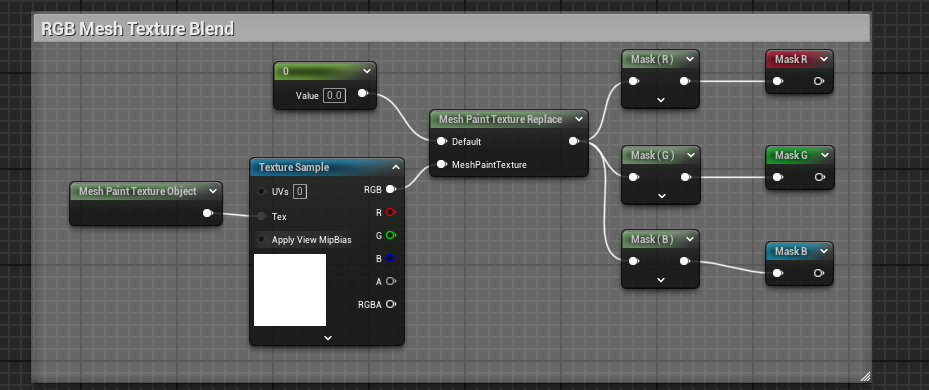 As mentioned you can vert paint nanite meshes, but you have to "apply" the vert paint which will make every instance of the mesh in the scene take that exact vert paint (any different vertex data breaks nanite instancing between meshes, ie be careful with spline meshes as each segment is not instanced and so on), so if…
 -
Guild Wars 2 shader/texture or both?
I noticed when playing GW2 that when looking at one of the legendary greatswords (ex: [ame=" https://www.youtube.com/watch?v=SbWI7WQD_TA"]Sunrise[/ame]) that a photo image within moves around when you move the character. Would anyone have an idea as to how they were able to do this? -
dark patches along segments of texture
 Hello all, When I have my model in Maya or 3Ds Max I have no discrepancies or problems along the UV islands on my model. But when I bring the model into Unity I get these funny dark shadows along the seams. I was wondering if anyone has encountered this problem before or could give me any ideas how to get around it?
 -
Tilebale Textures and the Tilde Key in zBrush
 So, I'm trying to make a tileable alpha in zbrush using the method wear you get a snap shot from the 2.5 canvas. The thing is when I go to use the 'tilde' key (~) to move the canvas about so i can fill in the gaps it doesn't let me. Anybody know what could be wrong or if anyone has experienced this. It's so frustrating :|
 -
How would you achieve this Texture?
Would the glass just be a normal map with specular? -But how would you achieve that distortion/noise? If the glass is the normal map, how would you have the gaps between the green/blue hexagons and the holes within them as a normal map? (do you simply add 2 normal maps in material editor in UE4?) Thank you. It overlays on…
>63302 results