Search
-
OBJ Format Question
 I'm working at a place that is using GIT hub to transfer files between the art team and our programmer. Sometimes our objs are too big for git to want to deal with. I'm told by the programer that the problem is that Maya exports obj's as an ascii. We exported something through meshlab to obj and apparently those are binary…
 -
Zbrush --------> 3dsmax obj import (Taking for eva
 At work some of of guys will make a mesh in max, export it as a Wavefront obj... then take that obj into Zbrush, then export the 300,000 poly object back as an obj for importing into max. Then in 3dsmax we want to import that obj. Problem is... Max can take 40 mins -> 2 hrs. to finally load in the high res mesh. MAx seams…
 -
UV island selections in XSI
 Bit of a longshot - but does anyone know of a script for xsi that quickly selects UV island edges and applies a hard edge? At the moment I'm doing most of my modelling in Max and exporting straight into unreal - I've been using turbotools to quickly do an island to smoothing groups before normal baking which works…
 -
Re: Problem With High Poly Baking (help)
 thank for the help if I import my high poly mesh from Zbrush into Maya then export it to substance it works but it does not use the high poly exported just from Zbrush even though the scale and position have not changed. and if I put the high poly into Maya first I lose the ID map I set up in ZBrush. thanks for the help…
 -
Re: Visible UV seams in Substance Painter at mirror edge

 All right, I figured out how to tell the mirror modifier(s) to shift the resulting UV maps by one square, but I'm not sure about the welding. The UVs shouldn't intercept anymore, and I think the modifier should "weld" the vertices, at least it definitely combines them to the same one after being applied on export. Upon…
 -
Re: Normal map issue

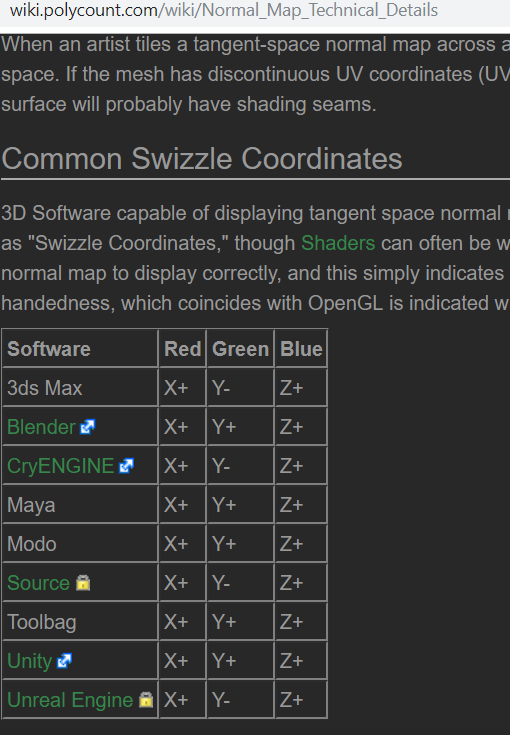 I think you may be using the wrong normal map format in your substance painter project. Try project settings > normal map format and choose the opposite of whatever you got right now. This is just for display inside painter. When you export, you can convert to whatever formats you need. I usually export both a directX and…
 -
Re: What's the best way to skin hair planes
 @CheeseOnToast: I'll give that a go as soon as I get home again. @jfeez: I looked at that before but the download link is 404 and if I copy the code it gives me error messages. I don't know coding so I cant fix it either unfortunately. @Mark Dygert: I've used max quite a bit and I have it installed so I might be able to…
 -
Re: Modo - Smoothing groups and the infinite sadness
 kirtalvin Yes, I saw that. That's the god awful smoothing group UI I was referring to. Unusable IMO, unless I just don't understand what I'm looking at. I generally set up the base shader at 89 degrees and that makes the model look good BUT it exports with a bunch of seemingly unnecessary vert breaks. I can make the model…
 -
Re: Modo UV's
 Oh, that doesn't matter. The engine or 3D program will handle that automatically. Setting the UV viewport to be rectangular rather than square is simply for the benefit of whoever is unwrapping the model - it doesn't have any effect on the model or it's UVs. If you're trying to export a non-square UV for texturing in…
 -
Re: Creating Hair Alphas for Games?
 In Zbrush alone: Place a black flat plane behind your fibermesh, then set the fibermesh colour to white, set document scale to whatever your desired texture resolution is, fit the black plane to the document size and render + export the flat color shot from the Document drop-down. In xNormal: Export your black background…
>17864 results