Search
-
Shading errors and smoothing groups
 Hello, I'm dealing with some minor shading errors around points with more than 4 meeting edges. I couldn't fix the problem with blended smoothing groups or detaching the problem faces to a separate element. Does anyone have any suggestions? Here is an image to illustrate this: edit: This is in 3dsmax. Also, photo to show…
 -
Triangles at Top of Cylindrical Object - Bad Smoothing?
 Hi all, I'm getting a weird smoothing group error at the top of this object, there's visible lines diving it up into triangles. Any idea why this is happening? Cheers! Dan
 -
What is this in Maya's smooth preview?

 So as i was modeling the grip to an assault rifle i noticed that when i had the one half of it done that it was giving me these random edges in places that are in a completely random place, i mirrored it over thinking that may have been something to do with it, but that was not the case, as you can see it's completely fine…
 -
Modular rounded piece. Seam on the smoothed mesh.

 Hi. I made a modular piece in Maya. All the edges are smooth but the border edges creates the seam. Is there workaround? Snapshot from UE4.
 -
[Unreal4] Retop smoothing issue

 Hello everyone, I have a low poly mesh that's been smoothed out in 3dsmax. I have no normals on that area now, but it looked the same way with the baked normal on. This is how it looks in Unreal: How would I approach this? Do I add polys or rebake the normal map? Or something else? I apologize for the noob question. Cheers,
 -
Re: [WIP] Mavica FD71 - Floppy Disk camera

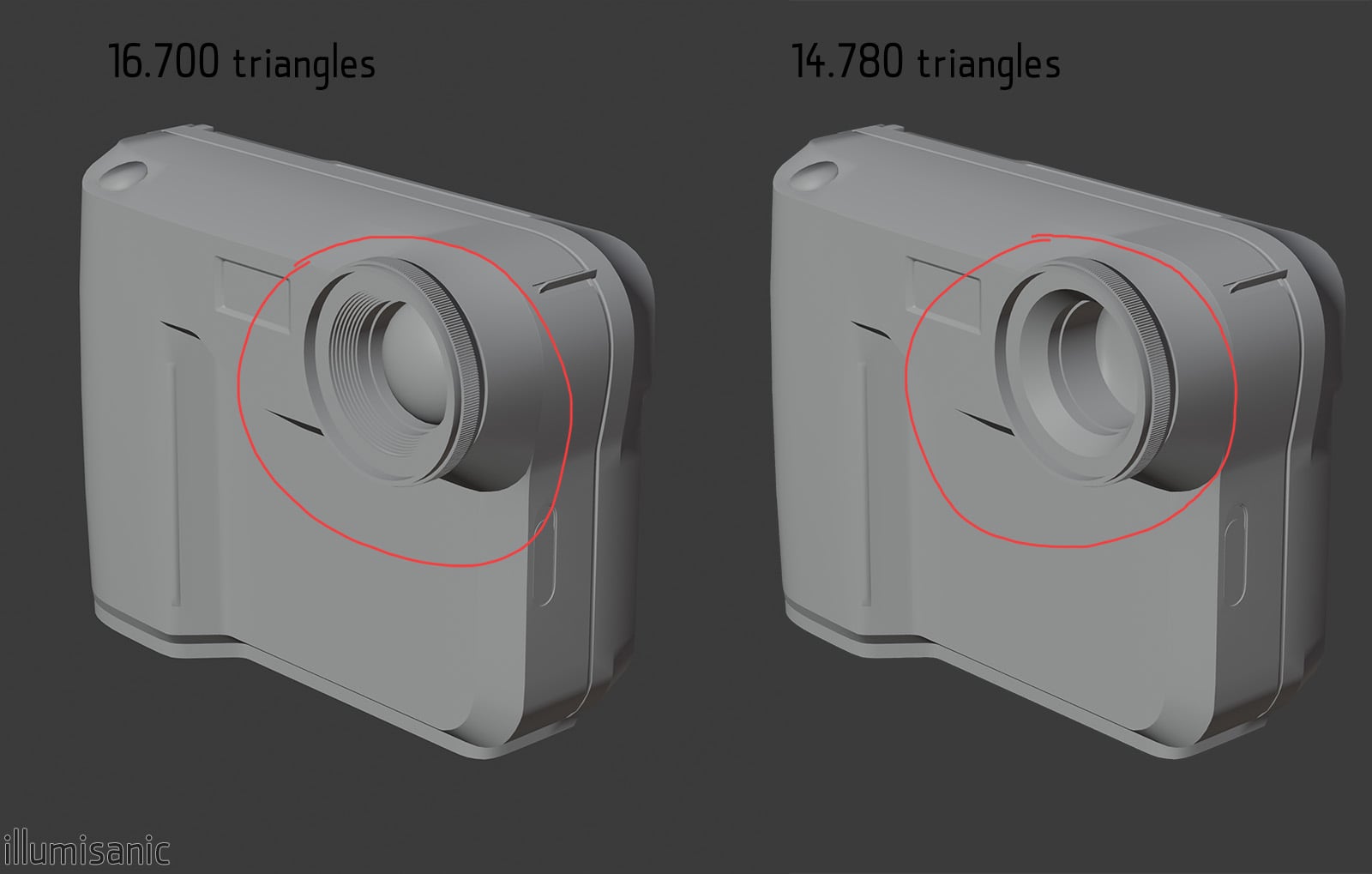 In the low version should I add the grip and steps on the lens or directly bake it on the smooth surface? It looks better, but for a portfolio game piece I'm not sure it's bad for "optimization evaluation" I'll be uv unwrapping. I don't know why everyone hates it, I have a blast doing it
 -
Problem with smoothing groups
Hi there... I'm having big problems with smoothing groups on my rock and i can't seem to be able to fix it. It's been haunting me for a long time but i haven't really started noticing it before now. Here are a few pics of a lowpoly rock with a normal map on it. As you can see in the pictures, there are seperate issues when… -
[Maya] Maps are angular and not smooth
Hello, I have a problem with baking out different maps from a high poly model to a low poly version. What I want the maps to look like is something like this: What I get at the moment are angular maps like that: I obviously I changed some settings. But I have no clue what to change to get my smooth maps rendered. Thanks in… -
3D Coat smooth subdivision?
 So in Mudbox when you add subdivisions it smooths the silhouette of the model, i.e. a cylinder gets rounder. Is there an option to do this in 3D Coat or am I supposed to import meshes that already have the correct silhouette and just paint on them to add damage? I imported an 8 sided cylinder with some edge loops and it…
 -
Re: 3ds max smoothing issues
 I have faced the same issue, in case of wrong topology quadrifying helps or HSDS modifier, also I found, that applying smooth modifier to your model can solve smoothing problems.
>15012 results