Search
-
Re: How would you approach this? 3ds Max
 @kosh3d: Clever! You'd still have to distort those lines to get the exaggerated curves of the ball in the OP, but that should be doable. I was wondering if the 3D renders were maybe just a rough 2D hack (as in: wrong), but all other images of the ball I looked at show the same curves as well.
 -
Re: Portfolio pieces
 Nice work so far! I have a (almost) finished model of a modified jeep myself. You might want to check your curvature. A lot of the pieces look flat, but aren't so in real life. Specifically the grill and fenders. I owned the same model for many years so I have these curves burned into my brain :) Here's a render of my old…
 -
Term Project Progress - Dragon-Age Style Blast Furnace Smithery [WIP]
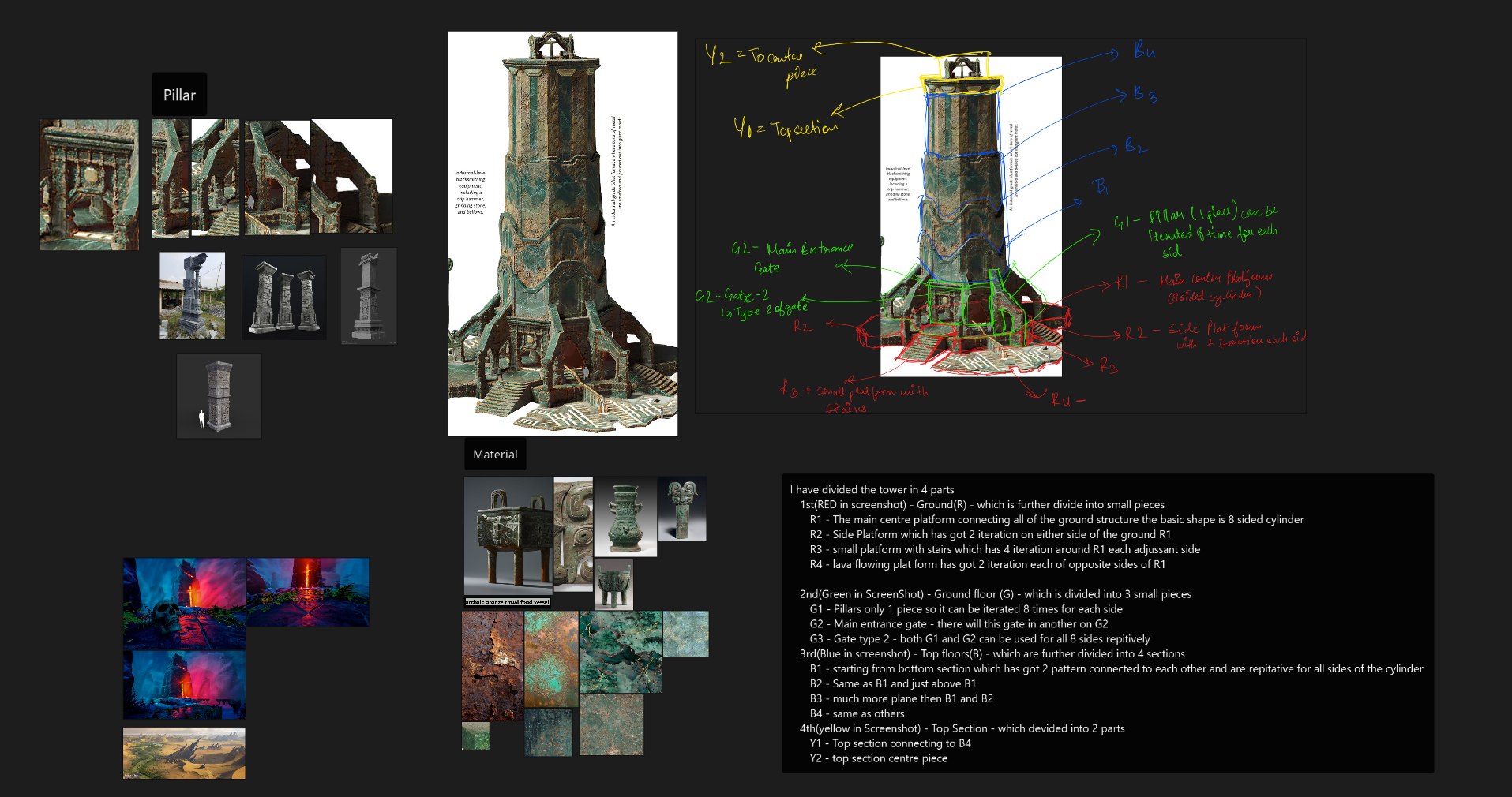 Hey everyone, I’m starting a WIP thread for a hero environment prop I’m building for my MA Game Art “Developing Skills” unit and my portfolio. 🔧 Project goal I’m basing this on the “Blast Furnace and Blacksmithing Equipment” concept from Dragon Age: The Veilguard (Creative Uncut link):…
 -
Re: Alexis
 thanks. my friend did rendering and composite . done in nuke
 -
Have anyone ever managed to do Photoshop LUT export files reader for Designer?
The one requesting 4k image is pretty tiresome to save and load . Especially when your sbs is already full of 8k bitmaps . I can't tolerate SD HLS node and do any color or gradients tweaks in Photoshop usually and wonder have anyone invented an easy quick way to share color tweaks into Designer? -
Really really need feedback on my character
 The issue is it looks really fake and weird which is definitely not the goal, I'm trying my best to make it look realistic but currently I'm stuck, it's rendered in marmoset.
 -
Re: Zbrush displacement issue
 It's more likely an issue on the rendering side. If you're using Maya/Arnold, try searching for that. This is also a good resource to look at: https://www.cggallery.com/tutorials/disp With the 32bit image, even if it looks black there's still data there.
 -
Re: Sketchbook: Tim Smith

 Here's a quick render of all the arm exercises together:
 -
Max 9 x64 craziness
 So, I'm trying to render out a sequence of frames. I can render individual frames just fine with no problem, but as soon as I set it to render multiple frames, it just continuously renders the first frame over and over again, for the duration of the frames I selected to render. Any ideas wtf is going on?
 -
3ds Max Lightmaps
I'm quite new to 3ds Max and have been experimenting with a few concepts to learn some techniques I'll need for creating a game environment. I wanted to test creating a lightmap on UV channel 2 so I followed these basic steps... Created a plane and some boxes Created 2 colours lights - turned on cast shadows Attached the…
>37776 results