Search
-
[Solved] ZBrush: Edges around open faces are warping when subdividing, please help

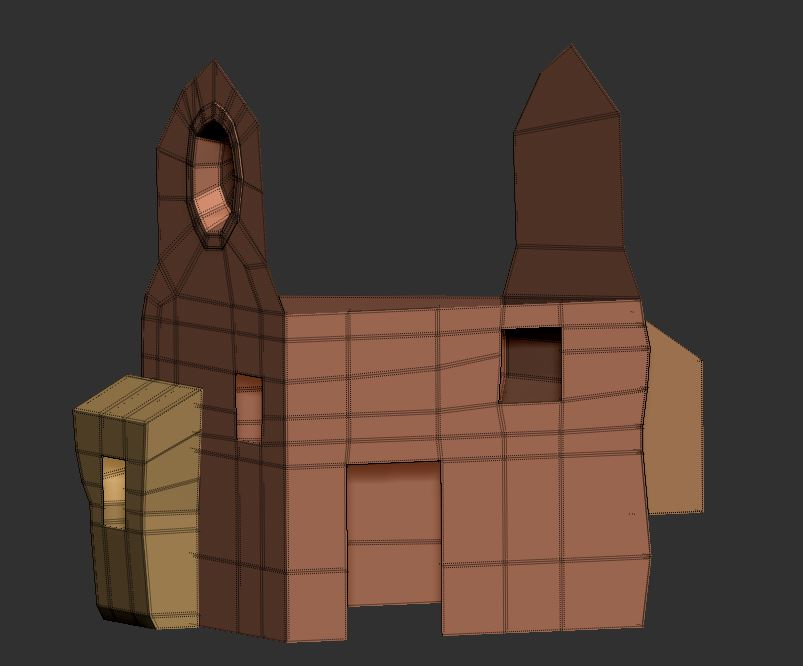 Hi all, When subdividing in ZBrush, the edges around open faces are warping pretty bad. Im modeling a building and wanted to sculpt all of the surface detail in ZBrush and then bake the low and high poly mesh in Substance Painter. My workflow has been: delete all unnecessary faces in Maya-open it up in ZBrush- put a…
 -
Re: help needed CgFx and texture offset-repeat
I think I found the solution, it is sampler2D ColorSampler = sampler_state { Texture = <ColorTexture>; MinFilter = LinearMipMapLinear; MagFilter = Linear; WrapS = Repeat; WrapT = Repeat; } excuse my newby questions I have just started on this...... -
Re: Rat Revival
 One critique about the warping, it conforms too much to the pits of his muscle, if it was wrapped tight it would be flat over any pits or sunken in parts of the arm tight cloth--> |) <--- indent in arm, its mainly happening on the inside part by the biceps.
 -
Re: [MAYA] Creating a normal map with rounded corners of a low poly model without baking high poly

 you could break up the UV's into islands with the boundaries as the edges you want rounded.... export as obj load into this tool then using the element mask in photoshop ..... add a gaussian blur and use the nvidia plugin to convert to a normal map..... for example a simple box uv elements (just each side)... guassian @…
 -
Re: Whale diorama
 That is some giant freaking kelp lol. I like the second one even though the scale is off. The theme of the first one is really dark, and really odd. The net adds this depressed trapped theme, but the swimming position wouldn't happen with a net wrapped around.
 -
Maya 2016 Curve Warp Tool missing
 So I cant seem to find the curve warp too in my version of Maya right now. I am fairly lost in what to do or what to try. I have tried to look around and find a fix but nothing has worked as of yet. I just know that it should be between "Cluster" and "Delta Mesh." Anyone know where to find this tool or another place I can…
 -
Re: link a dummy to a vert
Hi SpeCter, I did try linking to the object axis and unfortunately the space wrap didnt not follow. Because I'm using a cloth modifier on the mesh the object's axis remains in the same position as the mesh deforms, I wondered if there was a way for a space warp to follow a vert or a plane. -
Re: painting displacement texture in zbrush
 The best bet is to make the UV seams match the fabric's, then it will behave quite like normal cloth wrapped and sewed around an object. Otherwise, I think you'd have to mask off the sides to prevent the warping, and then rotate the mesh and apply it again. I stick with UVs though
 -
Re: [UE4] Original Spaceship - The Arrow
 I've unwrapped my spaceship. I'm going to use tiling textures for most of my spaceship surfaces, and I'm going to use the other UV channels to add grunge via RGB masks and perhaps liveries. I spoke to Tomas Woodward, and he said his spaceships were 512 per 1 meter, so I'm currently sorting out my spaceship's texel density…
 -
HandWraps
 I recently posted this and was given a answer that it would be best to use the zbrush built in feature to project out the wraps but it only had gave it the effect of floating cylinders that where gaggy instead of a wraps effect I wanted on this characters glove, so Im in 3d's max 9 trying to build wraps and Ive tried doing…
>13916 results