Search
-
Re: Gina (critique welcome)
 I don't think I'd call that a failure. As for the artifacts in your top right screenshot, that seems to be exacerbated by the fresnel effect/reflection and the fact that the backside of the top is visible behind that for even bigger contrast. We are probably looking roughly along the projection direction, here, which is…
 -
Re: Baking Problem in SP (Modelled in Max)
 Hi! Hm, interesting that you checked in Max but normals are flipped in the fbx. A simple way to check, would be to re-import the exported fbx and check that everything looks as intended. Since its normals define in what direction a face is looking, I would say flipping faces and flipping normals describes the same outcome.…
 -
Mesh fill does not fill mesh completely leaves visible Edges. (and there is padding space)

 When I use Fill/Mesh fill or even paint on a paint layer I get this result. The resolution of the texture is 4096. There is enough padding space.
 -
Re: SD Distance and Edge Detect nodes, how to combine with a stone texture
[Blur HQ] after the edge node + [level] or [Gradient Map] or [Histogram Scan] after it and before you blend it into your stone color. the point is to remove the aliasing by bluring the line and bringing back the sharpness of the lines by increasing the contrast. -
Need help with Edge flow and other tid bits.
 I always seems to run into problems within the shoulder and and hip areas. I just go to a stand still on how to make the flow work correctly (or even just connect it cleanly to the body). Surely I'm quite new and have decided just to just tackle it as I just want to dig in and hammer out my habits early on before it…
 -
UV Squashing in Borderlands 2 on masks for color tints.

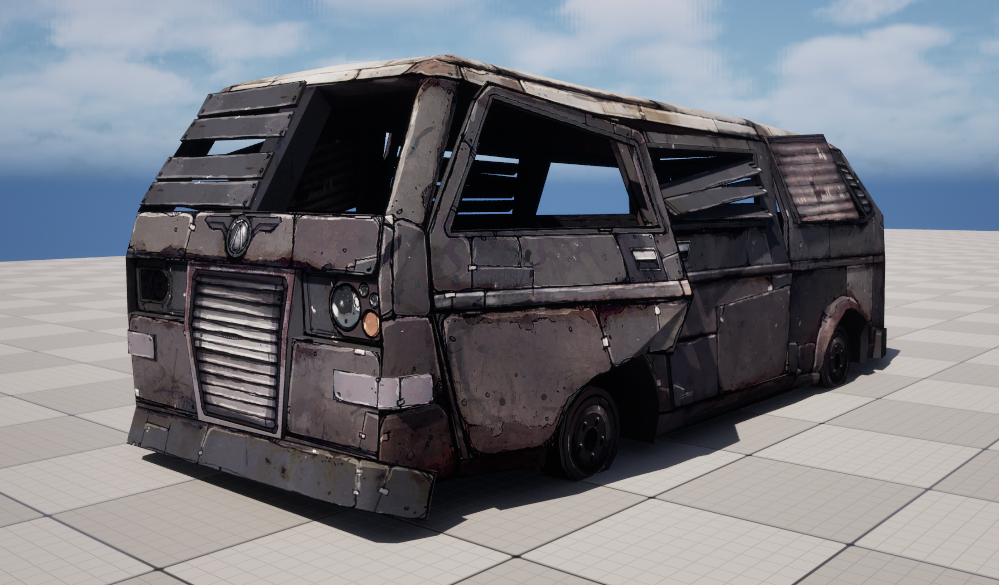 I wanted to share something I came across while looking at models and textures from Borderlands 2. There is a 3D model called WreckedVan that is used all over the game. It comes with a 2048 diffuse map and a second packed mask texture. The size might seem large for 2012 but given that it was standard practice to give…
 -
Re: Maya Marquee selection, I want it to only select complete edges that are inside the marquee.
Fast component selection in lasso tool selecting edge if it's center inside the selection. -
Re: New-ish to the modeling world. need some lovin
 yeah I think John_Warner nailed it. you need to focus on the large forms first, making sure the figure has a nice rhythm, balance, and weight distribution before you even think about adding and medium or small details [ QUOTE ] What's with the aversion to triangles? Is someone standing over you saying they're absolutely…
 -
Quick question! Why do I get sharp angles on the edge in Marmoset?
-
how to get beautiful edges and detail in dunes?

 thats how detailed i want it to be. look how perfect the eges are. no visible tris this is how it looks when i make it: i use world creator 2 i made the desert with 1/2 meter resolution. but when i send it to ue4 it just eats too much fps. i tried using the ue4 landscape lod settings without compositor but i dont know what…


>27979 results