Non square texture workflow - Unwrap modifier options

polycounter lvl 11
Hey 
I'm working with a non square texture ( for some reasons, I have my trim + decals on 1 texture 2048*4096 )
However, each time I want to place a strip on my trim, I have to go in the modifier Unwrap UVW > select my texture in the list > go to the Options > specify 2048 * 4096
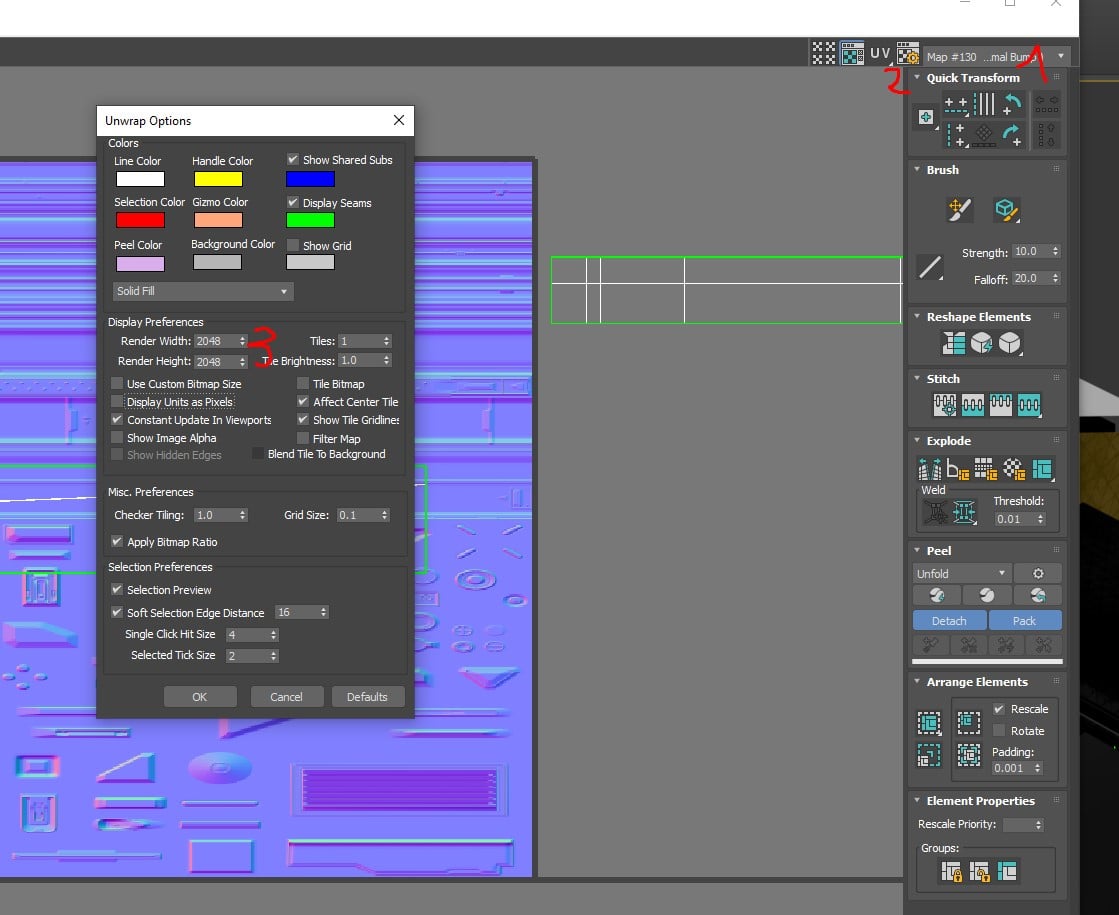
Is there a way to be faster ? Is there an option to adapt automatically the size UV space relative to the texture space ?
Thanks guys
I'm working with a non square texture ( for some reasons, I have my trim + decals on 1 texture 2048*4096 )
However, each time I want to place a strip on my trim, I have to go in the modifier Unwrap UVW > select my texture in the list > go to the Options > specify 2048 * 4096
Is there a way to be faster ? Is there an option to adapt automatically the size UV space relative to the texture space ?
Thanks guys
Replies
so there is no solution for a real time adaptative scaling relative to the texture ?
Sad story
event with a script ? we have a script for litteraly everything is possible on this earth, but not for this issue ?
there is a probably a way to reduce the number of times you need to do this by changing the order you do things - I don't remember getting particularly annoyed by this problem when I was doing a lot of work in max and i used non-square maps a lot.
https://www.polytools3d.com/tools/polyunwrapper/index.html