
Best Of
Re: Sketchbook: Frank Polygon
Subdivision sketch: minimum viable topology.
This is a brief write-up about subdivision artifacts caused by mesh deformation and how segment matching can create topology that reduces the disruption caused by intersecting shapes.
The accuracy of subdivision modeling is limited because it smooths the mesh by averaging the geometry. Adding, merging or moving geometry disrupts the segment spacing of curved surfaces and can deform the mesh. Subtle deformation may be acceptable but severe deformation will likely cause visible smoothing artifacts.
Below is an example of how mesh deformation affects subdivision smoothing when sliding, moving or adding edge segments on a cylinder.
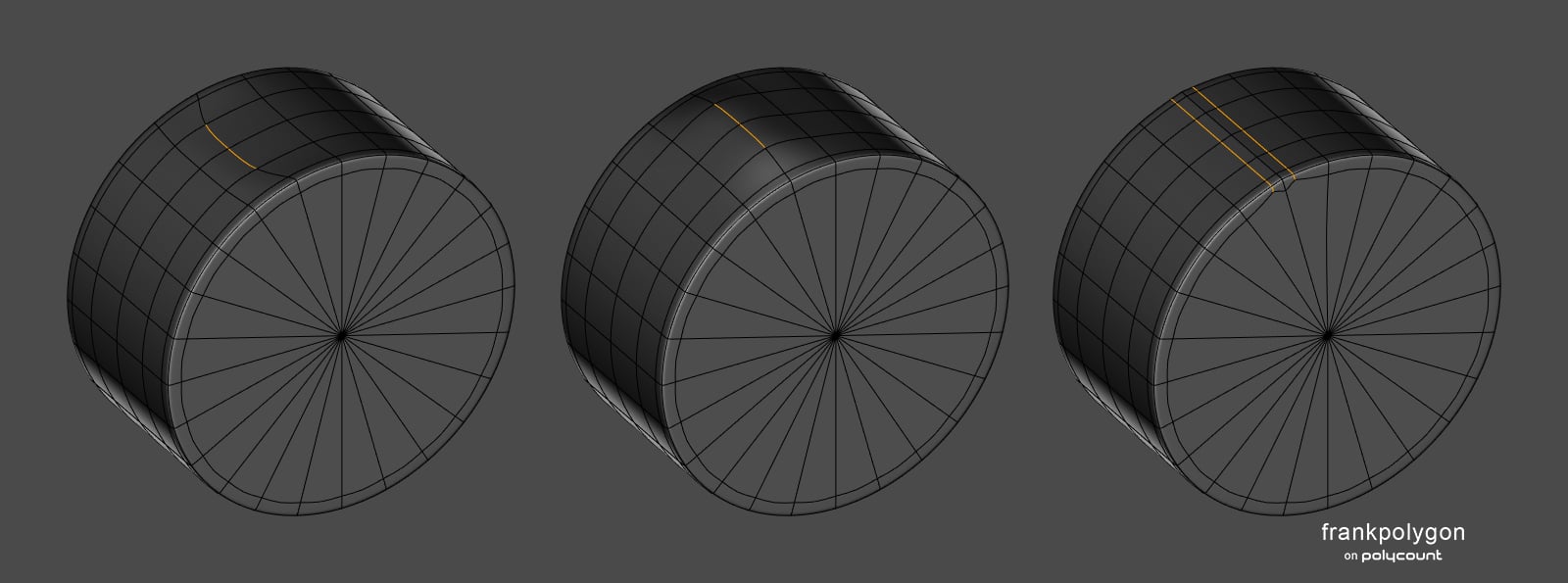
Mesh deformation, around shape intersections on curved surfaces, is often caused by adding support loops that disrupt the segment spacing or by merging the existing geometry into the intersecting geometry. The examples below show what this can look like when the mesh is subdivided.
From left to right: Adding support loops that disrupt the segment spacing near the base of the intersection tends to deform the curvature outwards. Increasing the number of segments and merging them into the support loop at the base of the intersection tends to deform the curvature inwards.
Using the geometry of the curvature to form part of the support loop around the base of the shape intersection greatly reduces the visibility of the smoothing artifact but doesn't completely resolve the deformation that's caused by the inconsistent segment spacing.
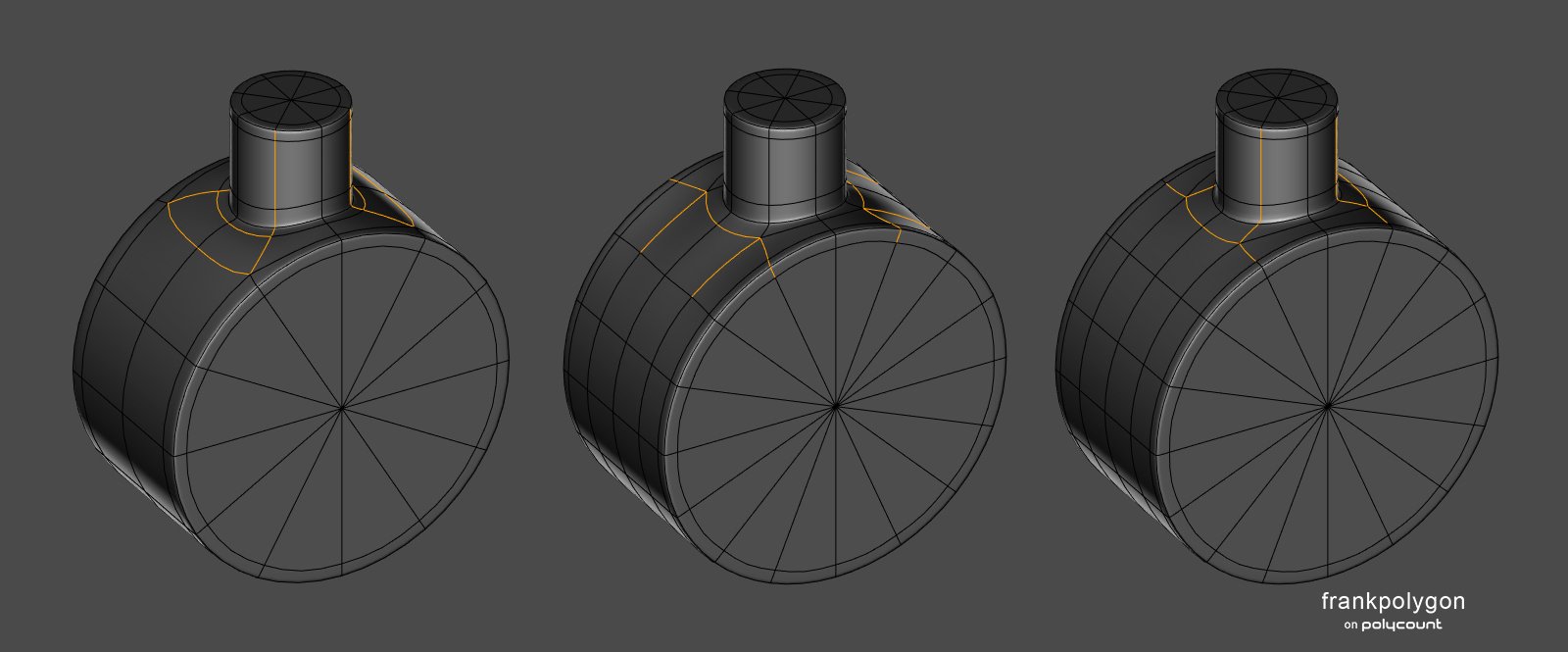
Adjusting the shapes, so the edge segments match, will produce a shape intersection with a relatively even polygon distribution. Since the segments in each curve are roughly the same length, the subdivision smoothing will be relatively consistent across all of the connected shapes. Which helps prevent undesired mesh deformation that could cause smoothing artifacts.
Working through these basic topology flow issues early in the block out will make the modeling process a lot easier but sometimes it's not possible to match the segments of each shape perfectly. In most cases though, close is good enough.
Any minor difference between the shapes can usually be taken up by the faces between the outer support loop and the base of the shape intersection. The support loop on the inside of the shape intersection can also be adjusted to compensate for the width of the support loop on the outside of the shape intersection.
Below is an example of the order of operations that works for segment matching most curved shapes. Start by adjusting the shapes until the segments that make up the curve are aligned then cut in the additional loops along the curve. Remember to include the width of the outer support loop when matching the segments.

Basic cylinder intersection: Line up the segments in both shapes until they're close to where the outer support loop will be. Confine any potential difference in the shapes to the area between the inner and outer support loops
.
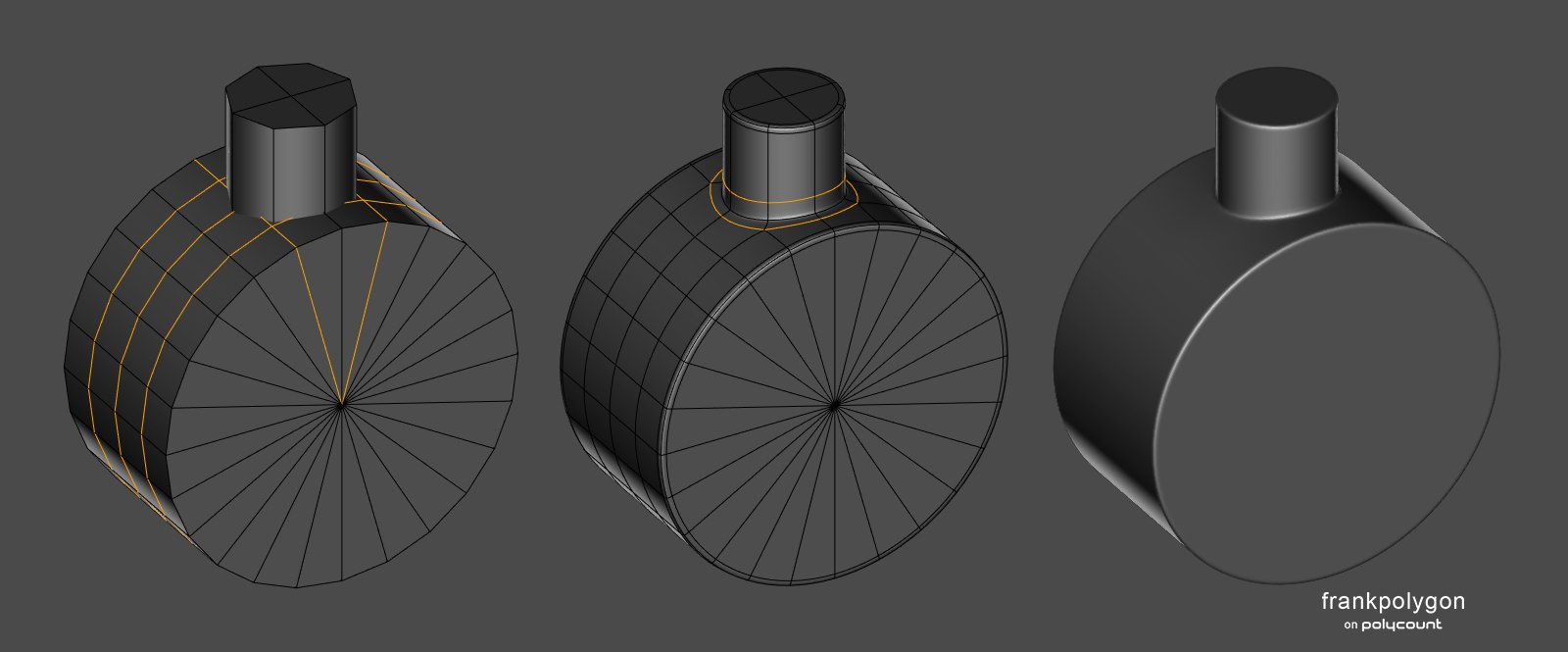
Tapered cylinder intersection: Same as the basic cylinder intersection but a triangular quad can be used to redirect the loop flow where the three shape profiles meet.

Edge to edge cylinder intersection: Rotating the starting position of the intersecting shape can provide better options for directing the topology flow, without having to arbitrarily increase the amount of geometry required.
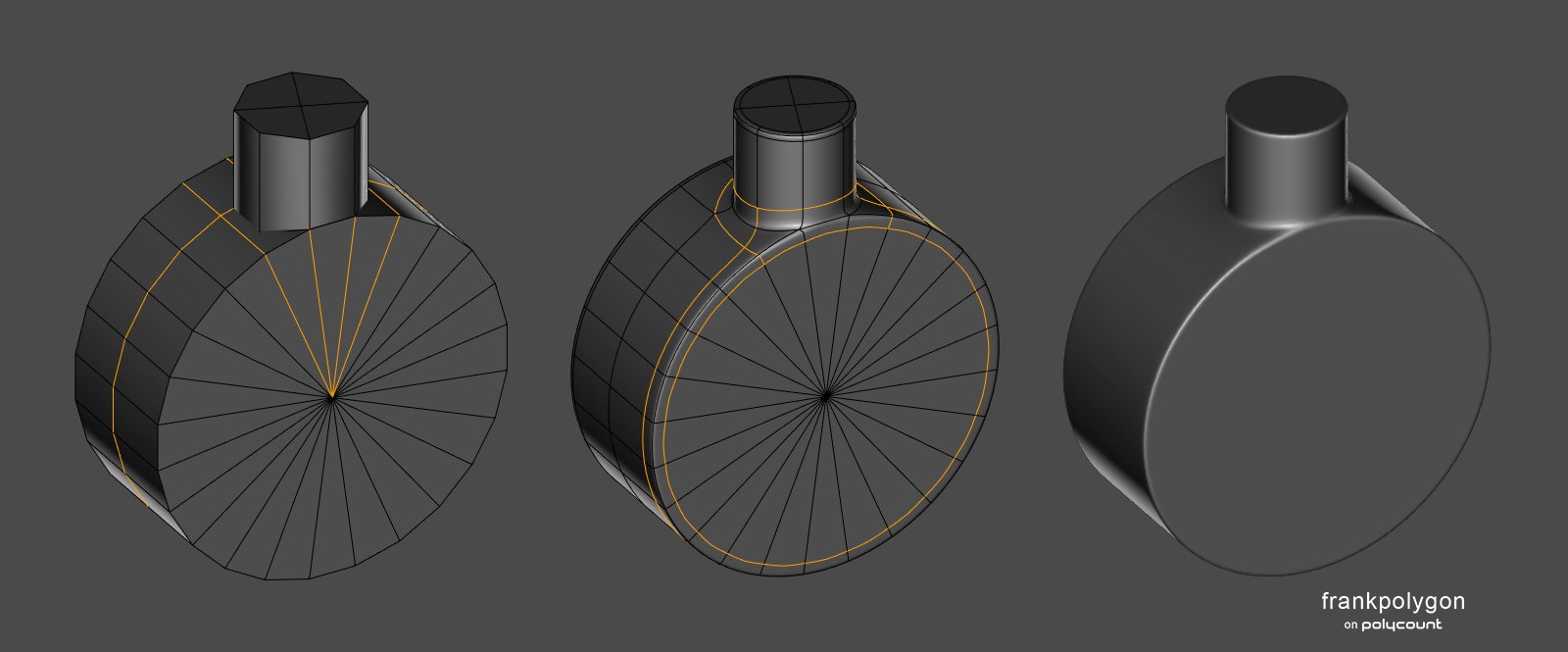
[Perpendicular] Overlapping cylinder intersection: Complex shape intersections increase the likelihood that some of the support loops will disrupt the curvature and cause smoothing artifacts. Rotating the intersecting shape can help optimize the use of existing geometry as support for the adjacent topology flow but sometimes it's just necessary to increase the number of segments in the shapes to reach the desired level of surface quality.

[Parallel] Overlapping cylinder intersection: Similar to the shapes in the previous example but could also benefit from moving the smaller shape a bit further into the larger one. Sometimes it's necessary to simplify certain details or compromise slightly on the position of the shapes to achieved the desired results when the intersecting shape is constrained by the number of segments in existing mesh.

Increasing the number of segments in a curve can make it easier to route the topology flow across the shape intersections and can also increase the accuracy of the subdivided curve but there are certain situations where details need to be added to an existing mesh that can't be adjusted easily. The same segment matching strategy can be used to find the minimum amount of geometry required to match the intersecting shape to the existing shape, even if the number of segments isn't evenly divisible or if the intersecting cylinder geometry has to be rotated to line up with the existing geometry.
Recap: Block out complex shape intersections before merging and adding support loops. Match the segments of the intersecting shapes and line up the edges of adjacent shapes as support whenever possible. When merging intersecting shapes, avoid deforming the curved surfaces by constraining any differences in the shapes to the area between the inner and outer support loops that define the shape intersection.
 FrankPolygon
5 ·
Re: Airbørn
part one of a few things to come on various platforms. Johannes and Simon are talking about the visual development, artdirection and concept art for the showcase.
 Neox
Neox
6 ·
Re: The Bi-Monthly Environment Art Challenge | September - October (80)


So far I've got my blockout and a light test in unity. Took a while to match the reference until I said good enough. Pretty happy with the light test so far but am feeling its a little flat. Could be the lack of textures as well. Working on a trim sheet now but I need a break
 squarebender
4 ·
Re: How The F*#% Do I Model This? - Reply for help with specific shapes - (Post attempt before asking)
20 sided cylinder. here you

 go.
go.
go.  wirrexx
4 ·
Re: How The F*#% Do I Model This? - Reply for help with specific shapes - (Post attempt before asking)
@count23 When the number of segments in a cylinder is the limiting factor, one option for capping it with a quad sphere is to create a cube then use loop cut to match the number of segments and To Sphere to generate the shape. Scale the new quad sphere to fit then delete any sections that aren't needed or don't line up with the cylinder and use bridge edge loops to join the sphere to the end of the cylinder. The example below shows what this process could look like.
For this particular shape, blending a quad sphere to the open end of the cylinder is a viable option but it does tend to produce a bit more complexity than is necessary. An alternate approach is to use the cylinder's existing geometry to create a hemispherical quadrant.
This can be done by revolving the portion of the cylinder that matches the cut out then extruding and rotating the remaining edge section so it can be scaled up to match the missing curvature. The edge of the non-manifold area can be selected, extruded and rotated into position then connected to the rest of the shape using bridge edge loops.
Below is an example of what this process could look like. All of the geometry here is created and shaped using tools that produce consistent results when lofting or blending edge segments. The final mesh is a bit simpler than a standard quad sphere and most of the edges should already line up with the cut out in the references. Which makes it a lot easier to cut in additional details, without having to manually redirect the loop flow.

There's a number of different ways to approach these kinds of shapes but it's generally considered best practice to rely on tools and primitives to generate accurate geometry. So try to avoid manually extruding and moving individual edge segments to create complex, compound curves.
A lot of air-frame and hull forms are a series of lofted curves so there's always situations where raw primitives won't match. In these cases it can be helpful to keep the base mesh fairly simple and rely on subdivision to smooth out the shapes and add the geometry required to support the smaller details.
 FrankPolygon
5 ·
Re: What Are You Working On? (3D) 2022
Working on a realistic version of the Book of Tyrael, concept by Glenn Rane
Pop by a thread to check out the progress!

 Svartberg
4 ·
Re: The Bi-Monthly Environment Art Challenge | July - August (79)
Hey everyone!
Really nice work from so many people. All of the concepts provided a myriad of challenges and it's been awesome to see everyone approach them in their own ways! Hopefully many of you came away with areas you'd like to focus on improving while recognizing the great accomplishments you've achieved in the work produced! :D
September is finally upon us and with it comes the close of one challenge and the opening of another! Hope some of the new concepts spark interest and we see you over there!
 Pinkfox
4 ·
Re: How The F*#% Do I Model This? - Reply for help with specific shapes - (Post attempt before asking)
@dunnie How does it appear when you sub-divide? Where are the problematic areas? Topology seemingly looks fine, but once it artifacts/pinches, it'll be easier to determine what topology will work.
 Epitaph
3 ·
Re: LOW-POLY ART
Thank you so much for your nice comments, @CraigSnedeker , @BrianDolan89, @sim725, @lyanoid, @Ghostb and @Uberren.
I did not expect such a positive response so I am humbled. I hope to one day get good enough to work in the industry.
The pixelation part is fairly simply. Usually I just end up scaling down my render by 50%, then increasing it back. Not having any sort of smoothing filter on to blur it out. You want crisp pixels. Other than that, I must admit it's very much just experimenting.
The style has just developed. I mean, I started with this in 2013.
Just trying new things with modelling, textures, lighting, rigging. The universal-type 3d artist skills, but working with doing the most you can with as little as possible, at times.
Really, I want to one day make a larger project in low poly and perhaps in that sort of medievaly style or similar.
I was commissioned for a piece recently and here it is.

Thanks again. And keep the good art coming, guys. I love it.
I did not expect such a positive response so I am humbled. I hope to one day get good enough to work in the industry.
The pixelation part is fairly simply. Usually I just end up scaling down my render by 50%, then increasing it back. Not having any sort of smoothing filter on to blur it out. You want crisp pixels. Other than that, I must admit it's very much just experimenting.
The style has just developed. I mean, I started with this in 2013.
Just trying new things with modelling, textures, lighting, rigging. The universal-type 3d artist skills, but working with doing the most you can with as little as possible, at times.
Really, I want to one day make a larger project in low poly and perhaps in that sort of medievaly style or similar.
I was commissioned for a piece recently and here it is.
Thanks again. And keep the good art coming, guys. I love it.
 Littlenorwegians
3 ·
Re: What Are You Working On? (3D) 2022
Trying to improve my npr on blender, rendered in eevee :

More pictures on :
 seimax
3 ·

