Best Of
Re: (3DCoat) What is 3DCoat and is it worth it? Who is using it? Do i need it?
I've been using 3DCoat for about 13 years and ZBrush for about 20. I enjoy both thoroughly and believe that they have their strengths and weaknesses.
ZBrush is the industry standard as most will agree. Go to any studio and there it is. Knowing it makes you more employable. Its ability to handle models with obscene poly counts is is unparalleled. Whenever you need ultra-high detail in your model, ZBrush is the app to use. Low hardware requirements also ensure that it'll run well on even a potato PC.
That said, ZBrush HAS gotten fairly bloated over the years. Too much redundancy in the way of brushes, for example. Additionally, there are numerous old features that feel dated and are fairly broken. Certain signature features such as using ZSpheres as well as its sub-purpose for retopo feel deliciously antiquated. There are better, more modern ways. Pixologic/Maxon, apparently, doesn't know how to deprecate and throw stuff away.
Furthermore, ZBrush's UI/UX feels highly non-standard. When coming from an app such as Maya or Blender, you can and probably will feel a bit of "culture shock" in the UX department. It does things its own way. More over, with a bevvy of options nested and sub-nested ... and sub-nested, it's sometimes easy to lose track of what critical feature is located where. Doubly true if you step away from it for a few weeks, for whatever reason.
3DCoat, visually, looks a bit more standard in the UI department. Don't get me wrong. It too does things its own way and suffers from some clutter, which has gotten better in recent years. However, it looks and feels closer to one of the standard suite apps in the way it operates and is organized. Jumping from Maya or Blender to 3DCoat doesn't feel so jarring.
In the performance department, ZBrush is still king. However, to say that 3DCoat performs at a high level would be an understatement. You can readily sculpt models in that 200mil+ poly range without having to mortgage your home for a super computer. And, let's face it. 200mil polys is MORE than enough for most projects and far beyond what you'd ever use in a game anyway; In that case, you're just going to retopologize to a far, far lower level of detail end product anyway.
3DCoat also benefits from having a broader categorical diversity of features under the hood and is a perfect complement to Blender, for example. While Blender has tools for UV, sculpting and texture painting, 3DCoat's puts them all to shame both in terms of power, functionality, and ergonomics. It's not unreasonable to suggest that in many situations, especially as a freelancer or within a small/developing studio, 3DCoat can function as a credible substitute, replacement for both ZBrush and Substance Painter.
Of course, not being an industry standard means that you put yourself on the outside as a 3DCoat user. Sculpting is sculpting no matter the app. However, having ZBrush on your CV carries more weight when searching for a job.
Additionally, 3DCoat's biggest strength is also its biggest weakness. 3DCoat is, effectively, perma-beta. On the one hand, Pilgway, the developer, constantly updates the app to introduce new features and quality of life tweaks. Unfortunately, being beta also means that each new release brings with it the potential for new bugs. Mercifully, Pilgway is on top of the situation and fixes bugs quickly; There are usually 1-3 betas each week. That said, if you constantly worry about stability then just stick with the latest stable version. That's always an option.
If you come into the money, I'd recommend both apps, tbh. They're both great. Personally, I just prefer 3DCoat these days. The upgrade cost, policy is better and the app gets updated more often - something that will probably remain the case now that ZBrush is a Maxon product. The flow, for me, from Maya/Blender to 3DCoat just feels more organic. I only wish that the data interchange plugin were as stable, useful as ZBrush's GoZ.
Just as an added note, if the idea of subscribing to ZBrush is an issue for you, the do still sell perpetual licenses and will (probably) continue to do so for the immediate future. It'll cost more than 3DCoat, but perpetual is still perpetual. No further fees unless you want to upgrade to the next paid version.
Another option? If you want to get your feet wet with ZBrush, but don't want to pay, just download the $0 (100% free) ZBrush Core Mini. The app itself has fewer features than either ZBrush or ZBrush Core and has a stricter poly limit. However, using ZBrush Core Mini will at least allow you to learn the basics of the app and how ZBrush works. So, should you eventually decide to move to the full version then you'll be able to hit the ground running since you already know how to navigate the app and its quirks.
As far as upgrade costs go, 3DCoat is by far the cheaper option. Granted, we don't know what Maxon will ask current users to pay to move from ZBrush v2022 to v2023. However, there's no way that it'll match 3DCoat's low upgrade cost, which will remain fixed at about $45 or so. A massive bargain to be sure.
Last thing. If you have work in a situation with a spotty (or no) internet connection then 3DCoat is most certainly your friend. Much like Maya, with ZBrush, you have to be online to contact the activation server after you install it. (Might be an offline way iirc, but online is the default.) 3DCoat allows you to do that, but it is NOT a requirement. In fact, Pilgway provides its users with a license file that allows you to self-activate. Unless you want 3DCoat to search for updates, it never has to be online at any point. You can literally work out of a cabin in the woods and never need an internet connection or have to contact Pilgway to help you (de)activate. Definitely convenient, especially right now since Pilgway is Ukraine based. (Shocking that they still reliably release updates atm.)
 MrMadcap
Re: Sketchbook: Frank Polygon
Subdivision sketch: truncated cones.
These examples show how segment matching can be used to join truncated cones to curved surfaces.
When the support loop around an intersecting shape disrupts the segment spacing of an existing shape, it tends to cause unintended deformation that can generate visible smoothing artifacts. Simplifying the support loop routing, by using the geometry of the existing shape to support the shape intersection, maintains consistent segment spacing and helps reduce the visibility of smoothing artifacts caused by abrupt changes in the topology.

Truncated cone joined to cylinder: This will generally behave like a simple cylinder to cylinder intersection. Align the segments in both shapes and simplify the support loops around the shape intersection whenever possible.

Truncated cone with adjacent cylinder joined to cylinder: Adjust the number of segments in each shape to maintain a relatively consistent geometry density while also aligning the edges around the shape intersection.

Truncated cone with radially clocked cylinder joined to cylinder: Start by aligning the segments in the shapes then add perpendicular support loops, as required, to match the support loops around the base of the shape intersection.

Truncated cone with adjacent cylinder joined to truncated cone: Get the alignment as close as possible then constrain any differences in the shapes to the area between the inner and outer support loops around the shape intersections.

Truncated cone joined to chamfered cylinder: Rotate the intersecting geometry as required and adjust the number of segments in each shape to align the edges around the base of the intersection. Perfect alignment isn't always possible but close enough is usually good enough. Perpendicular edge loops can be routed across the intersecting shape or reduced with a triangular quad.

Angled cylinder joined to truncated cone: Steeper tapers and proportionally larger intersecting shapes tend to amplify the difference between the segment spacing around the extreme ends of the shape intersection. Using the minimum amount of geometry required for each shape can help reduce the overall complexity and make it a lot easier to join the two shapes, without generating unintended shape deformations.

Recap: Adjust the number of segments to align the edges around intersections while also preserving the accuracy of the underlying shapes. Simplify topology routing and use the existing geometry to maintain the segment spacing of curved surfaces. Rotate intersecting geometry to align the edges without adding unnecessary mesh complexity.
 FrankPolygon
Re: Artstation.com funny business practices.
One word posts like that are likely to cause suspicion that you're a bot.
If you comment on an artists work it should address specific aspects of the piece, and/or be a well reasoned critique. Like if you like an artists work, why do you like it? What specifically made it interesting / inspiring / thought provoking to you?
 PolyHertz
Re: The Bi-Monthly Environment Art Challenge | November - December (81)
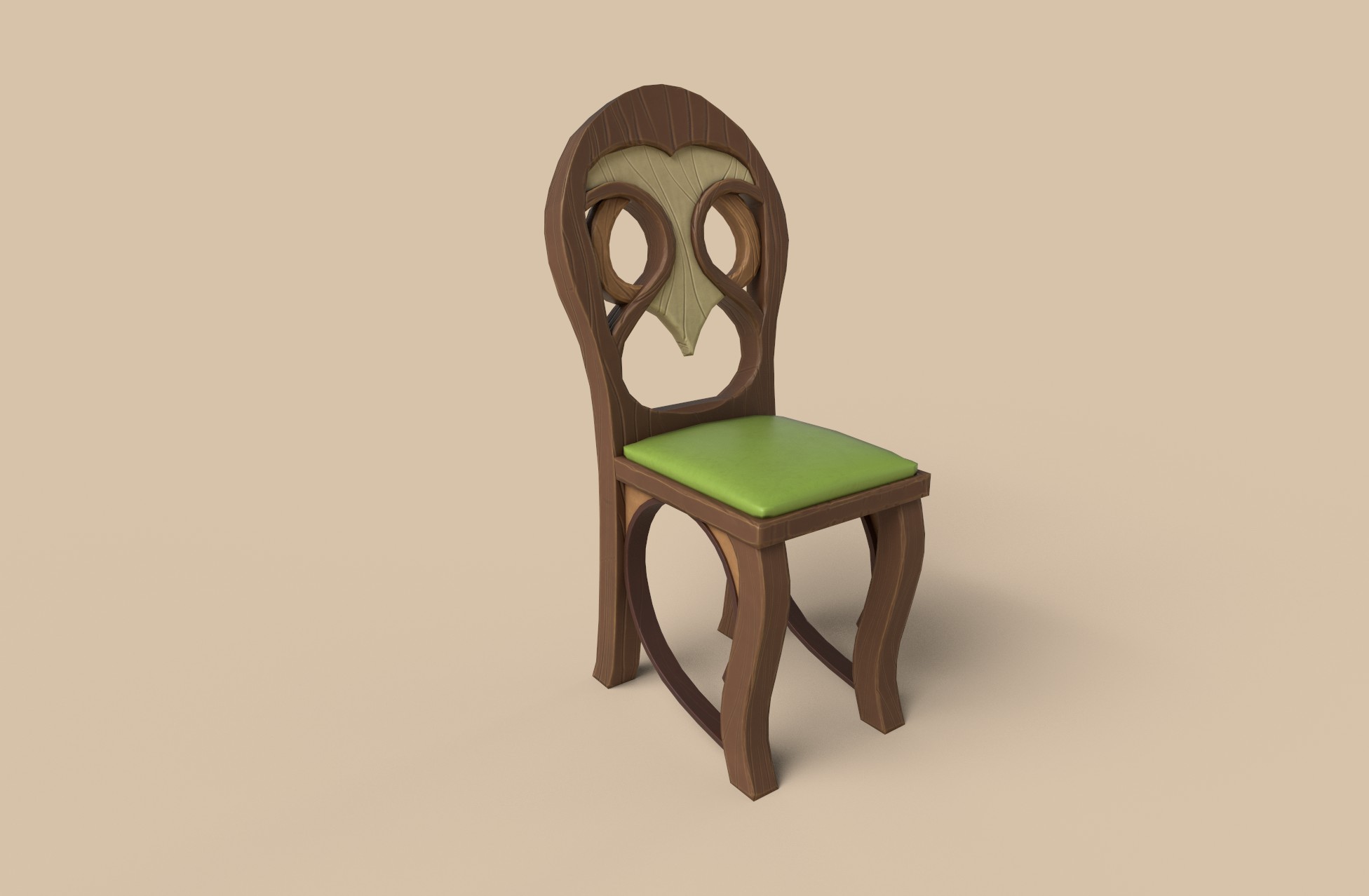
Hello everyone! I thought I'd start with the chair. Here's my current WIP. I spent the better half of a day on this as I tried to get a final model ready.
Upon closer inspection I think the back's shape could be tweaked a little bit more to match the reference.
Also, which grain style do you think works best here? The thin pattern, like on the legs, or the thick pattern like on the back area?
Almost forgot - I used Maya for modelling, Zbrush for sculpting and Painter for texturing. The rendered were made in Painter with iRay.
I would love to read your comments!


 YairMorr
Plague Marine Bust (finished)
Over the last two months, I was working on this Warhammer 40k Plague Marine bust to become more comfortable with collectible and miniature sculpting. Building all these layers of details and digging deeper into the Warhammer lore was a huge fun. Currently, I'm working on the printable version so stay tuned.


 Crazy_pixel
Re: The Bi-Monthly Environment Art Challenge | November - December (81)
Love the choices! My absolute favourite is the stylized post office so I will go with that for this challenge. It is plenty of lovely little props and details which should keep me quite busy for the next two months :)
Esselle
Looking for someone to create an image for 3d printing
Hello, I am located in Michigan.
I need a 3D image created and suitable for my Prusa 3d printer. It is a small car part ( see attached)
I can mail the part to you or can provide measurements. The drawing would have to address a small broken piece on this part.
Kevin
kwelch02
Re: LOW-POLY ART


Something i did once, loved the car so i made it.
 DavidCruz
Re: LOW-POLY ART
Realtime Eye Pratice for Games
Hello guys, I need this eye and I decided create a ready eye for my characters. Thanks for Alfred Roettinger xyz tutorials!
Iris PBR textures created from bitmap on Substance Designer.
Total tris; 3600
All Textures PBR
2 LOD
https://www.artstation.com/yunuskilic
www.yunuskilic.com


 yunuskilic
Re: LOW-POLY ART

 lsgrandchamp