
Best Of
Re: Brawl² Challenge / Competition, Vote and discussion?
This sounds like it could be a lot of fun if there are enough entries. The best thing about those past competitions was seeing the sheer volume of work being done in a collective sense. (but even without the domwar numbers, could still be fun!)
I would agree that having some set limits would be a good idea, whatever they may be.
Would there be any reason to stay within the fighting game theme? Is it to get character and environment artist involved (character/stage thing)? I see that there was Mario in the last one, so maybe that’s a bit more lax?
 pxgeek
2 ·
Love the feedback recently
Not sure why this is, but I've been seeing some really stellar feedback on people's WIPs lately, and I just wanted to say it's great to see. 
 Eric Chadwick
16 ·
Re: Sketchbook: Zetheros
Done with the lowpoly, coming in at 100,676 tris. A bit high, but I think the geometry is necessary for this level of detail. I want to revisit the other races to ensure they have a similar level of detail in the lowpoly. Unwrap & bake coming up next.
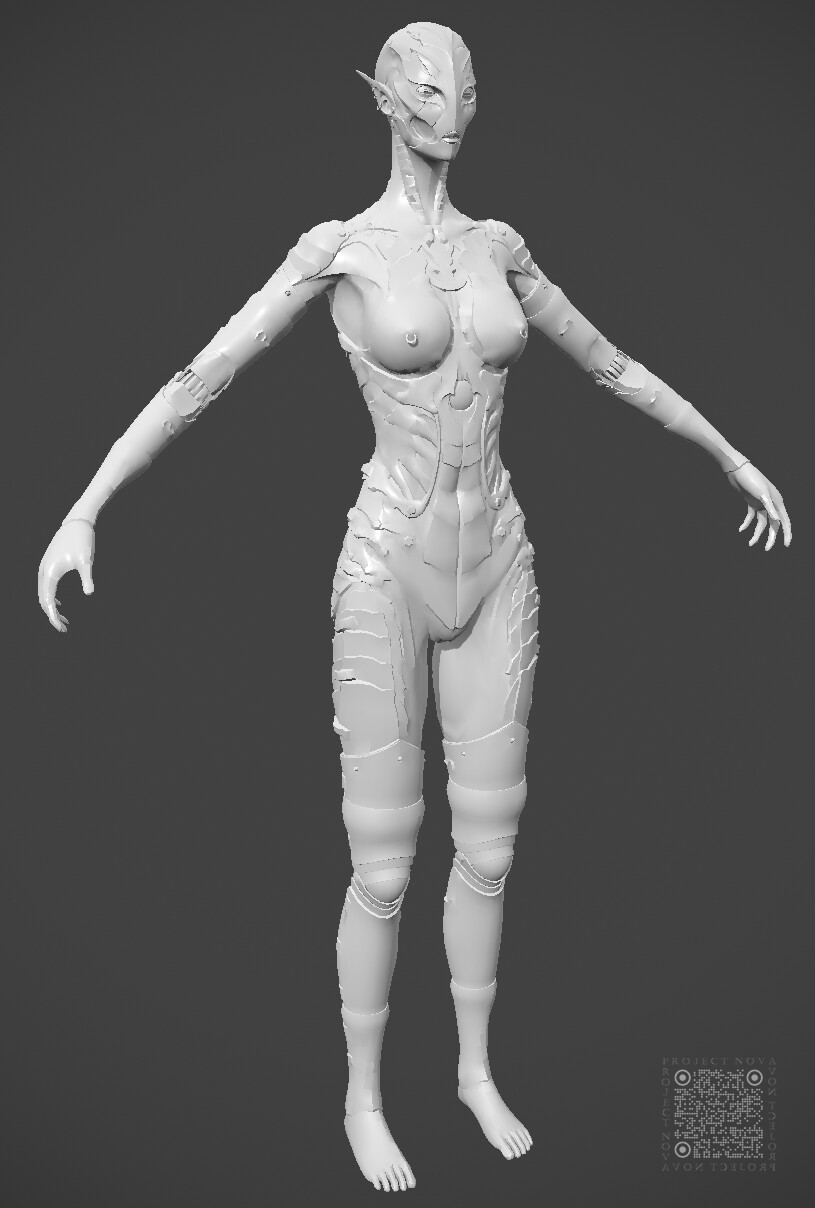
Have a great week!
Have a great week!
 zetheros
1 ·
Re: I started an animated series called " David The Modern Day Christian "
he's dedicated. Just gotta give him time and let him cook
zetheros
1 ·
Re: I started an animated series called " David The Modern Day Christian "
grumix8 said:...More art will come.
Please don't. Clearly this has nothing to do with images (work) but with linking your literature. Three other posts on this thread:


Two of the posts have the same image just different links. If this is what you think art is then Im not looking forward to more. It would be super if you could stop spamming polycount.
 kanga
kanga
1 ·
Re: I started an animated series called " David The Modern Day Christian "
The Polycount Forum is Not Your "blog"
...
"More art, less words" is a good mantra to go by when considering yourself a contributing member of the Polycount community.
...
kanga
1 ·
Re: I started an animated series called " David The Modern Day Christian "
There is nothing new about your message. Your production suffers from a number of problems. Using new media doesn't automatically enhance communication, especially if you use that media incorrectly.
kanga
1 ·
Breakdown of the AAA pipeline for game-ready realistic hero props

Hello! Some time ago I finished a project and thought I’d make a breakdown of the whole process from start to finish. This is not a detailed tutorial for every step but rather an overview over the process that I hope will help people (especially beginner 3D artists) get a better understanding of how the pipeline works. This is not the only way to go about things of course, just an insight into one of the more common pipelines.
The project was a prop made for games, meaning optimized for usage in game engines (real-time). You can see the finished asset here: https://www.artstation.com/artwork/GvzqxNThis breakdown will cover the following topics:
1. The requirements
2. Gather references
3. Blockout
4. Making the Highpoly
5. Making the Lowpoly
6. Unwrapping
7. Baking texture maps
8. Texturing
9. Final presentation
Let's get into it!
1. The requirements
This project was made for a community challenge and there was a set of requirements. It’s important to read those carefully because it will dictate the technical limitations. Ask questions if something is not clear, this will save you time down the line.
The challenge task was to model and texture the Walker’s Razor Slim Earmuffs (photos of the exact model were provided) and also to get creative and come up with an additional paint job. Final model should have one 4k texture set and the triangles budget was estimated at 20k.
If you make a project for yourself, it’s also important to set the scope and requirements, as well as deadlines, from the beginning. This will (hopefully) help you stay on track.
2. Gather references
Every project starts with this step. It’s crucial to get a lot of references because without those you will not be able to make an accurate model and texture it. Nowadays we have the luxury of google so it’s a matter of patience. Try to gather as many high-res photos as you can, those will help immensely, especially during the texturing stage. In case you can’t find any good photos, don’t forget to check promotional, review and disassembly videos.
A lot of people underestimate how much time this step takes. Finding different angles and good quality photos can take hours, especially if the prop in question is not a common one. Patience is required (I was also expanding it throughout the course of the project). Here’s how my reference board looked like:

3. Blockout
Now the fun begins, let’s start modeling! The blockout is arguably the most important stage and should not be skimped on. Blockout defines the main silhouette and proportions of your asset. The more time you spend on your project the harder it gets to fix those fundamental things, so you need to get those right before adding details. Bad blockout = you spend lots of time down the line fixing stuff.
Setup your reference images (and cameras if needed). If you know the exact dimensions of the asset, get a bounding box in your scene. If you don't have exact measurements, you need to estimate. Use other IRL objects where measurements are known as reference. Then analyze and break down the asset into simple shapes and use primitives to block out the main forms. This is how I started my blockout:

The next day I took a fresh look at this and fixed some mismatches in proportions, refined the shape of the headband and the ear cushions and added blockout shapes for the volume knob and some other details that were missing. Taking a short break really helps because you reset your brain and eyes.
During the blockout stage I try to work as non-destructively as possible, using lots of intersecting shapes and primitives with modifiers. This gives me flexibility and a really easy way to adjust and move things around. The goal here is to get the proportions right, not to make beautiful topology.
4. Making the Highpoly
There are different methods of creating the highpoly. The most widespread are: traditional poly-modelling, subd modelling, remesh/polish method, CAD and sculpting. CAD especially has found its way into the game-asset pipeline with tools like Fusion 360 and recently Plasticity. Also, the option to use a bevel shader is becoming more popular. Sculpting is usually associated with characters but is often useful for props as well, e.g. when you need to do a damage pass, bend/deformed panels, or like in my case here - folds on fabrics. Or anything organic looking in general.
Which method you choose is up to you. They all have different use-cases and up- and downsides. Important is the outcome, so basically whatever gets you a good looking highpoly. Combining them together is also a good way to be efficient. That said, in an actual work environment you might be required to use a specific workflow and software to be able to work within the studio pipeline.
For a game-asset, the topology of the high-poly (usually) doesn’t matter, the only thing that’s important is that it shades well. The reason for that is that the highpoly is not your final asset, it will only be used for baking down the texture maps which you need on your lowpoly for texturing.
Because of this, the remesher workflow is quite popular since it gives you an easy and comparatively fast way to get good hardsurface highpoly shading. The idea here is to make your base highpoly mesh using poly-modelling and mainly booleans. Then, use a remesher (remesh modifier in Blender or Dynamesh in ZBrush) to get a very dense and even topology. The final step is polishing, where you smooth out the sharp edges of your model in order to get the nice bevels required for baking.
When it comes to polishing (or highpoly bevels in general for that matter) it is recommended to make the bevels softer than they would be in real life. Reason for that is that it will produce better bakes and create more pronounced highlights, which in turn will translate into better readability of your asset.

I recommend using a shiny/very reflective matcap on your highpoly during modelling to catch shading artifacts. It is much easier to notice things like pinching and bad shading with a proper material.
For this project, I used a combination of the methods listed above. First, I modeled the base meshes in 3ds Max using poly-modelling and subd. Next step was moving everything to ZBrush to do a dynamesh/polish pass (example part illustrated above). Last step was to sculpt folds on the fabric parts of the model and on the ear cushions. I wanted to start learning sculpting so this challenge was a great opportunity to dive into ZBrush.
You also need to decide what details you want to add during the highpoly stage and what details are better done during texturing. For example, I could have done the stitching on the headband as geometry, but decided it would be easier and faster to do during texturing. Also it would be non-destructive, allowing me to adjust the stitching lines as I go without having to redo the highpoly and subsequently bakes. Those kinds of decisions are based on experience mostly and will vary depending on the model, details and project. Here is how my final highpoly model looked like:

5. Making the Lowpoly
When it comes to realistic hero assets, our goal as 3D artists is to convince the player that they are looking at a very detailed and beautiful model, while, in fact, they are actually looking at an optimized lowpoly mesh. Thanks to some dark magic clever technology, we are able to fake a lot of the highpoly details through baking of normal maps (this will be covered in the next chapter). What we can’t fake unfortunately is the silhouette, hence it becomes our main goal to get it right during the lowpoly creation.
There are a lot of factors and technical knowledge that goes into the whole process. Now topology is important because this will actually be your in-game asset. Depending on which method you choose to do your highpoly, you might have an easier or harder time with this task. For example if you made use of CAD software for the highpoly, you will need to retopo/remodel the whole thing since CAD topology is a nightmare and not usable in games. On the upside you most likely saved time during the highpoly creation because CAD gives you a lot of flexibility that traditional poly-modelling programs lack (Remember when I mentioned that each method has its up- and downsides before? That’s one of those trade-offs).
Since I used poly-modelling and subd for my base meshes, the low-poly creation was fairly straight forward in my case. By modeling smart and making use of non-destructive workflows, modifiers and backup geometry, getting your lowpoly mesh becomes a less daunting task. The non-destructive way of modelling is possible in almost any 3D software package nowadays. The most accessible being Blender which offers a modifier system and lots of addons. But 3ds Max, Maya, Cinema 4D or Modo will get the job done just as well. I work in 3ds Max. The program is just a tool and most modeling techniques can be done in any package. The knowledge and skill of a modeler is universal and can be transferred from one program to another, it merely becomes a question of learning the UI and where the corresponding functions are.
As established before, it is crucial to get the silhouette right. If we don’t spend enough geo on the curvature, the facetting (or stepping/jagginess) becomes very noticeable and ruins the realistic look. I usually try to find the most prominent and shape-defining curves of the model and figure out the amount of loops needed to get a nice smooth look and then go from there. Spend the geo where it matters most (shape-defining curvature), and keep the smaller details lower.
While thinking about facetting it is important to keep in mind the intended view distance. A hero prop can be held in hands and used by the player, meaning it will be pretty close to the camera. We have to try and do our best here to make the silhouette smooth.
For the ear shell of the muffs my thought process was like this:

The limiting factor here is obviously your poly-budget. That’s why number 4 is not good - at some point adding more geo loses any benefit and becomes a problem, the model stops being a lowpoly. So your task here is to find the optimal trade-off between the facetting not being obvious and staying low enough that you don’t exceed your poly-budget.
For the most part, I could take the meshes I created during my blockout and highpoly stages, disable the modifiers or delete the support loops where needed, and work from there. Here is the headband as an example:

The second important point after the silhouette is the shading. To prevent errors during the bake process, your lowpoly has to shade reasonably well. I say “reasonably” because the normal map will be able to compensate for small shading errors, usually caused by lack of geometry on curved surfaces. But it won’t be able to just magically fix terrible lowpoly shading. To achieve this, it is sometimes needed to add additional loops to contain the problematic areas or use hard edges.
Another point I want to discuss is optimization. The rule of thumb is: every edge should have a purpose. Edges and edge loops that do not:
- Define the silhouette of the model- Contribute to shading
- Serve animation/deformation purposes
- Define material/UV separation
can and should be deleted/collapsed. This will reduce the tri-count of your model by a lot.
There is the unfortunately very wide-spread misconception about topology and triangles. “Triangles are bad!” “Good topology has to be all quads” “Avoid triangles at all costs, they cause bad shading!” You probably heard or read some form of those statements. People tend to just regurgitate what they heard or read online without actually understanding or fact checking. And so this keeps coming up despite being incorrect.
Triangles are totally fine and even needed to be able to optimize properly for game-engine use. Furthermore, every model will be triangulated when it is put into a game engine. Without getting too technical, your GPU can only render triangles. Every quad you have in your model is technically just 2 tris and you can see the triangulation when you turn on that option in whatever 3D software you are using. So please use triangles for your game-ready lowpoly meshes.
Ngons are also a very common topic which is riddled with misconceptions. While they definitely have their place and use, for beginner artists I recommend avoiding them. Basically if you need to ask yourself if it’s ok to use an ngon in a certain situation, it most likely means that you don’t have the experience and technical knowledge needed to use them correctly, ergo avoid it until you have a better understanding of that topic.
Also for the final lowpoly, it’s better to avoid ngons because of possible triangulation issues. Every polygon is being triangulated and it’s always better to have control over it than just hope that the algorithm does it right (more on that in the “Baking” chapter).
Topology in general never exists in a “vacuum”. Asking if something has good topology without context makes no sense. It depends on the use case for the asset. What is considered “good topology” for a game asset is usually pretty bad topology for film/VFX and vice versa for example. Or 3D printing for that matter. Context is key.
Here is my finished lowpoly:

6. Unwrapping
There are lots of different programs, plugins and tools for unwrapping, but some general rules apply across the board.
For this project, the technical requirements specified that the final model should only use one texture set, 4k resolution. This means I didn’t need to think about separating the model according to different UV sets, everything should be unwrapped and packed together in one.
The lowpoly consists of different meshes, like the ear shells, head band, cables, etc. I usually work part by part, making base unwraps for each of the objects and then finally packing everything together.
An important rule to follow during unwrapping is: every hard edge has to be a seam. Otherwise you will see nasty artifacts during baking. This also brings us to my preferred method of unwrapping. Every program offers some way of marking seams by using your hard edges. Doing that, then adding some additional seams to objects and parts without hard edges (cylindrical shapes that need to be cut to be unfolded properly or parts where UV distortion becomes an issue) and then unfolding usually gives you 85% of an unwrap. Then it’s just a matter of straightening the edges and aligning the islands either perfectly vertical or horizontal (to avoid artifacts related to anti-aliasing).
It is a good idea to get a checkermap material and apply it to your lowpoly in order to see if there are any spots where UV distortion is very apparent. Sometimes after unfolding a UV shell you will need to manually relax it in order to get a perfect unwrap and get rid of distortion.
Here is how I usually do the unwrap demonstrated on one part of the model:

It is almost always worth it to cut those long thin circle shapes and straighten them. You will get a much better packing result, since the long strip will take up only a fraction of the space the circle shell would. Yes, this will introduce some distortion to the UVs but the benefit of saving so much space and avoiding AA artifacts greatly outweighs some minor distortion.
When every piece is unwrapped, it is time to pack everything together. The automatic way of packing UVs has improved a lot and most programs will do a decent job. That said, the best result is still achieved by spending some extra time and manually adjusting some things. Scaling some small parts up to fill the space better for example. Or grouping things together to help the packing algorithm achieve a more optimal result.
It’s also worth noting that sometimes it is important to be mindful about the orientation of the UV shells. A good example are wooden objects, it will make texturing easier if all shells of the wooden boards have the same horizontal and vertical orientation in your UV space. That way, when you apply a wood texture to it, the wood grain/fibers will also point the same way.

The red UV islands are stacked/mirrored. That is a common technique to save UV space. You take parts of your mesh that are identical, and stack the UV shells on top of each other instead of packing them individually. It is not advisable to do that for focal areas of your model, where the re-use of the same texture will be very apparent. But it is a really good option for less prominent regions. In my case this was the inside of the ear shells for example.
As far as texel density goes, there is no magic number that your UVs should have, because that depends on a lot of factors. Texel density will vary a lot depending on the size of the object and texture resolution. Also keep in mind that portfolio pieces usually have a higher texel density than actual game assets. But regardless of the actual number, it is important to make sure that the TD is uniform across your asset. This is achieved by averaging out the size of the UV shells during packing. If you don't do that, then some parts of your model will end up having much more texture space than others and it will be very noticeable since the textures will look very blurry/low res in some areas and suddenly sharp in others.
7. Baking texture maps
Now we have everything we need to bake our texture maps. I’d recommend baking in Marmoset Toolbag or Substance Painter, both offer great tools for that and work very well. The setup for baking is fairly straightforward, especially if you took the time and managed the naming correctly during the modelling process.
By using affixes like _low and _high for the respective parts of our model, we can setup the baking groups automatically using the naming convention option. This effectively groups corresponding meshes together, e.g. earshell_low and earshell_high. This way objects that are very close together do not interfere with each other when the rays are cast during the bake process, because each bake group is handled separately. If you’re older, you might have heard of programs like XNormal and “exploding” meshes. This was the way baking was handled back then, basically all the mesh parts had to be moved far away from each other (hence “exploding”) prior to baking so they didn't interfere with each other. It's nice to not have to do this anymore.
I recommend exporting a triangulated mesh of your lowpoly and use that for baking to avoid triangulation issues. Basically, your modelling software might have a different way of triangulating the quads as the program you bake in and the engine. This can lead to tangent issues and normal map artifacts. Exporting the mesh triangulated ensures consistent behaviour between different software packages.
Once you imported your high- and lowpoly meshes and checked that everything is correct (a simple typo in the mesh names can lead to wrongfully assigned baking groups), the baking can begin.

Sometimes it can be tricky to decide if a detail will look good and convincing when baked, my advice here is to do test bakes. Basically even before setting up the whole project, you can do a quick unwrap for the lowpoly part in question and do a test bake for that part only. That way you can catch potential problem areas and even errors in your lowpoly or UVs very early. It’s really not pretty having to redo your entire carefully crafted UV layout from scratch because you noticed during the full bake that you made an error in the unwrap of one pesky part.
After baking is done, I recommend checking each individual part for bake errors. If you did everything correctly prior to this step, there should be little to no problems. But in case they do appear, it is crucial to fix them before texturing, saving you a lot of headache down the line. Usual suspects are skewed details like screws and insets, jagged edges and visible artifacts along hard edges.
To fix skewed details, Marmoset offers an excellent option of painting the skew directly on top of your model. Jagged edges are usually an indicator of not straightened/not vertically or horizontally aligned UVs. And artifacts along hard edges are the result of not having a seam there. This is also why it was so important to take your time and do a proper unwrap. If you did a good job there, it will save you a lot of trouble now and the bake will most likely come out very good without the need to fix a lot of problems. Good UVs are the foundation for good bake and texturing.
8. Texturing
Texturing is probably the most time-consuming part of the project. The reference board you made at the start of the project will be your constant companion here. I can’t stress this enough, references are key, you will not be able to make good believable and realistic materials without them. So even if you can’t find good high-res photos of your particular object, get photos of other objects with a similar material.
There are different software solutions for PBR texturing, but the most popular and widely used one is Substance Painter. If you want to work in the AAA industry, I recommend learning it.
If you baked in Substance Painter, you can directly start texturing. Otherwise you will need to import your baked maps and lowpoly mesh first. I like to start by setting up masks for the different parts and materials of my model. Giving the base layer inside each of the folders a correct color and roughness (those don’t need to be perfect values, just an estimation is fine for now) will help with initial material definition.
Substance comes with a variety of smart materials. And yes, you could certainly use them. But slapping a smart material on a model and adding some decals will in best case just look fine. Maybe passable for a background prop. You’re here to learn and improve and get better at texturing. Using smart materials mindlessly will not teach you anything. That is why I always advise to start from scratch and build your materials layer by layer, especially when you are just starting out.
Having said that, when you have more experience or when time is of essence (especially in production) it’s obviously useful to have a library of smart materials at hand. You can use those as base and adjust to get the look you’re going for with your particular project.
It’s also useful to open those materials and see how they were constructed, which generators and masks were used, etc.
At the start I just have a folder for each part with a single base layer with a color and roughness value:

Your goal now is establishing your base materials for each part. A good base material is a material that does 80-90% of the work on its own. Especially beginner artists tend to jump into adding details like scratches, decals and fingerprints very early, because it’s flashy and you can see the effect right away. But without having a solid base material, those details will only harm the realistic look and appear fake and out of place.
Don’t start adding details until you’re certain your base materials read correctly. Ask other people for feedback here. You know what you’re texturing and that bias makes it harder for you to properly judge if your materials look right. It’s usually easy to tell something like wood and plastic apart because wood has the characteristic structure. It gets harder with something like black polymer and rubber. Or different kinds of metal. This is where your skill as a texture artist comes in.
Making a really good base material is hard. What helps is studying the references and also understanding why the material looks like it does. Is it metallic or not? If yes, is it painted metal, anodized, brushed, blued? Where does the subtle discoloration come from, is it oxidation? Where does rust build up the most? Etc. I hope you get the idea. By asking those questions and researching, you will gain knowledge which needs to be translated into actual texturing. This in turn is a matter of understanding how PBR texturing works and learning the tools Substance Painter offers you and how to use them.
Depending on the requirements and the desired look, you might need to create a clean looking model or a heavily used one. Regardless, it is your task to try and create interesting textures, add details that tell a story and try and make it look good. In order to achieve this, it is sometimes a good idea to go beyond the references. A lot of real objects don’t look interesting or nice. So use your creativity and ideas, try things out, have fun! We’re making art here after all.
It is important to constantly check how your textures look in the engine, because Substance Painter viewport can differ a lot from what you see in-game. The most obvious reason for that is lighting, the HDRI you use in Substance is most likely different from what you have in Marmoset for example. You can setup the same one in both, but even then sometimes you get vastly different results. Which brings us to the topic of color space. Without getting too technical again, it is recommended to configure both your engine and Substance Painter to use the same color space. I prefer ACES.
I recommend joining 3D communities and engaging with people there, frequently asking for feedback and sharing work-in-progress pics.
9. Presentation
Almost done, all that’s left is to present your finished prop!
It is very peculiar to see someones project, opening the description and reading how they spend hundreds of hours on it and now they want to “proudly” show it to everyone - and then you click on the picture and it’s a viewport screenshot with terrible lighting, pixelated, where you can barely see the silhouette of the model, never mind the textures. Cherry on top is if all that is a photo of the monitor the person took with their phone camera.
Please don’t do that. You can be the best 3D artist there is, if you can’t present your work in a compelling way (or at least clear and visible), nobody will be able to appreciate all the hard work you put into your project. You’ve come this far already, done all these complicated steps to get here, just put in this last bit of effort and make a good presentation to actually show off your artwork.
The most crucial aspect of the presentation is probably lighting, followed by shot composition. No amount of texturing and fancy materials can save a badly lit shot. A standard 3-point-lights setup will go a long way if you’re struggling with where to start. Experiment with the background color to get more contrast between it and your prop.
I like to setup a few shots of my prop showing it from all sides. We’re making 3D here, so make use of it. A turntable animation can be cool as well.
Showing the asset in isolation is fine, but I think it adds a lot to the project if you make a small scene as well. Megascan assets are a good resource here, you can get scanned props that can be used as a background for your asset. Experiment, come up with some cool ideas. Most importantly, have fun! Maybe your prop was a beautiful vase and you can place it on a nice tablecloth next to some glasses. Or maybe it’s an axe, and you set up a small forest clearing where it’s stuck in a tree stump.
I made this outdoor scene with a snowy background, I think it gave a nice contrast to the materials of the earmuffs.

During the reference gathering phase I noticed that the earmuffs can be folded together. I thought it would be interesting to show a render where you can see them folded. I created a basic rig for the earmuffs to be able to implement that idea. So if your asset has some moving parts that can be animated, this is always a nice addition.

And since it was requested that we make a second paint job for this challenge, and I did a NASA-themed skin, I had the silly idea to make a render where it just kind of floats in space. It turned out nice I think!

Don’t forget to add breakdown renders. Showing wireframes and UVs adds extra value to the project, clearly demonstrating that it’s not just pretty pictures but you actually have the technical skills to make good game-ready models.
You can see my final renders here: https://www.artstation.com/artwork/GvzqxN
I hope this writeup was helpful. If you have any comments or questions, don’t hesitate to ask. Thanks for reading! 🙂
I also offer a 3D hardsurface modeling mentorship: https://bsky.app/profile/kosh3d.bsky.social
 kosh3d
20 ·
Re: Brawl² Challenge / Competition, Vote and discussion?
iam717 said:Have fun with it all do not restrict yourselves, been thinking it would be very small in the rules situation, in that the only rule would be no Automated/Generated additions what so ever. (there is enough promotion going on atm for it, so to make this "harder", not allowing it would be beneficial for learning.)
Going to have to respectfully disagree with this one, not the stuff about no AI, that is totally fine, but about having no limitations. I don't think you can accurately judge a 1 billion triangle super detailed sculpt piece against a low poly hand painted piece, it's a problem I feel that has popped up with other competitions. Game art also generally takes a bit longer if someone is going through the whole high-low workflow and is at a bit of a disadvantage time wise. We're also a game art forum, and game art always has limitations, some of the best stuff that has come out of these competitions are doing absolutely stellar work within those limitations.
Like Dominace War 4's Winner by SlipgateCentral, this is roughly 10K triangles for the final model and still kicks ass and holds up today:
 https://www.youtube.com/watch?v=2l64YyPfiA4
Or when Skankerzero managed to make not 1 character, but a whole team using the specs for the Polycount Mutant Little League competion:
This stuff is only made more impressive because of the limitations they worked within. This is the kind of stuff I would want to see, I want to see people be challenged by making something that is 50k polygons with 2k textures and can stand up to a model with a million triangles and 3 4k textures. I want to see what creative things people can do within limitations.
Limitations also help with the time scale for competitions, generally about 2-3 months seems to be the sweet spot and having limitations helps keep people reigned in and make it so more people can complete. After all, a lot of people will be doing these on their spare time.
 Alemja
5 ·
Re: Brawl² Challenge / Competition, Vote and discussion?
is there a special forum thingy you can put on people if they win a thing?Eric Chadwick said:Yeah as we've seen with the Polycount Store, just shipping to Australia (as just one example) can be a real pain for people. Better to go prize-less IMHO. There's going to be enough excitement already with a reboot like this. Love that you're stepping up for this!
that sounded better in my head
 poopipe
2 ·