The BRAWL² Tournament Challenge has been announced!
It starts May 12, and ends Oct 17. Let's see what you got!
https://polycount.com/discussion/237047/the-brawl²-tournament
It starts May 12, and ends Oct 17. Let's see what you got!
https://polycount.com/discussion/237047/the-brawl²-tournament
Best Of
Re: Adobe raises price of Photoshop 50%
That´s a bit too broad and Imo depends on what OS you want or need it for.
If you need perpetual licenses, portable version(s) etc.
What features and file formats you want/need.
As an example;
Affinity Photo is only available on Apple devices and Windows systems.
https://affinity.serif.com/en-gb/photo/
DDS file format is not supported and there is thus no BC1-7 compression
Exported PSDs will always have Textlayers rasterized.
you could quickly and easily open the native file formats afphoto,afdesign,afpub in all three of the Affinity programs.(Designer/Photo/Publisher.) An almost seamless and glorious experience to jump with one File within the entire Affinity Suite.
If you need perpetual licenses, portable version(s) etc.
What features and file formats you want/need.
As an example;
Affinity Photo is only available on Apple devices and Windows systems.
https://affinity.serif.com/en-gb/photo/
DDS file format is not supported and there is thus no BC1-7 compression
No 1bit texture support.
pixel snapping/half pixels can be problematic.
Pixel art and the forced anti-aliasing can be problematic.
channel packing is at best cumbersome and without heavy tricks could be simply marked as non existent.
Affinity
Photo has imo the best PSD compatibility but if your workflow relies on PSDs with editable Textlayers, you are screwed.pixel snapping/half pixels can be problematic.
Pixel art and the forced anti-aliasing can be problematic.
channel packing is at best cumbersome and without heavy tricks could be simply marked as non existent.
Exported PSDs will always have Textlayers rasterized.
you could quickly and easily open the native file formats afphoto,afdesign,afpub in all three of the Affinity programs.(Designer/Photo/Publisher.) An almost seamless and glorious experience to jump with one File within the entire Affinity Suite.
If you bought all three programs, you can within Publisher, use and access the majority of all features inside of it.
Knowing all that, Affinity Photo can be helpful as long as it´s shortcomings are known,complimentary software can be used for compensating its shortcomings.
Gimp... is ok for packing .icon files.
Gimp... is ok for packing .icon files.
 myclay
2 ·
Re: Advice with secondary forms
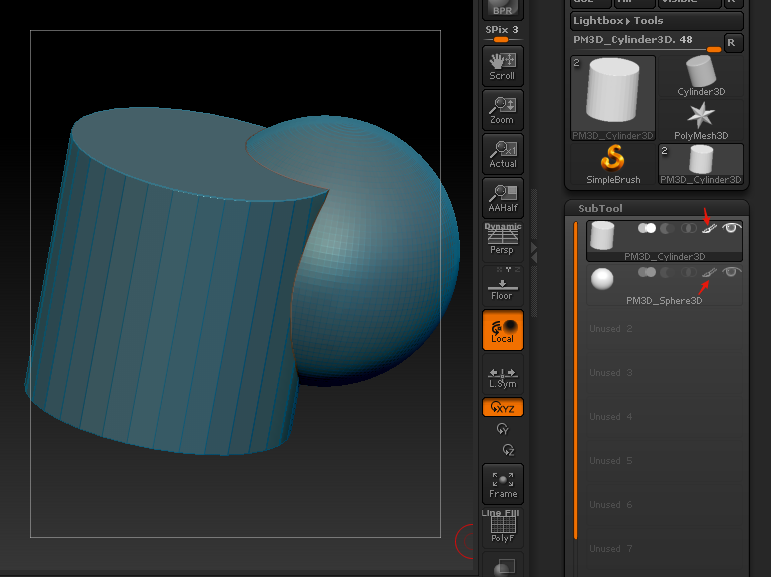
Apparently this is how you turn off that highlight. Just so you are comparing apples to apples.
That face study is fairly good! This might just be a case of needing to just grind out a lot of studies, and ratchet your intuition up.
 Muzzoid
1 ·
Re: Learning Diary - Zbrush Sculpting for Characters and Creatures.
Wow great beginning and progress !
Anatomy is good looking, I know the anatomy is highly stylized but some parts feel a bit too dissociated from the rest of the body (trapeze, triceps tendon on the elbow, brachioradialis + extensor carpi radialis longus), like it's soooo sharp ^^ (even though I get that was the effect you were going for). Also, a fun thing I've seen, you actually "misinterpreted" the upper trapeze part, you made so big and high that it replaces the form of the kind of cape/scarf he has on his neck ^^ (well it ended pretty well with clothes so I could be totally wrong but still it was a funny explanation for the MASSIVE trapeze ^^). I know it was just a quick study (which is a good idea in my opinion by the way), but if it can help for your future works 
I think you do very good blocking, I wish I was that good (sometimes I do an ok job but most of the time I'm scared as hell as to where to begin ^^).
The model looks really good, though it might be not the best choice to animate a character with this type of clothes (not too close to the body) if you're not used to it. Well I hope you wont burry yourself in frustration with that ^^.
Two questions (purely out of curiosity) :
1/ From the rear view there's some kind of glitchy mess on the bottom part of the clothes, I guess it's just not finished ? Shadows are weird there.
2/ Why did you put this guy on a pedestal if you want to animate it later ?
Keep up the good work ! 
 Dabou Master
1 ·

Re: Free Toolkit for Beginner/Intermediate Rigging, Animation, and Modeling users!
So where’s the screenshots, feature set, video of it in action, etc.? Why should people give up their emails?
 Eric Chadwick
1 ·
Re: Adobe raises price of Photoshop 50%
Hopefully the painting program I'm making will be the best in a few months time
*if you want a rock solid paint program, and don't need a ton of features anyway
*if you want a rock solid paint program, and don't need a ton of features anyway
Muzzoid
1 ·
Re: WIP Mortuary: What I wish someone told me 8 years ago (but to be honest, I couldn't listen)
had some busy weeks, so not much time and energy to work on this. luckily that doesn't matter once you have a job. Not that it really matters how much you spend on your portfolio while you don't have a job either. More time spent doesn't increase chances to get a job. They'll ask you to spend 16-40hrs on a shitty art-test, even though you have 100s of hours of work in projects posted on your portfolio already. Somehow 3-6 years of studying isn't enough for them to make a decision, but if you spend a few more hours they might be convinced? In reality, portfolio work doesn't matter that much after a few solid pieces. You don't suck for not getting a job with a serviceable portfolio, the industry does. It's not even because of high standards or that it's highly competitive. It's mainly lack of work positions but also wide-spread incompetence on their part.
but I did have some time to implement some changes to the scene
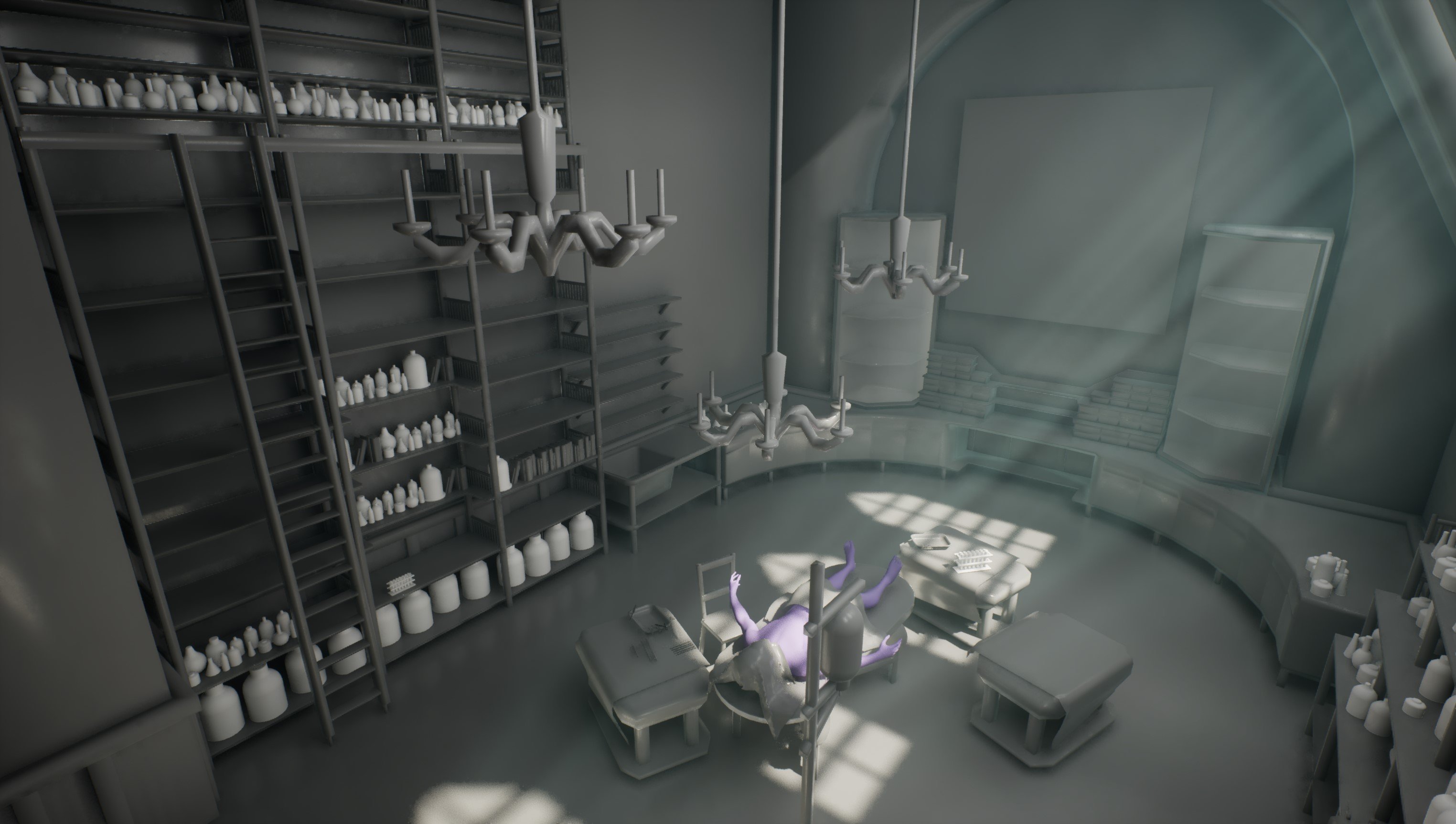
Next step will be to populate the scene more to fill out all the areas, get a more final feel for the entire composition.
In doing so I'll also be gathering references and refine the list of assets needed - I want to make sure that I commit to making as few assets as possible.
but I did have some time to implement some changes to the scene
Next step will be to populate the scene more to fill out all the areas, get a more final feel for the entire composition.
In doing so I'll also be gathering references and refine the list of assets needed - I want to make sure that I commit to making as few assets as possible.
 Daniel_Swing
2 ·
Re: Gina (critique welcome)
It got a little easier in the end.
I'm assuming there were some changes in Blender, because the (simple) face rig was much easier to make this time. Weight painting was the most time-consuming though. But it's as finished as it's going to be, I think. At least until I add hair. By this point I got used to seeing her without it. Wonder how that part will go.
Will have to go back to SP to readjust some values before export.
Otherwise just need to place hair and figure out how to properly render things.
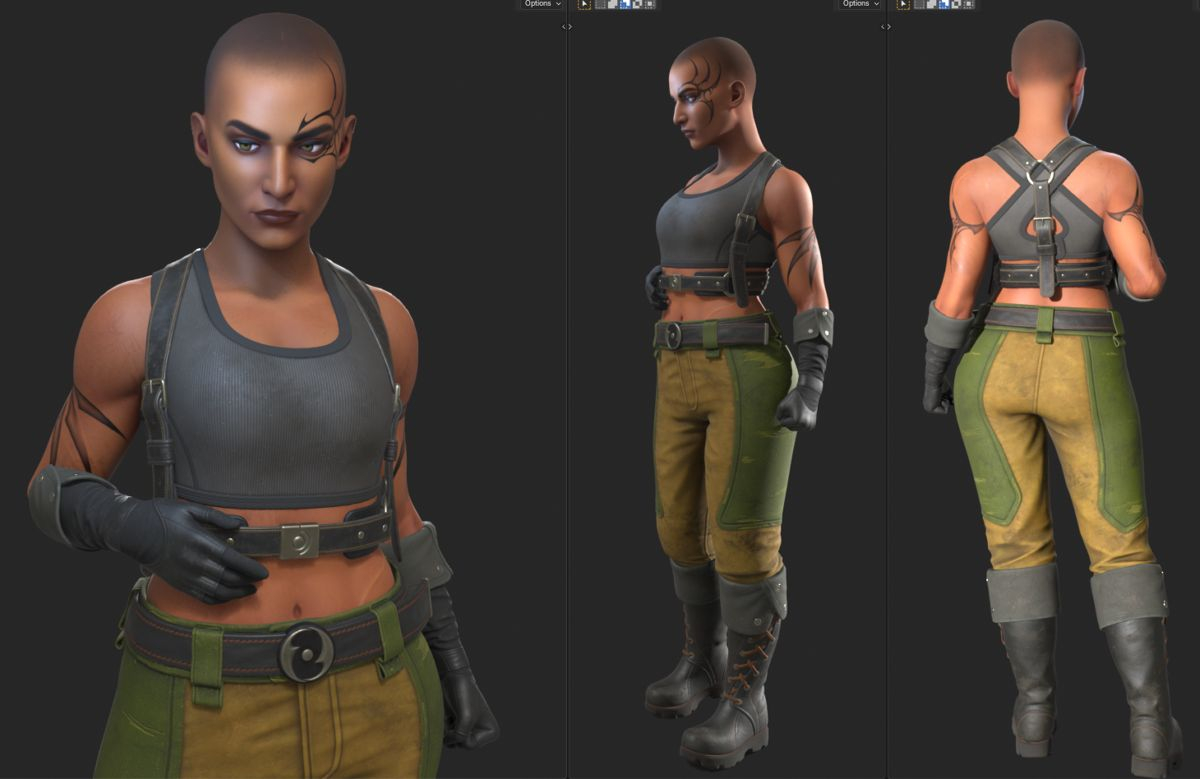


I'm assuming there were some changes in Blender, because the (simple) face rig was much easier to make this time. Weight painting was the most time-consuming though. But it's as finished as it's going to be, I think. At least until I add hair. By this point I got used to seeing her without it. Wonder how that part will go.
Will have to go back to SP to readjust some values before export.
Otherwise just need to place hair and figure out how to properly render things.
 stray
stray
1 ·
Re: Advice with secondary forms
This is an exercise that i want to see you doing! I would recommend making the matcap's identical between both.
For this exercise, i want you to get out of the mind of 3d analysis, as in don't try to intepret and remember the 3d forms, and instead get into matching the shading exactly. Think like a painter, you are just darkening and lightening pixels, you are just doing it through the abstraction of a 3d model.
The study isn't on anatomy, it's on training your brain to understand form from shading.
For this exercise, i want you to get out of the mind of 3d analysis, as in don't try to intepret and remember the 3d forms, and instead get into matching the shading exactly. Think like a painter, you are just darkening and lightening pixels, you are just doing it through the abstraction of a 3d model.
To put it another way, the lessons you need to learn, are specifically those differences that are hardest to capture. If you push a study to 70%, you only covered the path you already know well, it's by pushing it to be exactly what's there, that where the gold is to be found.
Muzzoid
1 ·
