Best Of
Re: How The F*#% Do I Model This? - Reply for help with specific shapes - (Post attempt before asking)
FrankPolygon said:@jhonerick This type of pinching artifact is generally caused by excess smoothing stress generated where edges cross over the face of a curved surface to connect the corner vertex to the support loop. In this case the effect is exacerbated by the edges of the support loops themselves because they disrupt the segment spacing of the curve and are generating some unintended surface deformation before the smoothing is even applied.While it is possible to brute force a solution by arbitrarily increasing the geometry density of the curve, it's also possible to simplify the mesh and solve each issue individually at a higher level. Keeping the shapes relatively simple and using the existing edges in the curve as part of the support loops for the intersecting shapes is generally considered best practice when working with subdivision and allowing the subdivision do a lot more of the smoothing work will help make things easier.Below is an example of what this could look like: Start by blocking out the basic shapes until there's enough room between the segments of the curve to accommodate the intersecting shape, plus the width of the support loop for that same shape. Work on solving the basic topology flow paths around the shape and across the curve. Use at least one of the edges in the curve to act as an intermediate support loop across the flat interior surfaces of the intersecting shapes. Route the primary loop flow paths around the intersecting shape first, avoiding unintentional deformation of the curved surface, then add the final support loops to sharpen the edges of the shapes.The basic topology flow can be routed directly around the shape intersection with manual loop placement operations and the tighter support loops, used to define the sharp edges of the shapes, can be generated with vertext group or edge weighted beveled / chamfer modifiers. Using the existing edges of the curve as support and keeping the tighter edge loops within the existing segment spacing will help reduce undesired pinching and surface deformation.Here's what the final base mesh looks like before and after the edge sharpening support loops + subdivision are applied.The same basic topology routing strategy works for most types of serrations. In this example there's no space between the edges of the serration and the resulting triangle on the curve is constrained by the adjacent loops and doesn't cause any noticeable smoothing artifacts so it's acceptable.A lot of A1's and similar variants have fairly shallow serration patterns and when dealing with details like this it's generally best to keep things as simple as possible. Let the subdivision do the smoothing. Here the same segment spacing from the previous example works with the shallower serrations.Subdivision smoothing is an approximate process: so there's a trade off between mesh density, editability, and shape accuracy. The topology routing in this example does produce some very minor surface imperfections, however they're only visible at extreme glancing angles and when viewed up close.There's diminishing returns on the amount of time and effort spent improving these sorts of results and if the high poly model is going to be baked down to a low or viewed from first person then this is generally going to be more than acceptable, given how small these details are and how subtle the minor smoothing discontinuities are. Especially once normal and roughness details are added.Close up comparison between reflective high gloss material and soft highlight material with smooth roll off. Subtle surface quality issues like this aren't visible under all conditions but could be resolved using the same topology routing strategies and increased segment density along the curved surface.With subdivision: whether or not all that extra effort makes sense depends entirely on the use case, view distance, and material reflectivity.Depending on what the project goals are: it may also be worth looking at alternate poly modeling and re-meshing workflows (some of which are native to Blender) or maybe even a parametric modeling workflow like Fusion or Plasticity.
The example below shows how those subtle surface quality issues are largely unnoticeable at first person view distances.Also, tighter support loops around the edges might look great up close but the edge highlights around the shapes will tend to disappear when viewed from further away. Over sharpened high poly models can also cause baking issues. Which is why it's generally better to have slightly softer edge highlights so the shapes remain readable at a distance or when baking down from a high poly to a low poly.Recap:-Block out the shapes and solve the larger topology flow issues first.-Use the existing geometry of the curve to support the transitions between intersecting shapes.-Avoid over sharpening the high poly as this can make the shapes difficult to read and might cause baking issues.Links to additional write ups that cover similar shapes and smoothing artifacts:


incredible, I don't know how to thank you for such an excellent and detailed response
Thank you very much, when I get home I will apply it
 jhonerick
1 ·
Re: BRAWL2 [Environment] Landing Plaza, northoftherain

Slowly getting a blockout done so I can get a vibe for what I want it to look like! Trying to figure out how to make structures look imposing and massive has bee a little bit of a challenge but I'm really enjoying it.
 northoftherain
5 ·
Re: BRAWL2 [Environment] Landing Plaza, northoftherain
All of Team ICO's work has been incredible artistically! Although myself I never got to play any of the games I did see playthroughs, and the way the developers are able to make environments so full of intrigue and charm as well as stories that are rich and engaging is what hooked me.Celosia said:As someone who cribbed their handle from Shadow of the Colossus, I'm watching your entry with great interest! 😀
northoftherain
1 ·
Re: Learning Diary - Zbrush Sculpting for Characters and Creatures.
Hey there! I finished the character I was working on!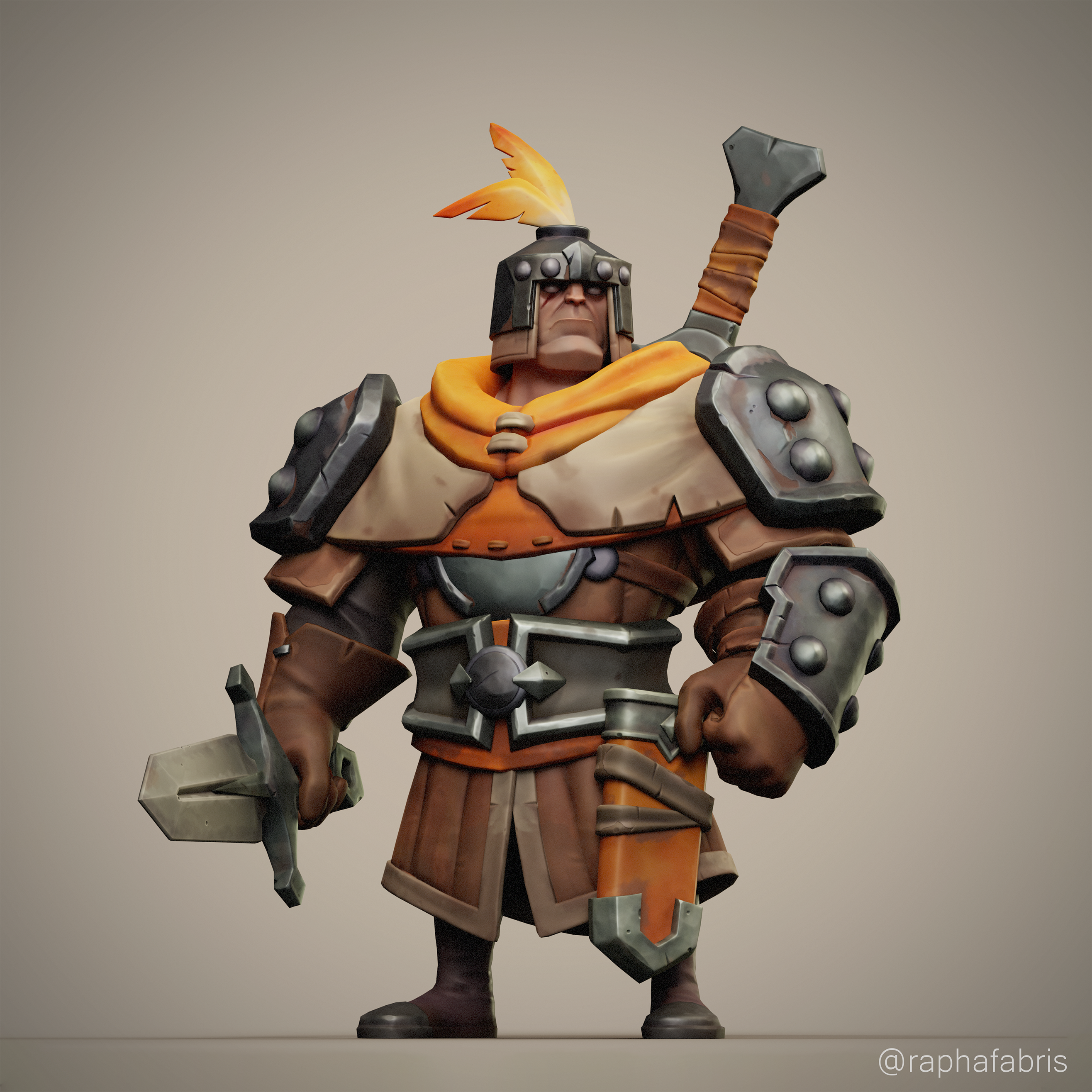
My idea for this guy was to create him game ready, and a scene of him where he's ambushed by a gang of goblins, so I also did a highpoly of the little bugger:

But I felt like this goblin was inferior in every aspect of the project.. specially when I tried to pose him and the soldier using TPose in zbrush, that was frustrating and the poses looked stiff and unnatural... so I scrapped the amazing idea I had in my head and made a simpler scene with the goblins out of focus, just to be a plus, no the whole project.
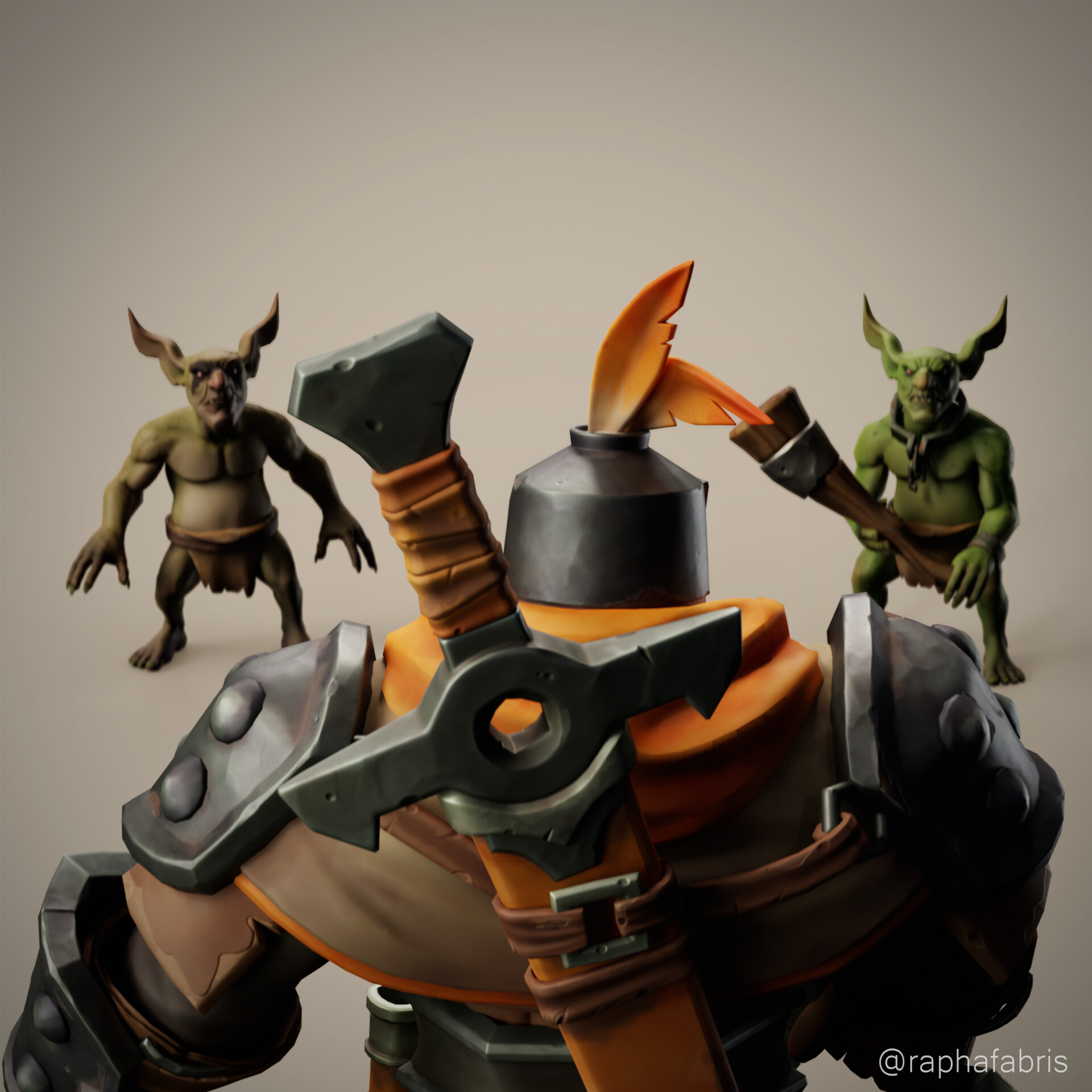
I don't want to spam this thread but there's way more images and details(polycount, maps, ect) on the artstation post: https://www.artstation.com/artwork/982Avv
Anyways.. that's kinda it for this guy, I'm honestly not feeling great about the results now that I'm thinking about it, I'm not sure if this project is better than the dwarf and if I improved. I know it's more complex, but more complexity doesn't necessarily means better.
The idea now is to relax and don't worry about 3d(which I think it's unlikely to happen) until at least the end of this month, for what Im gonna do next, if it's gonna be a new project following a concept or a tutorial/course, I have no idea, but I will keep you guys updated. Thank you for reading this and stay safe.
My idea for this guy was to create him game ready, and a scene of him where he's ambushed by a gang of goblins, so I also did a highpoly of the little bugger:
But I felt like this goblin was inferior in every aspect of the project.. specially when I tried to pose him and the soldier using TPose in zbrush, that was frustrating and the poses looked stiff and unnatural... so I scrapped the amazing idea I had in my head and made a simpler scene with the goblins out of focus, just to be a plus, no the whole project.
I don't want to spam this thread but there's way more images and details(polycount, maps, ect) on the artstation post: https://www.artstation.com/artwork/982Avv
Anyways.. that's kinda it for this guy, I'm honestly not feeling great about the results now that I'm thinking about it, I'm not sure if this project is better than the dwarf and if I improved. I know it's more complex, but more complexity doesn't necessarily means better.
The idea now is to relax and don't worry about 3d(which I think it's unlikely to happen) until at least the end of this month, for what Im gonna do next, if it's gonna be a new project following a concept or a tutorial/course, I have no idea, but I will keep you guys updated. Thank you for reading this and stay safe.
 RaphaelFabris
1 ·
Re: LOW-POLY ART
Pior if you still have those tutorials would you consider uploading them to archive.org? I’ve been trying to find tutorials from the Q3 days and so much of that internet is simply gone nowadays.pior said:Hell yeah ! Another great one @SamLoboda .
This is making me want to dive into a box of old backup CDRs to feast on some oldschool modeling and texturing tutorials ...
Joshua Skelton
1 ·
Re: Sketchbook: Zetheros
Sectioned out and retopo'd areas of the dynamesh. I think there are some design elements on the dynamesh that are better than the cleaner subdivision sections; for instance I think the serratus anterior area looks nicer on the dynamesh. But that's one of the reasons why these weekly recaps are helpful to me; comparing earlier designs to later designs helps identify regressions in design, and I'll know where to improve next time.
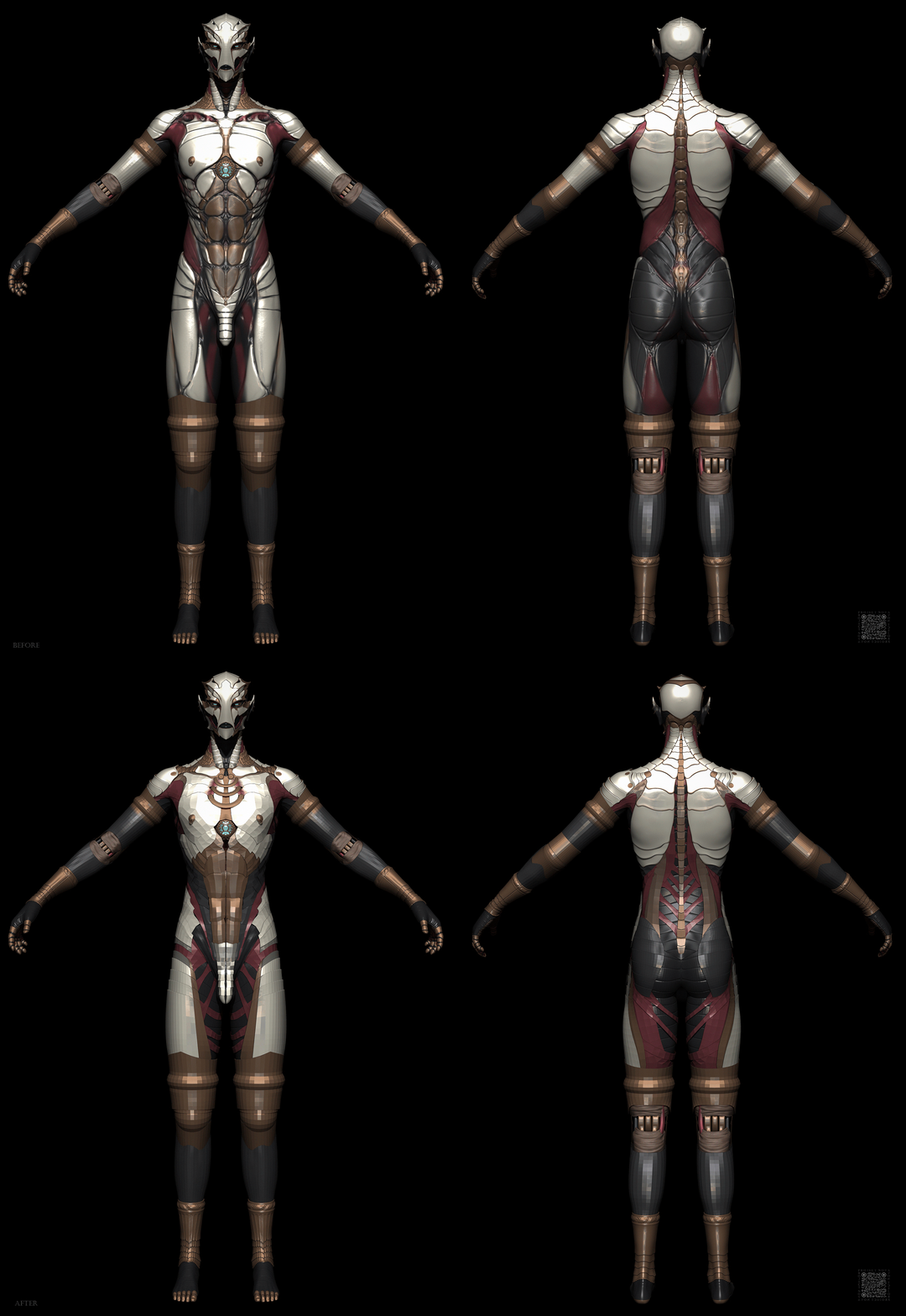
Have a great week!
 zetheros
1 ·
Re: How would you approach this? 3ds Max
2, as Erics, with a turbosmooth, it's not ideal as there are a couple of pinch points
 Klunk
Klunk
1 ·
Re: What Are You Working On? (3D) 2025
finally got around to making my character all polygon based. need a better alpha for the beard tbh, but the technique using hair tool addon works fine.
I can finally get my work out of Blender and in to Unity or Unreal . Might do a pass in substance painter first

 Ruz
Ruz
3 ·
Re: What Are You Working On? (3D) 2025
bought the hair tool addon for blender a few years ago and haven't used it for while, but its really is very nice, but is quite in depth at times.
Has 2 options for short fur/hair for video games shell hair and short hair
this is the shell hair. Not sure of all the options yet, but easy to use different vertex groups for each section, like ear hair, fur on the side of the head etc
that way cany vary the length a bit
this is the shell hair. Not sure of all the options yet, but easy to use different vertex groups for each section, like ear hair, fur on the side of the head etc
that way cany vary the length a bit
great for combing too, has a guide object which you can sculpt using normal sculpt tools like nudge etc
 Ruz
Ruz
1 ·
Re: How would you approach this? 3ds Max
Tried the cloth approach.
A bit cumbersome, especially since the panels have to be moved into position at least roughly (used the geosphere method as a template) in order to make sense of things and reverse seams were necessary, but you can't switch back to the flat version interactively.
I tried to preserve it with a morph modifier, but inevitably the vertex order was changed down the road.
Luckily, you can revert the panel positions after doing your cloth sim, which makes UV-Mapping and Skin Wrapping possible, but then you lose your manual panel arrangement (could save that as an initial state in the cloth modifier, perhaps, and you can simulate with self intersection, but it's messy). So it's doable, but not ideal.
I attached the file in 2022 and 2019 format (not sure if Subdivide works correctly in the latter). The bitmap is just the one from the OP saved as a png. Interestingly, the panels are not all identical, especially the big one in the right upper corner is quite a bit higher than the rest, but I chose to ignore that. In general the shapes seem to be correct. Might help to reverse engineer the design process. Off center slicing sound very plausible, but then that would probably throw off the base pattern we had established previously?

A bit cumbersome, especially since the panels have to be moved into position at least roughly (used the geosphere method as a template) in order to make sense of things and reverse seams were necessary, but you can't switch back to the flat version interactively.
I tried to preserve it with a morph modifier, but inevitably the vertex order was changed down the road.
Luckily, you can revert the panel positions after doing your cloth sim, which makes UV-Mapping and Skin Wrapping possible, but then you lose your manual panel arrangement (could save that as an initial state in the cloth modifier, perhaps, and you can simulate with self intersection, but it's messy). So it's doable, but not ideal.
I attached the file in 2022 and 2019 format (not sure if Subdivide works correctly in the latter). The bitmap is just the one from the OP saved as a png. Interestingly, the panels are not all identical, especially the big one in the right upper corner is quite a bit higher than the rest, but I chose to ignore that. In general the shapes seem to be correct. Might help to reverse engineer the design process. Off center slicing sound very plausible, but then that would probably throw off the base pattern we had established previously?
Noren
3 ·