Best Of
Re: Watch tower in the forest (UE5.4)
@MBauer17 this is a great! I'm loving this a lot.
Don't stop now. You're at 70% - this could be mind-blowing if taken to 90%+.
Being smart and not spending a lot of time I think you can tweak a few things:
1. Composition
Add a foreground and background to create some real depth and separation.
2. Color
You don't have any complimentary color here. Splashes of pink/purple bushes and/or trees would create some juicy color contrast!

3. Lighting
Adding the sun in the back with some subtle lens effects could be a cheat that would go far. Or maybe even a rainbow like this Witcher shot. (little particles of flaying grass/leaves in the foreground are also a simple way to create dynamism and depth)

Don't stop keep going! You got this 💪
Don't stop now. You're at 70% - this could be mind-blowing if taken to 90%+.
Being smart and not spending a lot of time I think you can tweak a few things:
1. Composition
Add a foreground and background to create some real depth and separation.
2. Color
You don't have any complimentary color here. Splashes of pink/purple bushes and/or trees would create some juicy color contrast!
3. Lighting
Adding the sun in the back with some subtle lens effects could be a cheat that would go far. Or maybe even a rainbow like this Witcher shot. (little particles of flaying grass/leaves in the foreground are also a simple way to create dynamism and depth)
Don't stop keep going! You got this 💪
 d1ver
d1ver
5 ·
Re: [WIP] Tiger I
Indeed, they're great when trying to reference stuff that's either 'hidden' or difficult to gauge via just eyeballing sucky looking pics so these are routinely sources I tend to make use of, among others:
Prime Portal - Armoured Vehicles
Wikipedia - Panzerkampfwagen VI, Tiger I (H1), SdKfz. 181.
The Tank Museum Bovington - ''Tiger 131' as she is today walkaround
 sacboi
1 ·
Re: 1900's Western Fields
Thank you for the feedback! I went ahead and changed the lighting to the images. Here are some quick shots:
I kinda have a hard time with fog and still trying to learn how to render foliage. Feel free to paintover. 


 AtomicArmy
1 ·
Re: [WIP] Ghibli Kiki's delivery service, inspired enviroment UH Main project
When it comes to lighting if you compare your histogram to your reference you will see that you have a lot more darks/contrast. Most likely due to the shaded empty forest space to the left. Once you fix your composition it's going to help you get the values closer.


But also please note that the film shipped with higher contrast than your reference. Which is what human eye and brain generally prefer. So if I were you I would definitely increase the contrast to match the film. And would have probably made the foreground plant even darker to improve the depth of the frame. Due to aerial perspective the darkest shadows are always in the foreground so it's a great way to tickle your audiences brain with a real feeling of depth.

But also please note that the film shipped with higher contrast than your reference. Which is what human eye and brain generally prefer. So if I were you I would definitely increase the contrast to match the film. And would have probably made the foreground plant even darker to improve the depth of the frame. Due to aerial perspective the darkest shadows are always in the foreground so it's a great way to tickle your audiences brain with a real feeling of depth.
 d1ver
d1ver
2 ·
Re: [WIP] Ghibli Kiki's delivery service, inspired enviroment UH Main project
@Wardana happy to elaborate!
If you look at your reference - the focal points like the winding road and the house fall neatlyon the thirds

But your reference has an aspect ratio that is not conventional for games or film. So when mapped to your composition it doesn't support the focal point. There is just too much empty space and your focal point is not highlighted to it's full potential

If you compare to how the film shipped in this aspect ratio you'll see that the framing is quite different. It uses a longer lens which results in a tighter crop on your focal point:

Which is also beneficial for you because it cuts out a lot of the the scene you will not have to bother with populating. So use it to your advantage. You can improve the composition while at the same time cutting down the amount work. And once you lock the composition (or multiple if you have them) - you'll be able to proceed with spending time in areas that don't matter.
If you look at your reference - the focal points like the winding road and the house fall neatly
on the thirdsBut your reference has an aspect ratio that is not conventional for games or film. So when mapped to your composition it doesn't support the focal point. There is just too much empty space and your focal point is not highlighted to it's full potential
If you compare to how the film shipped in this aspect ratio you'll see that the framing is quite different. It uses a longer lens which results in a tighter crop on your focal point:
Which is also beneficial for you because it cuts out a lot of the the scene you will not have to bother with populating. So use it to your advantage. You can improve the composition while at the same time cutting down the amount work. And once you lock the composition (or multiple if you have them) - you'll be able to proceed with spending time in areas that don't matter.
d1ver
2 ·
Re: BRAWL2 [Environment] Ashes of Demons , Zein
I'm creating the modular assets after wards i will try to create some sculptures and details in a demonic style with some other ornaments i will try to look for some assets online and make some modifications over it 
 Zein
Zein
5 ·
Re: Flakpanzer Ostwind WW2 Tank- Critique
@sacboi
If i understood it correctly, i basically didnt even need to make the interior, as the outer parts are sufficient enough to show what i know?
One of the main reasons i chose this as my project was, that i used to play a lot of Company of Heroes 2, and boiii, this tank won me many battles.
Plus, im positive the devs added atleast a cube for the engine, when it gets destroyed that it looks nice, and i also wanted to make everything, but thats on me personally xD
If i understood it correctly, i basically didnt even need to make the interior, as the outer parts are sufficient enough to show what i know?
One of the main reasons i chose this as my project was, that i used to play a lot of Company of Heroes 2, and boiii, this tank won me many battles.
Plus, im positive the devs added atleast a cube for the engine, when it gets destroyed that it looks nice, and i also wanted to make everything, but thats on me personally xD
 axer
axer
1 ·
Re: Organic Environment Inspired by Southeast Asia – UE5 (No Megascans)
You're welcome @baraa_odeh
You have some solid assets to start. If you nail the big picture you have a really good portfolio peace. Keep going!
While at it think about your color composition. There are no clear complimentary colors here right now.
You have some solid assets to start. If you nail the big picture you have a really good portfolio peace. Keep going!
While at it think about your color composition. There are no clear complimentary colors here right now.
d1ver
1 ·
Re: Organic Environment Inspired by Southeast Asia – UE5 (No Megascans)
Good progress @baraa_odeh!
Here are a few things I'm struggling with here:
1. Aerial perspective, mist, water and sky
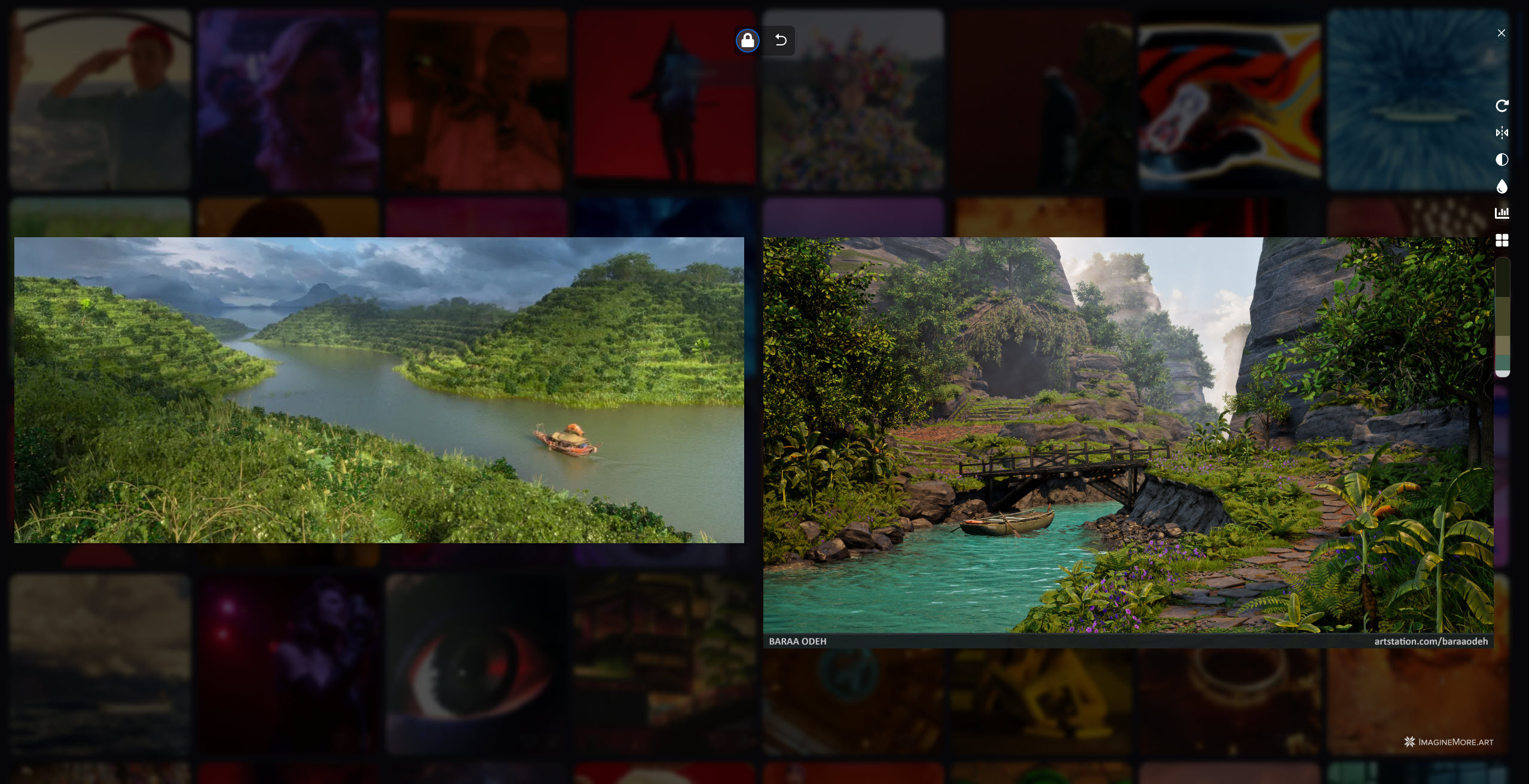
I think you are missing the fact that they are all the same. The sky is "blue" because there are water droplets in the air refracting the incoming light. And both mist and general aerial perspective are an expression of the same. So The color of water, the fog and the sky should come together to create a believable image. I think once you improve this things will get much better.
Separate, on aerial perspective you have a lot of crunchy contrast on leaves around the bridge. Is is too far into the frame for so much contrast. Look at more reference and dial in in the noise level. The darkest contrast is always in the foreground due to aerial perspective.
2. Composition
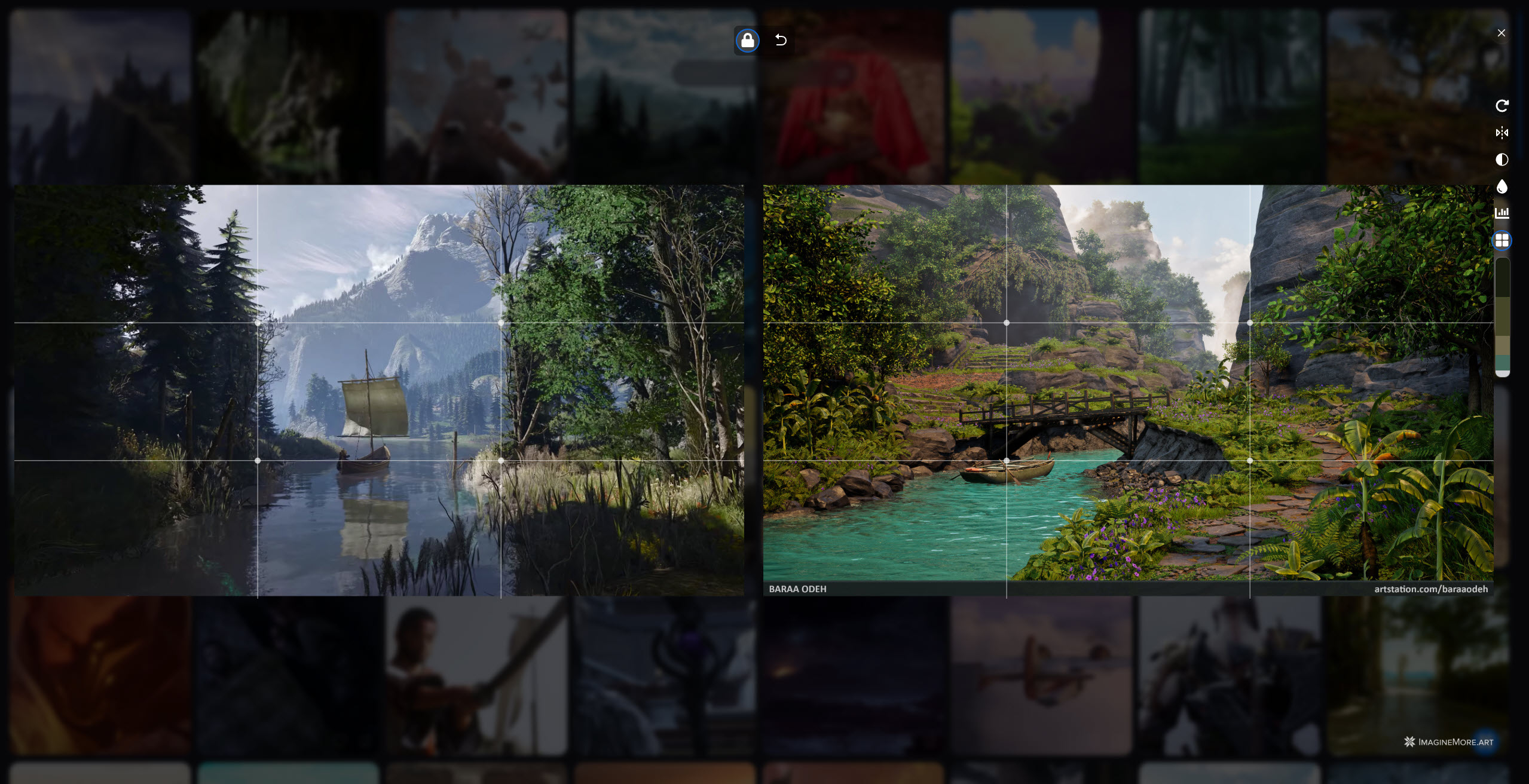
Your focal points right now are very cramped. The boat, the bridge or the cave - all 3 could be focal points, but they are on top of each other so much (especially the boat and bridge) that they make for a hard read. For focal points
1. Make clear choices of what is the main focal point vs. just features that help lead the eye
2. Use aerial perspective and contrast to separate. For example if it's the bridge change the material to be different color than the rock, add a fog card behind it to separate it
3. Consider strong foreground. Just place shaded vegetation in front of the camera - that will improve depth a ton.
Good luck!
Here are a few things I'm struggling with here:
1. Aerial perspective, mist, water and sky
I think you are missing the fact that they are all the same. The sky is "blue" because there are water droplets in the air refracting the incoming light. And both mist and general aerial perspective are an expression of the same. So The color of water, the fog and the sky should come together to create a believable image. I think once you improve this things will get much better.
Separate, on aerial perspective you have a lot of crunchy contrast on leaves around the bridge. Is is too far into the frame for so much contrast. Look at more reference and dial in in the noise level. The darkest contrast is always in the foreground due to aerial perspective.
2. Composition
Your focal points right now are very cramped. The boat, the bridge or the cave - all 3 could be focal points, but they are on top of each other so much (especially the boat and bridge) that they make for a hard read. For focal points
1. Make clear choices of what is the main focal point vs. just features that help lead the eye
2. Use aerial perspective and contrast to separate. For example if it's the bridge change the material to be different color than the rock, add a fog card behind it to separate it
3. Consider strong foreground. Just place shaded vegetation in front of the camera - that will improve depth a ton.
Good luck!
d1ver
1 ·
Re: BRAWL2 [Character] Aiur survivor, shark2003
I see this with a predator strapped into a "pony tail", type of design as in the concept, since you mentioned it i thought i add some possibly helpful C&C.
The final update in sc2 where they had to cut their "back tails" could also be a direction to go in? as they were being possessed by the dark protoss/zerg leader. (i am not into the names as others i just played the game and moved on  so sorry to not know the exact names of stuff. but i was there i swear! ha,hah.)
so sorry to not know the exact names of stuff. but i was there i swear! ha,hah.)superb update in the blocking stages, i am still stuck there also.(for now)
 iam717
1 ·