Search
-
Re: Geo-loop
 I was running the script in 2010 on a cylinder as the base object with Edit Poly on top, so my mistake. I didn't know the base object needed to be editable poly. I didn't feel like opening the customize UI menu so I was evaluating the script with the header commented out, something most people probably won't be doing ha =P…
 -
Re: Maya - Bevel using control edges possible?

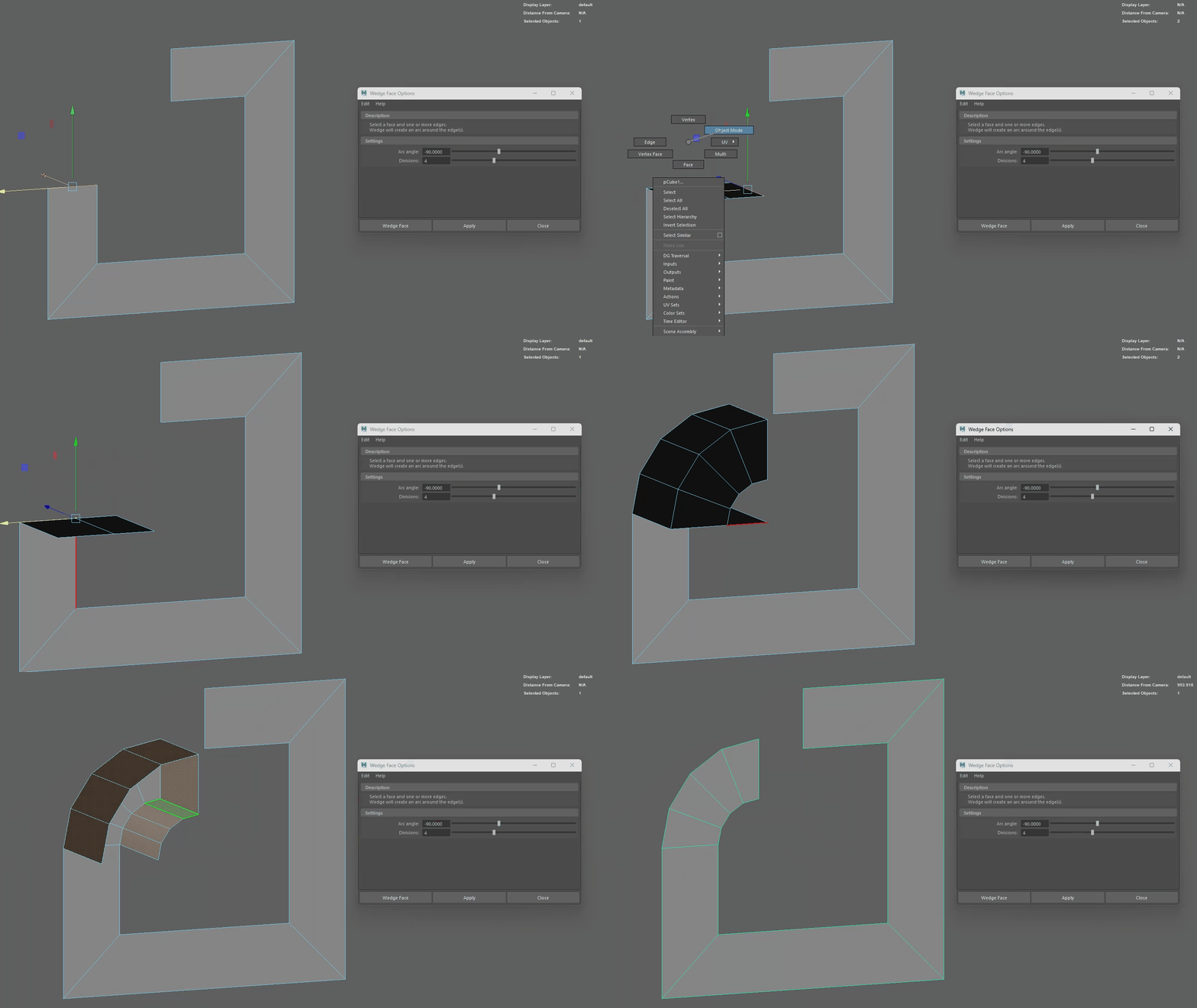 I always did this type of rounded bevel with the spin tool in Blender. I've also been looking for the equivalent in Maya but so far the closest I've come across is 'edit mesh > wedge'. I hate that it's the one tool you have to be in multi mode to use, also you have to delete the extra faces afterwards :/
 -
Re: Nuclear Bunker Office Environment Art (WIP)

 Hmm it seems to embed OK for me. https://www.youtube.com/watch?v=oCukV_jKRSA Maybe you are using the URL button by mistake? You should instead just paste the youtube address without any formatting. Then you can try the Preview button to see if it worked, before hitting Post Reply. As a last resort if it's still not…
 -
Re: attaching two different rigged objects?
You're not exiting the modifier properly. you need to deselect all sub-objects (vert, edge, poly ect) then click on the modifier label "edit poly" then click on the skin modifier label. Sub-object selection is passed up the stack, if you have one vert selected and then improperly exit the modifier only that one vert will… -
Re: Confusion with Normal baking issues around edges/borders

 Hi! Took a look at the files and at the lowpoly exported from Painter and wrote down some thoughts (some not on issue): I think big part of the issue your describing is that the difference of the curvatures between high and low of the gorget is too great - but the highpoly would be best improved as well (see below). Low…
 -
Re: Max to Maya - Verts, Edge, Faces XYZ position
 Wrote something up for ya. Will show the positions of selected object(s)/vert(s)/edge(s)/face(s), averaging their values if multiple are selected like in max: if (`window -exists xyzWindow`) deleteUI xyzWindow;window -wh 275 75 -mxb 0 -title "xyzWindow: component positions" xyzWindow;rowColumnLayout -numberOfColumns 2…
 -
Kaneki Ken : Oh god help me Edition

 So this is a commission that I've been working on for far too long. I've learnt a lot whilst reworking it over and over again, but I've run head first into a wall I'm struggling to get over. -Hair- I've put up a picture of my last vaguely successful attempt. Emphasis on vaguely. I'm honestly not sure that sculpting the…
 -
Re: Maya - Edge loops and some other quesitons
 For the circle tool you mentioned, I would use one or several of the curve tools and the curve tool options such as rebuild curve, you can then choose polygons for the geometry output in case you were trying to build a pipe or tube prop etc. For the "even spaced edge loop" tool problem, if you go to insert edge loop in the…
 -
Re: Interior Environment with Hero Assets WIP Log: 1960s Apartment Crime Scene
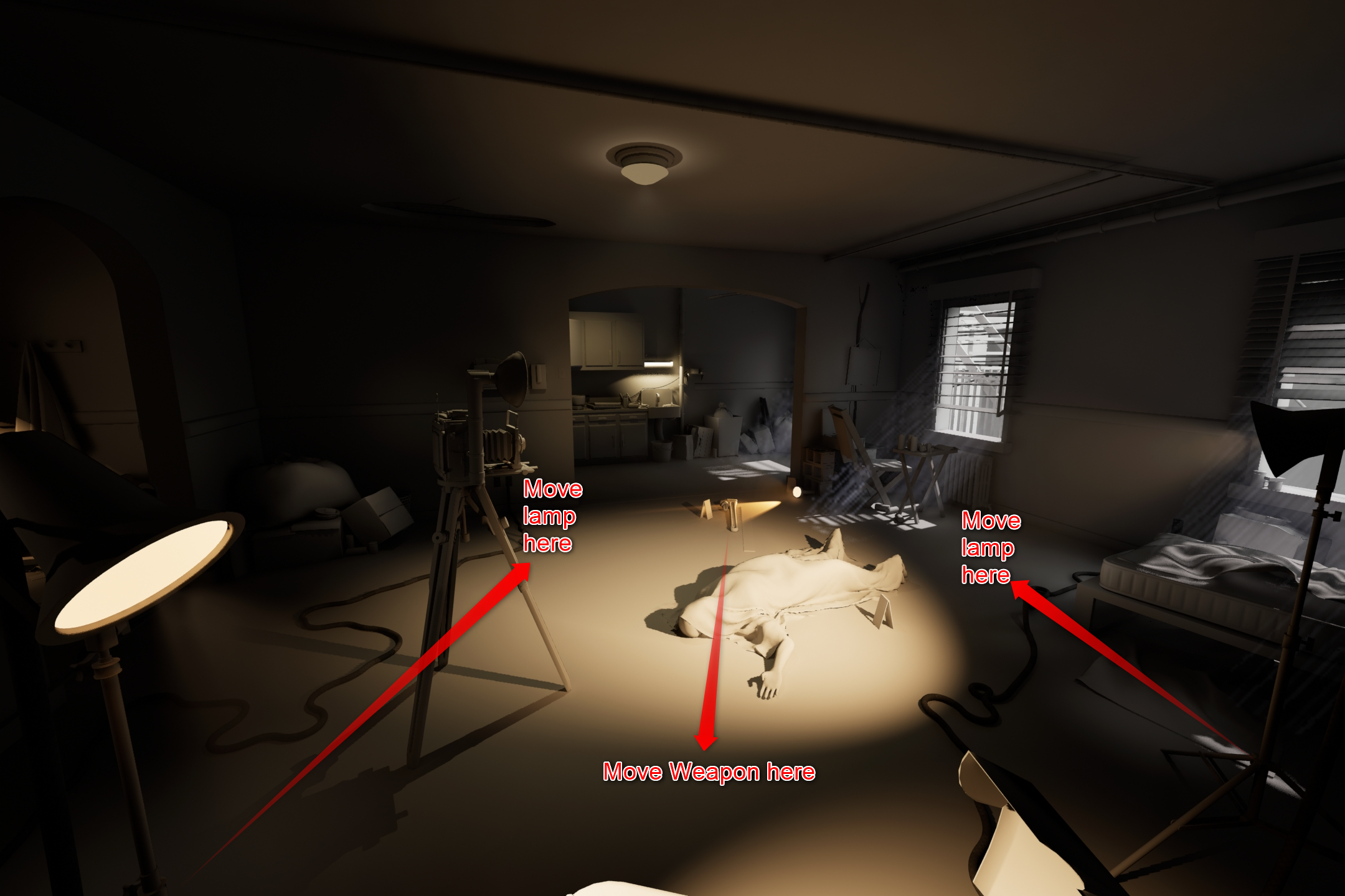 (Apologies if you saw the two same images, realize I selected the same image twice on the first upload, and I've since edited the post) I didn't think of that; so with keeping the same camera position (kitchen/escape route in background, windows with rays to the right) you're thinking something like this might be better…
 -
Re: How to retypologise collectly
 A mesh gets triangulated when imported into an engine anyhow. The reason why meshes are retopoed mostly in quads is that it is easier to edit them while working on them. But, there are parts of a mesh that just need a few tris and that is ok. The first example of your post uses elongated quads which as a rule you should…
>35069 results