Search
-
Re: Environment and Prop Art
 You also need to add some glow coming from the laptop screen (possibly bluish). Computer screens glow quite a bit, it's very noticable in the dark. Right now the laptop looks like it isn't on, and the onscreen content looks dull, like it's only a cardboard picture pasted to the screen.
 -
Re: cintiq 21ux 2nd generation
 I use my Cintiq as my second screen and keep all my web browsing and reference images on the laptop screen. You can mirror display if you want (where both screens are identical right?). That's the same as any secondary monitor.
 -
2D UI & 3D Models - Space Strategy - Mobile/Smart TV
 Good Morning. I am looking for an artist to create content for a mobile/smart tv space strategy game I am developing. The work will involve creating the following components: Pre Game 2d UI (Menus - ie New Game/Join Game/Continue Game/Options) (5 screens - static backgrounds, fairly simple gui elements - assuming base…
 -
Re: Artists work - past and present
 mid 2011 how to do a screenshot on a pc late 2011 open source screen capture 2012 somewhere photo hosting sites late 2012 early 2013 how do i print screen couple days ago :) windows screen capture
 -
Re: [FINISHED] Scifi Antenna
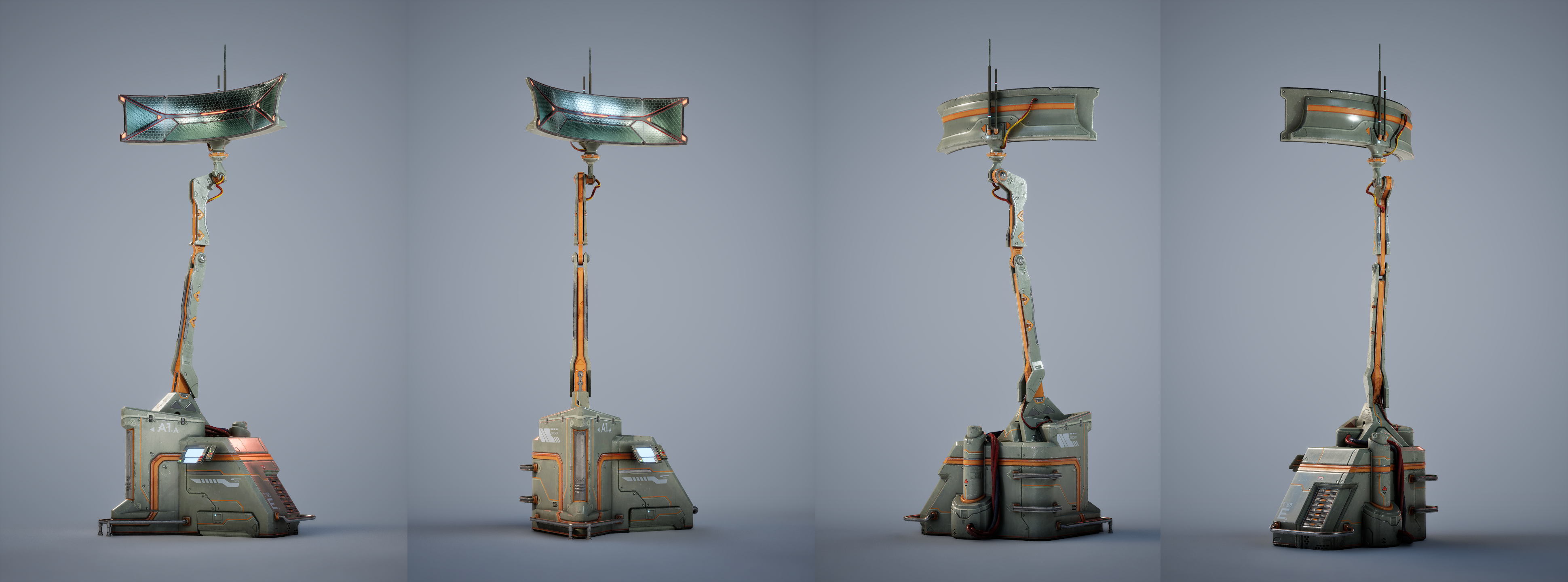 Hello ! I've made some slight changes to the color scheme of the assets. What do you think? I'm planning to tweak a few parts, add some more details, and polish the screen then it should be ready. I'm still not sure if there are enough details though. In the end, it still feels a bit flat to me.
 -
Re: Technical Q&A
 In any video tutorial I've seen, the windows fit into the aspect ratio of the screen, I really can't see Motionbuilder being the only tool I have ever used not resizing the windows to fit the screen...Surely its just configured to display on a 800x600 screen or something? Is there any way to edit this configuration?
 -
Re: Annoying coworkers
 [ QUOTE ] edit: Oh, and i hate people that touch my screen, or anybodies screen for that matter, how dare they dammit. Keep your greasy germs for yourself. [/ QUOTE ] I've started to touch Therms screen. On Purpose. So far he hasn't told me not to.
 -
Re: What are you working on? 2017

 A simulation of the aliasing of a typical CMOS sensor with naive reconstruction. The Lenna image is projected by a simulated LCD screen. Under Bayer filtering, the screen aliases exactly like pinstripes, bricks, etc. do on a digital camera. You will also notice on close inspection fringing on the borders of the screen…
 -
Re: Max Problem
Problem solved. The browser was off screen. Fluxity over at 3d Palace posted this; " Most likely the menu is off the screen. Go into the Material Editor and click Standard again. Then press Alt -> Down Arrow -> Down Arrow -> Enter -> then press any arrow key with the mouse in the middle of the screen. Hope this works for… -
Re: The Ministrium
 I asked a buddy of mine that knows UDK shader stuff and only lurks here. He said to have a screen position plugged into a component mask into the texture. Make sure the screen position has screen align checked on. Hopefully that fix works. Looking awesome otherwise.
>24169 results